
Automatischer Abgleich
Jede Bestellung, jede Anpassung wird automatisch synchronisiert.
Ihre Bücher bleiben aktuell, ohne dass Sie sie anfassen müssen.
Bestellungen, Lagerbestandsanpassungen, Rückerstattungen und Kontoaktualisierungen fließen automatisch zwischen Ihrem Shop und QuickBooks hin und her – in dem Moment, in dem sie passieren, nicht, wenn Sie daran denken, eine CSV zu exportieren.
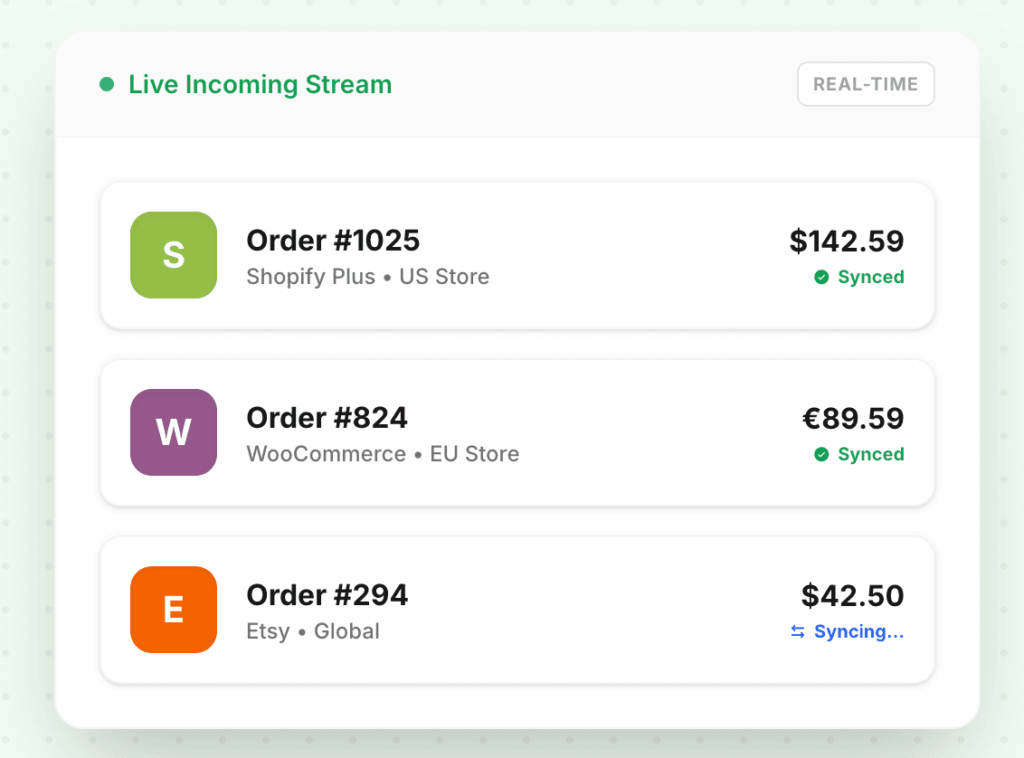
10,000+
Bestellungen synchronisiert/Minute
< 30s
Durchschn. Synchronisierungs-Latenz
99.98%
Sync-Genauigkeit
Das Problem
Kommt Ihnen das bekannt vor?
Sie exportieren jeden Freitag eine CSV und beten, dass nichts übersehen wurde
Manuelle Exporte bedeuten, dass Ihre Bücher immer eine Woche hinterherhinken. Donnerstagnacht aufgegebene Bestellungen schaffen es erst am nächsten Montag in QuickBooks – wenn Sie sich daran erinnern.
Rückerstattungen erscheinen in Shopify, aber nicht in Ihrer Gewinn- und Verlustrechnung
Wenn ein Kunde eine Bestellung zurückgibt, weiß Shopify Bescheid. QuickBooks weiß es nicht – bis Sie manuell eine Gutschrift eingeben, oft Tage später, oft mit Fehlern.
Monatsabschluss dauert einen ganzen Tag nur zur Abstimmung
Jede Synchronisierungslücke wird zu einer Abstimmungsaufgabe. Sie verbringen Stunden damit, Shopify-Auszahlungen mit QuickBooks-Einträgen abzugleichen, die bereits übereinstimmen sollten.
Sehen Sie den Unterschied
Vorher vs. nachher LedgerPort
Warum es wichtig ist
Gebaut für die Art und Weise, wie E-Commerce tatsächlich funktioniert
Echtzeit, nicht Stapelverarbeitung
Jede Bestellung wird innerhalb von Sekunden nach der Aufgabe synchronisiert. Keine nächtlichen Jobs, keine wöchentlichen Importe, keine veralteten Salden am Montagmorgen.
Wirklich zweiseitig
Im QuickBooks vorgenommene Lagerbestandsanpassungen werden zurück an Shopify weitergegeben. Änderungen in beiden Systemen bleiben konsistent – keine manuelle Abstimmung, um sie aufeinander abzustimmen.
11 Datenpunkte abgedeckt
Bestellungen, Rückerstattungen, Gebühren, Auszahlungen, Lagerbestand, Gutscheine, Umsatzsteuer, Rückbuchungen, Versand, Anpassungen und Geschenkkarten – jeder Transaktionstyp korrekt zugeordnet.
Konfliktfreie Multiplattform-Unterstützung
Betreiben Sie Shopify Plus und WooCommerce nebeneinander. Jeder Shop synchronisiert sich unabhängig – Bestellungen aus einem Shop fließen niemals in die Buchhaltung eines anderen ein.
So funktioniert's
In wenigen Minuten einsatzbereit – kein Engineering-Team erforderlich.
Verbinden Sie Ihren Shop
OAuth-Autorisierung in unter 60 Sekunden. Keine gespeicherten Anmeldedaten, kein Entwickler erforderlich. Funktioniert mit Shopify und WooCommerce.
Bestätigen Sie Ihre Kontenzuordnung
LedgerPort erkennt automatisch Ihren QuickBooks-Kontenplan und schlägt Zuordnungen vor. Überprüfen, anpassen oder akzeptieren Sie die Standardeinstellungen und fahren Sie fort.
Synchronisierung läuft automatisch
Von diesem Zeitpunkt an landet jede Bestellung, Rückerstattung und Gebühr, die Ihren Shop betrifft, in Echtzeit in QuickBooks – keine manuellen Schritte, keine geplanten Exporte.
Unterstützte Integrationen


Häufig gestellte Fragen
Häufig gestellte Fragen
Synchronisiert es historische Bestellungen oder nur neue?
Beides. LedgerPort kann historische Bestellungen ab einem von Ihnen bei der Einrichtung gewählten Datum nachfüllen. Die meisten Kunden beginnen zu Beginn des aktuellen Geschäftsjahres.
Was passiert, wenn Shopify während einer Synchronisierung ausfällt?
LedgerPort stellt alle Ereignisse in eine Warteschlange und spielt sie erneut ab, sobald die Verbindung wiederhergestellt ist. Es gehen keine Daten verloren und keine Bestellungen werden doppelt gezählt.
Erstellt es Duplikate, wenn ich bereits einige Bestellungen manuell eingegeben habe?
Nein. LedgerPort prüft anhand der Bestell-ID auf vorhandene Einträge, bevor neue erstellt werden. Sie können auch ein Stichtagsdatum festlegen, damit nur Bestellungen nach einem bestimmten Zeitpunkt synchronisiert werden.
Funktioniert es mit QuickBooks Desktop oder nur mit QuickBooks Online?
Derzeit nur QuickBooks Online. Die Unterstützung für QuickBooks Desktop ist in der Roadmap enthalten – Sie können sich von der Preisseite auf die Warteliste setzen lassen.
Weitere Funktionen entdecken
Beginnen Sie noch heute mit der Synchronisierung Ihrer Bücher.
Schließen Sie sich unserer Mission an, E-Commerce-Marken dabei zu helfen, ihre Bücher in Minuten statt in Tagen abzuschließen. Kostenloser Plan verfügbar – keine Kreditkarte erforderlich.