
الربط الذكي
كل معاملة، يتم توجيهها إلى الحساب الصحيح.
كل معاملة يتم توجيهها إلى الحساب الصحيح - تلقائيًا.
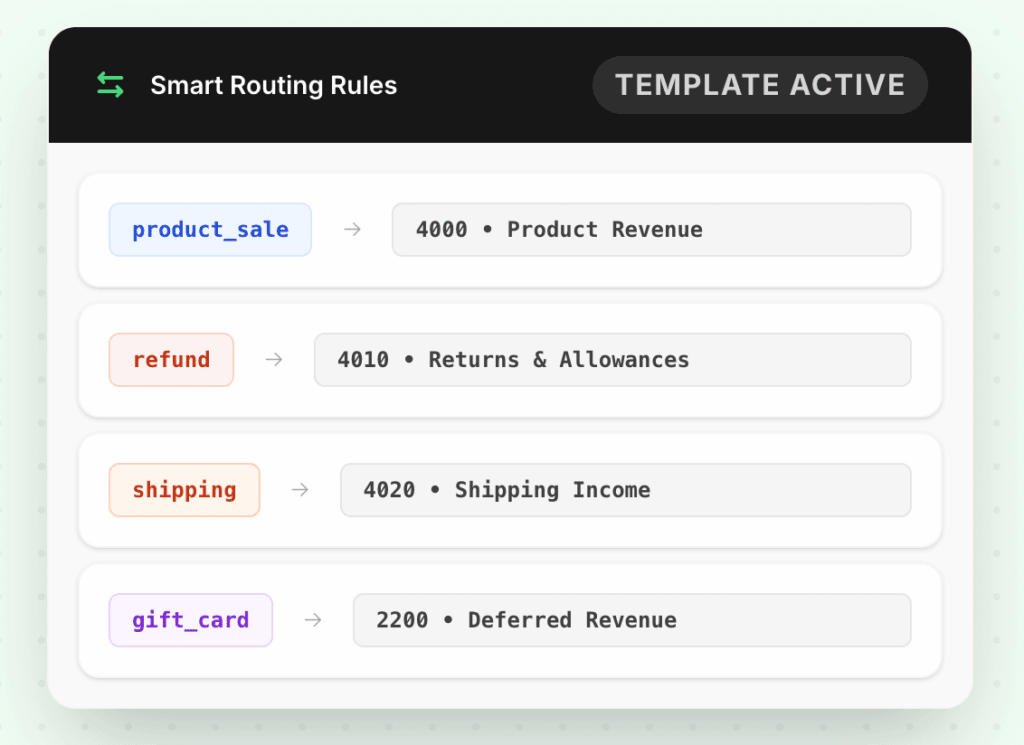
استخدم قوالب جاهزة للإعدادات القياسية لـ Shopify أو قم بإنشاء قواعد توجيه مخصصة ترسل المعاملات إلى الحسابات الصحيحة تمامًا - حسب النوع أو المبلغ أو المتجر أو فئة المنتج.
10,000+
طلبات تمت مزامنتها/الدقيقة
8
قوالب المنصة الجاهزة
100%
قابل للتكوين لكل متجر
المشكلة
الربط اليدوي يكسر دليل الحسابات الخاص بك
عندما لا يتم توجيه المعاملات إلى الحسابات الصحيحة، فإن بياناتك المالية تحكي قصة خاطئة.
كل إيرادات Shopify تذهب إلى حساب واحد فقط "المبيعات"
بدون الربط المناسب، تتراكم الرسوم ودخل الشحن وإيرادات المنتجات في نفس الحساب. يتم ملء بيان الأرباح والخسائر الخاص بك تقنيًا، ولكنه عديم الفائدة تحليليًا.
نفس نوع المعاملة يتم تصنيفه بشكل مختلف كل شهر
التصنيف اليدوي يعني عدم الاتساق. رسوم الشحن التي تم تسجيلها في تكلفة البضائع المباعة في فبراير تصبح مصروف تشغيل في مارس اعتمادًا على من قام بالاستيراد.
أنواع المعاملات الجديدة تذهب بصمت إلى حساب شامل
عندما يظهر نوع رسوم جديد في Shopify، فإنه يقع في حساب عام "غير مصنف" ولا يلاحظه أحد حتى التدقيق - بعد أشهر.
قبل وبعد
شاهد الفرق
الفوائد
ربط ذكي يتكيف مع عملك
قوالب جاهزة للإعدادات الشائعة
تأتي قوالب Shopify Payments و PayPal و Stripe مهيأة بالحسابات الصحيحة لإيرادات المنتجات والإرجاع ودخل الشحن والرسوم والإيرادات المؤجلة فور إخراجها من الصندوق.
قواعد مخصصة لدليل الحسابات الخاص بك
قم بتوجيه المعاملات حسب النوع أو المتجر أو حد المبلغ أو فئة المنتج. يمكن أن يذهب طلب بالجملة بقيمة 5000 دولار إلى حساب مختلف عن طلب بيع بالتجزئة بقيمة 50 دولارًا - تلقائيًا.
قائمة مراجعة للمعاملات غير المتطابقة
تظهر المعاملات التي لا تتطابق مع أي قاعدة في قائمة مراجعة - لا يتم إسقاطها بصمت أو تعيينها إلى قاعدة شاملة. أنت تقرر كيفية التعامل معها مرة واحدة، ثم يتذكر LedgerPort.
تطبق القوالب فورًا وبأثر رجعي
غيّر قاعدة تعيين وطبقها بأثر رجعي على آخر 30 يومًا. لا حاجة لإعادة تصنيف المعاملات يدويًا التي قمت بمزامنتها بالفعل تحت الإعداد القديم.
كيف يعمل
ابدأ في دقائق - لا يلزم وجود فريق هندسي.
اختر قالبًا مبدئيًا
حدد القالب المُعد مسبقًا الذي يتطابق مع معالج الدفع ونوع متجرك. يقوم LedgerPort بملء الحسابات القياسية مسبقًا - إيرادات المنتجات، الرسوم، المرتجعات، الشحن.
تخصيص القواعد لتتوافق مع دليل الحسابات الخاص بك
تجاوز أي افتراضي بأرقام حساباتك المحددة. أضف قواعد مخصصة للحالات الاستثنائية - طلبات البيع بالجملة، أو رموز SKU محددة، أو متاجر ذات اعتراف مختلف بالإيرادات.
يتم تشغيل القواعد عند كل مزامنة
من هذه النقطة فصاعدًا، يتم تقييم كل معاملة واردة مقابل قواعدك وتوجيهها تلقائيًا. لا يوجد تصنيف يدوي، ولا مراجعة إلا إذا كان هناك شيء لا يتطابق حقًا.
عمليات تكامل مدعومة


أسئلة متكررة
أسئلة متكررة
نحن نستخدم دليل حسابات مخصص. هل يمكن لـ LedgerPort التعيين إلى أرقام حساباتنا المحددة؟
نعم. كل قاعدة تعيين قابلة للتكوين لأرقام حساباتك المحددة. ابدأ بقالب وقم بالتخصيص، أو قم ببناء قواعد من الصفر.
ماذا لو أردت قواعد تعيين مختلفة لمتاجر مختلفة؟
يتم تعيين قواعد التعيين لكل متجر. يمكن أن يكون لديك Shopify الأمريكي و WooCommerce البريطاني لهما هياكل حسابات مختلفة تمامًا - لا يتعارضان أبدًا.
ماذا يحدث للمعاملات التي لا تتطابق مع أي قاعدة؟
تظهر في قائمة مراجعة مع سياق المعاملة الكامل. تقوم بتعيين حساب مرة واحدة، ويتذكر LedgerPort القاعدة لجميع الحالات المستقبلية.
هل يمكنني تغيير قاعدة تعيين وتطبيقها على المعاملات السابقة؟
نعم. يمكن تطبيق تغييرات القاعدة بأثر رجعي على آخر 30 يومًا. بالنسبة للمعاملات الأقدم، اتصل بالدعم - يمكننا إجراء إعادة معالجة تاريخية عند الطلب.
استكشف المزيد من الميزات
قم بتعيين كل معاملة إلى الحساب الصحيح.
ابدأ في مزامنة معاملات التجارة الإلكترونية الخاصة بك إلى برنامج المحاسبة الخاص بك في دقائق. لا يتطلب الأمر أي كود.