
Afstemming
Net storting komt overeen met bank. Elke keer weer.
Automatiseer uw vergoedingen en uitbetalingsafstemming zonder dat u een ontwikkelaar nodig heeft.
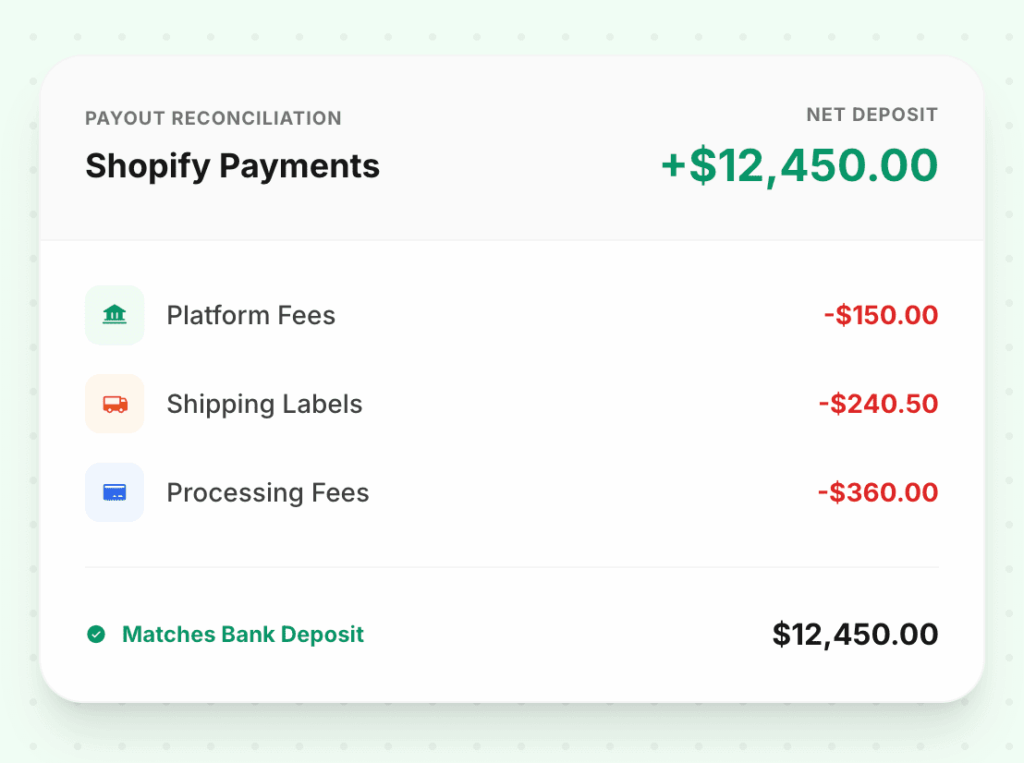
Platformkosten, verzendkosten, kosten van betalingsverwerkers en de netto-uitbetaling — allemaal toegewezen aan aparte rekeningen en afgestemd zodat de som precies gelijk is aan wat er op uw bankrekening terechtkomt.
100%
Uitbetalingsmatchpercentage
4+
Vergoedingstypes uitgesplitst
0
Handmatige afstemmingsstappen
Het probleem
Klinkt bekend?
De netto storting op uw bank komt niet overeen met uw QBO-saldo
U ziet € 8.432 op uw bankrekening. QuickBooks toont € 9.100 aan bruto verkopen. Het verschil — Shopify-kosten, verwerkingskosten, terugbetalingen — wordt nooit netjes verwerkt.
Platformkosten zijn begraven in uw omzetregel
Wanneer kosten niet worden uitgesplitst, ziet uw brutomarge er verkeerd uit. U rapporteert 45% marge terwijl het werkelijke getal, na het scheiden van de kosten, dichter bij 38% ligt.
Eind maandafstemming kost uw boekhouder een halve dag
Handmatig Shopify-uitbetalingsrapporten extraheren, QBO kruislings controleren en het verschil vinden tussen wat er is gesynchroniseerd en wat er is gestort, is langzaam en foutgevoelig.
Voor & na
Wat verandert er met LedgerPort
Voordelen
Elke vergoeding, elke aftrek, elke dollar — verantwoord
Platformkosten op hun eigen rekening
Shopify's maandelijkse abonnementskosten horen niet thuis in COGS. LedgerPort stuurt ze naar een speciale SaaS/Software Abonnementen-rekening — gescheiden van transactiekosten, gescheiden van omzet.
Verwerkingskosten regel voor regel uitgesplitst
Shopify Payments-kosten, PayPal-kosten en Stripe-verwerkingskosten krijgen elk hun eigen vermelding — niet samengevoegd in één enkele "kosten"-rekening die uw kosten per kanaal verhult.
Verzendlabels als een COGS-regel
Shopify Shipping-kosten zijn een kostprijs voor het uitvoeren van bestellingen — geen bedrijfskosten en geen aftrek van de omzet. LedgerPort stuurt ze automatisch naar de juiste COGS-subrekening.
Netto uitbetaling afgestemd op bankstorting
Bruto verkopen minus kosten minus terugbetalingen is de netto storting. LedgerPort verifieert deze berekening bij elke uitbetaling — als de cijfers niet kloppen, markeert het de afwijking voordat u de maand afsluit.
Hoe het werkt
Begin binnen enkele minuten — geen engineeringteam vereist.
Uitbetaling komt binnen in Shopify
Shopify consolideert de verkopen, kosten en terugbetalingen van uw week in één netto uitbetaling. Uw bank ziet één storting — LedgerPort ziet de volledige uitsplitsing.
Elke component wordt toegewezen aan zijn rekening
Bruto-inkomsten naar inkomen. Platformkosten naar operationele kosten. Verwerkingskosten naar handelaarskosten. Verzending naar COGS. Elk regelitem gaat naar de juiste rekening.
Netto wordt verrekend met de bankstorting
LedgerPort verifieert dat de som van de componenten gelijk is aan het netto uitbetalingsbedrag. De reconciliatie is voltooid voordat u QuickBooks opent — niet iets dat u achteraf doet.
Ondersteunde Integraties


Veelgestelde vragen
Veelgestelde vragen
Wat als een uitbetalingsperiode twee maanden overspant?
LedgerPort handelt uitbetalingen met gesplitste periodes correct af, waarbij het relevante deel aan elke maand wordt toegerekend in plaats van de volledige uitbetaling toe te passen op de afrekeningsdatum.
We gebruiken Shopify Payments en PayPal. Worden beide verrekend?
Ja. Elke betalingsverwerker wordt afzonderlijk behandeld met zijn eigen kostenstructuur en uitbetalingsschema. De reconciliatieberekening wordt per verwerker gedaan.
Wat gebeurt er als een uitbetaling niet klopt?
Als de componenten niet optellen tot de netto uitbetaling, markeert LedgerPort de afwijking en laat het u precies zien welk regelitem afwijkt. U hoeft niet te zoeken naar een afrondingsfout van € 0,12.
Worden Shopify Capital-terugbetalingen afgehandeld?
Ja. Shopify Capital-terugbetalingen worden naar een aparte aansprakelijkheidsrekening geleid, niet behandeld als operationele kosten of inkomstenverminderingen.
Ontdek meer functies
Verreken elke uitbetaling automatisch.
Stop met het najagen van afwijkingen. Laat LedgerPort elke vergoeding, elke aftrekpost en elke storting matchen — zodat uw boeken zichzelf sluiten.