
एकीकृत प्रबंधन
एक डैशबोर्ड। हर स्टोर। शून्य रिसाव।
एक डैशबोर्ड। हर स्टोर। शून्य रिसाव।
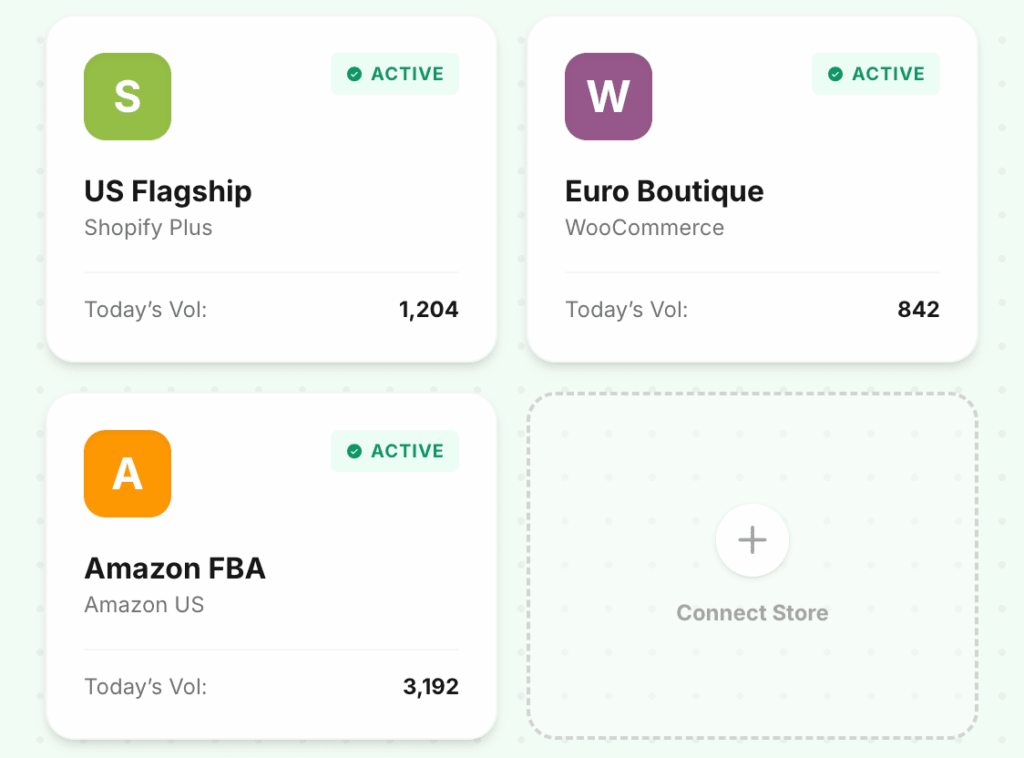
हर स्टोरफ़्रंट, मार्केटप्लेस और क्लाइंट इकाई को एक ही लेजरपोर्ट खाते से प्रबंधित करें। प्रत्येक वातावरण पूरी तरह से अलग है — डेटा, सेटिंग्स और अनुमतियाँ कभी भी पार नहीं होती हैं।
10,000+
ऑर्डर सिंक्रनाइज़्ड/मिनट
असीमित
प्रति खाता स्टोर
1
सभी के लिए डैशबोर्ड
समस्या
परिचित लगता है?
आप प्रत्येक क्लाइंट के लिए अलग-अलग QBO फ़ाइलों में लॉग इन और आउट करते हैं
10+ Shopify क्लाइंट वाले CPA फ़र्म प्रमाणीकरण पर अकेले ही हर हफ़्ते घंटों बिताते हैं। प्रत्येक क्लाइंट एक अलग लॉगिन, एक अलग टैब, एक अलग संदर्भ स्विच है।
स्टोर A का एक लेनदेन स्टोर B के लेजर में समाप्त होता है
जब कई स्टोर एक QBO फ़ाइल साझा करते हैं तो क्रॉस-संदूषण एक वास्तविक जोखिम होता है। एक गलत आयात महीनों की साफ-सुथरी किताबों को दूषित कर देता है — और उसे ढूंढना मुश्किल होता है।
आप एक बार में स्टोरों में समग्र प्रदर्शन नहीं देख सकते
यह जानने का कोई तरीका नहीं है कि आपका यूरोपीय स्टोर खराब महीने में था, जबकि अमेरिकी स्टोर बढ़ा, क्योंकि प्रत्येक स्टोर का डेटा एक अलग साइलो में रहता है।
अंतर देखें
LedgerPort से पहले बनाम। बाद में
यह क्यों मायने रखता है
ई-कॉमर्स के काम करने के तरीके के लिए निर्मित
सभी स्टोर एक साथ दिखाई देते हैं
एक ही दृश्य में Shopify और WooCommerce — प्रति-स्टोर वॉल्यूम, सिंक स्थिति और अंतिम-अपडेट टाइमस्टैम्प के साथ एक ही स्क्रीन पर।
पूर्ण वातावरण अलगाव
आपके अमेरिकी फ़्लैगशिप के लेनदेन कभी भी आपके यूरोपीय बुटीक के लेजर में दिखाई नहीं देंगे। प्रत्येक स्टोर अपने स्वयं के क्विकबुक्स कंपनी फ़ाइल में स्वतंत्र रूप से मैप करता है।
CPA मल्टी-क्लाइंट डैशबोर्ड
सभी क्लाइंट स्टोर को प्रबंधित करने के लिए एक फ़र्म लॉगिन। कोई खाता स्विचिंग नहीं, कोई अलग लॉगिन नहीं, हर सत्र में पुनः प्रमाणीकरण नहीं।
भूमिका-आधारित क्लाइंट एक्सेस
क्लाइंट को अपने अन्य क्लाइंटों को उजागर किए बिना अपने स्टोर के डेटा तक केवल-पढ़ने के लिए एक्सेस प्रदान करें। अनुमतियाँ स्टोर स्तर पर स्कोप की गई हैं।
यह कैसे काम करता है
मिनटों में शुरू करें — किसी इंजीनियरिंग टीम की आवश्यकता नहीं है।
अपना पहला स्टोर जोड़ें
OAuth के माध्यम से Shopify या WooCommerce कनेक्ट करें। स्टोर तुरंत आपके डैशबोर्ड में दिखाई देता है और सिंक कॉन्फ़िगर करने के लिए तैयार है।
प्रत्येक स्टोर को स्वतंत्र रूप से कॉन्फ़िगर करें
खाता मैपिंग, सिंक आवृत्ति और कर नियम प्रति स्टोर सेट किए जाते हैं। जो आपके यूएस शॉपिफाई के लिए काम करता है, उसे आपके ईयू वूकॉमर्स पर लागू करने की आवश्यकता नहीं है।
किसी भी समय अधिक स्टोर या क्लाइंट जोड़ें
दो स्टोर से दस तक - या पांच क्लाइंट से पचास तक - स्केल करने के लिए किसी भी री-आर्किटेक्चर की आवश्यकता नहीं है। प्रत्येक नया जोड़ पहले दिन से पूरी तरह से अलग है।
समर्थित एकीकरण


सामान्य प्रश्न
अक्सर पूछे जाने वाले प्रश्न
क्या मैं जितने स्टोर कनेक्ट कर सकता हूं उसकी कोई सीमा है?
कोई हार्ड लिमिट नहीं है। प्लान ऑर्डर वॉल्यूम पर आधारित होते हैं, न कि स्टोर की संख्या पर। जितने चाहें उतने स्टोर जोड़ें जितने आपकी फर्म प्रबंधित करती है।
क्या प्रत्येक स्टोर एक अलग क्विकबुक्स कंपनी फ़ाइल से कनेक्ट हो सकता है?
हाँ। प्रत्येक स्टोर स्वतंत्र रूप से अपनी क्यूबीओ कंपनी फ़ाइल में मैप होता है। यदि आवश्यक हो तो आप अलग क्लास ट्रैकिंग के साथ एक ही फ़ाइल में कई स्टोर मैप कर सकते हैं।
क्या मैं किसी क्लाइंट को दूसरों को देखे बिना केवल उनके स्टोर तक पहुंच दे सकता हूं?
हाँ। भूमिका-आधारित पहुंच आपको किसी क्लाइंट को अपने खाते में अन्य स्टोर को उजागर किए बिना उनके अपने डेटा तक केवल-पढ़ने के लिए पहुंच प्रदान करने की अनुमति देती है।
हमने मध्य-वर्ष में एक नया स्टोर अधिग्रहित किया। क्या मैं इसे जोड़ सकता हूं और ऐतिहासिक डेटा को बैकफ़िल कर सकता हूं?
हाँ। एक नया स्टोर जोड़ने से आपके द्वारा चुनी गई तारीख से एक वैकल्पिक ऐतिहासिक बैकफ़िल ट्रिगर होता है। आपके मौजूदा कनेक्टेड स्टोर में कोई व्यवधान नहीं।
अधिक सुविधाएँ एक्सप्लोर करें
हर स्टोर को एक डैशबोर्ड से प्रबंधित करें।
ई-कॉमर्स ब्रांडों को दिनों में नहीं, मिनटों में अपनी किताबें बंद करने में मदद करने के हमारे मिशन में शामिल हों। निःशुल्क योजना उपलब्ध है - किसी क्रेडिट कार्ड की आवश्यकता नहीं है।