

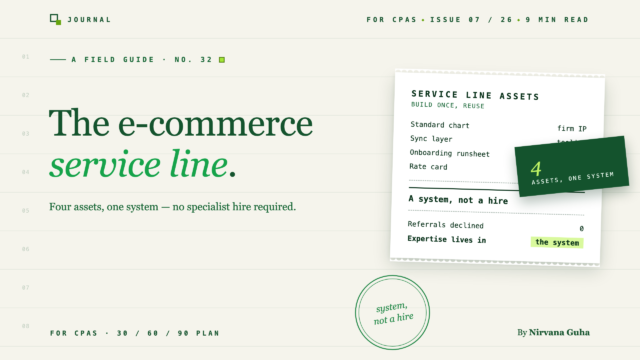
Bir e-ticaret muhasebe hizmet hattına işe alarak girmezsiniz. Dört varlık oluşturursunuz — ve mevcut personeliniz bunları yürütür.
Geçen çeyrekte firmanızda iki şey oldu ve bunlar birbiriyle bağlantılı.
İlk: on yıllık bir uyumluluk müşterisi ücretinize itiraz etti - sorgulanmayan beyanname artık yazılımla karşılaştırılıyor. Yerel uyumluluk çalışmaları metalaşıyor, yavaş yavaş ve sonra hep birlikte ve bunu her yenileme konuşmasında hissedebiliyorsunuz.
İkinci: başka bir Shopify yönlendirmesi geldi. Birinin müşterisi, birinin kuzeni, gerçek gelir elde eden ve kitaplarını anlayan bir muhasebeci için çaresiz bir mağaza. Ve firmanız kibarca geri çevirmenin bir yolunu buldu — tekrar — çünkü bir e-ticaret muhasebe hizmet hattı oluşturmak, sahip olmadığınız bir şeye ihtiyaç duyuyormuş gibi hissettirdi.
Ortaklara nedenini sorsaydınız, cevap aynı cümlenin bir versiyonu olarak çıkardı: "Bu müşterileri kabul edebilmek için önce bir e-ticaret uzmanı işe almamız gerekirdi."
Bu gönderinin parçalamak için var olduğu yalan budur. Kârlı e-ticaret uygulamaları yürüten firmalar, büyük ölçüde bir uzman işe almadı. Bir sistem oluşturdular — standart bir hesap planı, veri tesisatını yapan bir senkronizasyon katmanı, belgelenmiş bir işe alım süreci, yayınlanmış bir fiyat listesi. Uzmanlık bir kişide değil, sistemde yaşar. Bu dört varlık mevcut olduğunda, mevcut personeliniz nişe haftalar içinde hizmet verebilir, çünkü zor kararlar bir kez verildi ve şablonlandı.
Hizmet hattının neleri içerdiğini, kurulması için 30-60-90 planını ve çalıştığında ekonomiyi burada bulabilirsiniz.
Reddettiğiniz Yönlendirmeler Talep Sinyalidir
Zaten doğru olanla başlayın: müşteriler sizi buluyor. E-ticaret yönlendirmeleri pazarlama harcaması olmadan gelir çünkü mağaza sahipleri sürekli olarak birbirlerinden muhasebeci tavsiyesi istiyor — ve çoğu yerel firma hayır diyor, bu yüzden yönlendirme birisi alana kadar etrafta dolaşıyor.
Bu kıtlık tüm fırsattır. E-ticaret muhasebesinin talep tarafı, daha fazla perakende çevrimiçi oldukça her yıl büyüyor; onu yetkin bir şekilde hizmet etmeye istekli firmaların arzı neredeyse sabit kalıyor. Uzmanlaşan firmalar, e-ticaret müşterileri neden kârsız görünüyor — ve değiller bölümünde ayrıntılı olarak ele aldığımız nedenlerle, aynı kapsam için genel uzman oranlarının %30-40 üzerinde fiyatlandırırlar. Sizi daha önce yakan kar marjı sorunu, bir müşteri türü kostümü giymiş bir altyapı sorunuydu.
Bu sırada, savunduğunuz iş — yerel uyumluluk — yazılımın yuttuğu segmenttir. Stratejik matematik rahatsız edici ama basittir: ticarileşen bir hizmet hattını koruyor ve prim bir hizmet hattını reddediyorsunuz. Eğer "kapasite olduğunda" bir e-ticaret muhasebe uygulaması başlatmayı düşünüyorsanız, kapasitenin ticarileşmenin size sunmak üzere olduğu şey olduğunu fark edin.
Yönlendirmelerin reddedilmeye devam etmesinin nedeni talep değil ve marj da değil. Bunun nedeni, onlara hizmet etmenin, işgücü piyasasında satın almanız gereken uzmanlık gerektirdiğine inanılmasıdır. Öyleyse işe alımın gerçek bileşenleriyle değiştirelim.
Bir E-Ticaret Muhasebe Hizmet Hattı Bir İşe Alım Değil, Dört Varlıktır
Hayali "e-ticaret uzmanı", dört şeyi bilen bir kişidir: defterleri nasıl yapılandıracağını, platform verilerini nasıl işleyeceğini, bir müşteriyi temiz bir şekilde nasıl dahil edeceğini ve ne ücret alacağını bilir. Bunların her biri, bir çalışanın örtük bilgisi olarak değil, belgelenmiş bir firma varlığı olarak daha dayanıklı — ve daha ucuzdur. Bir çalışan istifa edebilir. Bir sistem bileşik getirir.
Varlık 1: Standart bir hesap planı. Bir kez tasarlanmış, her müşteriye uygulanan bir e-ticaret hesabı planı. Ödemeler için takas hesabı, ayrılmış ücret gideri hesapları, satış iadesi karşı gelir, satış vergisi yükümlülüğü — Shopify verilerinin müşteri başına doğaçlama yapılmak yerine temiz bir şekilde oturmasını sağlayan yapısal kararlar. Bu, altıncı müşteriyi birinci müşterinin maliyetinin çok küçük bir kısmına mal eden varlıktır. Sıfırdan tasarlamanıza gerek yok: e-ticaret hesap planı şablonumuz başlangıç noktasıdır ve bunu bir kez firmanızın geleneklerine uyarlarsınız.
Varlık 2: Bir senkronizasyon katmanı. E-ticaret taahhütlerinin tarihsel olarak patlamasının nedeni, platformların net ödemeler yatırması, ancak QuickBooks'in brüt geliri ücretler ve iadeler ayrılmış olarak istemesidir — ve ikisi arasında elle çeviri yapmak, faturalandırılamayan saatlerin gittiği yerdir. Yazılım artık bu çeviriyi yapıyor: ödemeler otomatik olarak ayrıştırılıyor, ücretler ayrılıyor, her sipariş doğru hesaba işleniyor. Aracı seçmek, gerçek ödünleşimleri olan kendi kararıdır ve seçenekleri dürüstçe karşılaştıran araçlar için firma düzeyinde bir kılavuz yazdık. LedgerPort, özellikle çoklu müşteri firma kullanım durumu için oluşturulmuştur — ancak hangi aracı seçerseniz seçin, prensip aynıdır: çeviri katmanı kalıcı olarak yazılıma aittir.
Varlık 3: Belgelenmiş bir işe alım kontrol listesi. Bir öğleden sonra süren bir işe alım ile 55 dakika süren bir işe alım arasındaki fark, beceri değil, sıralamadır — erişimi ve kararları çağrıdan önce toplamak, sırasında bağlamak ve eşlemek, sonrasında doldurmak ve doğrulamak. Sırayı bir kez yazın ve bu, bir junior'ın üçüncü müşterisinde çalıştırabileceği bir şeye dönüşür. Tam beş aşamalı süreci bir saatten kısa sürede bir Shopify müşterisini QuickBooks'e nasıl dahil edeceğiniz konusunda yayınladık; çalın, uyarlayın, firmanızın kontrol listesi yapın.
Varlık 4: Yayınlanmış bir fiyat tarifesi. Mağaza sayısına ve sipariş hacmine göre bantlar, en kötü ay maliyetinde taban fiyatlar, başlangıç ücreti ayrı sabit bir ücret olarak alınır. Bir fiyat tarifesi, teklif-her-etkileşim yaklaşımının yapamadığı iki şeyi yapar: kapsam sorularını sayılarla önceden yanıtlar ve firmanızın standart fiyatlandırmaya sahip olacak kadar bu işi yaptığını potansiyel müşterilere bildirir — ki bu da uzman konumlandırmasının kendisidir. Modeller ve matematik, e-ticaret muhasebe hizmetlerine nasıl fiyat verilir bölümünde açıklanmıştır; fiyat tarifesi bunun sonucunda ortaya çıkan artefaktır.
Bu listede ne olduğuna dikkat edin: personel sayısı yok. Her varlık, bir kez oluşturulup yeniden kullanılan bir belgedir veya aboneliktir ve her biri bir sonraki müşteriyi hizmet için daha ucuz hale getirir. "Uzmanlık sisteme akıyor" bunun anlamı budur — ve aşağıdaki zaman çizelgesinin haftalarla ölçülmesinin nedeni budur.
30-60-90 Planı
Bir hizmet hattını bir web sitesi güncellemesiyle başlatmazsınız. Bir müşteriyle başlatırsınız, kasıtlı olarak çalıştırırsınız.
1–30. Günler: Bir müşteri, birinci sınıf hizmet. Bir sonraki yönlendirmeyi alın — veya zaten listenizde gizlenen e-ticaret müşterisini seçin. Herhangi bir teklif vermeden önce, QuickBooks dosyasının durumunu değerlendirin; dosya tanılama aracı, başlangıç yapıp yapmadığınızı veya rehabilitasyon yapıp yapmadığınızı söyleyen 30 dakikalık bir kontroldür. Dosya bozuksa — çifte sayılmış gelir, hiç sıfırlanmamış bir takas hesabı — düzeltmeyi, temizlik oyun kitabını kullanarak ayrı bir sabit ücretli proje olarak kapsama alın, ardından temiz dosyaya başlangıç yapın. Bu ilk etkileşimi şahsen ve yavaşça yürütün. Henüz karı optimize etmiyorsunuz; öğrenmeyi optimize ediyorsunuz. Verdiğiniz her karar — hangi hesap, satıcı ücretlerini tutar, iadeler nasıl eşlenir, ay sonu incelemesi neleri kontrol eder — siz verirken kaydedilir.
31–60. Günler: Şablonları çıkarın. Bu, firmaların atladığı adımdır ve tüm olayın özü budur. İlk müşterinin kararlarını dört varlığa dönüştürün: standart hesap planınızı sonlandırın, hesap eşlemelerinizi firma şablonu olarak kaydedin, notlarınızı başlangıç işlem föyüne dönüştürün ve gerçek saatlerinizden fiyat tarifesini taslak olarak hazırlayın. Ardından ikinci ve üçüncü bir müşteri alın ve onları şablonlar üzerinde çalıştırın — genç personel yürütmeyi yapar, siz gözden geçirirsiniz. Şablonun bozulduğu yerde, sadece müşteriyi değil, şablonu düzeltin. Bu aşamanın sonunda, çoğu bilgiyi sizin değil, sistemin bilmesi gerekir.
61–90. Günler: Yayınlayın ve doldurun. Nişi web sitenize koyun — Shopify ve WooCommerce işletmelerine hizmet verdiğinizi söyleyen özel bir sayfa, üzerinde fiyat tarifesi bantları olan. Yönlendirme kaynaklarınıza cevabın artık evet olduğunu söyleyin ve daha önce reddettiğiniz yönlendirmelere yanıt verin; bazıları hala arıyor, çünkü herkes onları da reddetti. 90. güne kadar hedef, sistemde beş müşteri — birim ekonomiyi kanıtlamak, işlem föyünü stres testine tabi tutmak ve onuncu müşteriyi kolaylaştıran vaka çalışması materyali üretmek için yeterli.
Üç ay. İş ilanı yok.
5 ve 15 Müşteride Ekonominin Durumu Nasıl Görünüyor
Tüm birim ekonomisi matematiğini fiyatlandırma kılavuzunda yaptık, bu yüzden burada sadece şekli var.
Motor, çoğunlukla sabit bir zaman maliyetine karşı düz bir aylık sabit ücrettir. Temsili bir orta bant müşterisinde, manuel bir kapanış yeterli sayıda kıdemli saat harcar ve bu da marjın %30'un altında kalmasına neden olur — ve iki kötü ay bunu silebilir. Senkronizasyon katmanı mutabakatı yaptığında, kapanış dakikalarla ölçülen bir incelemeye dönüşür ve aynı sabit ücret üzerinden marj %80 civarına iner. Portföy büyüdükçe müşteri başına yazılım maliyeti yuvarlama hatasına doğru küçülür, ki bu tam olarak LedgerPort'un firma kurulumunun tasarımıdır — her müşteri tek bir firma girişi altında ayrı bir işletme, şablon şemanız hepsine uygulanır.
5 müşteriyle, hizmet hattı, mevcut personelinizin mevcut işlerinin yanında absorbe ettiği anlamlı bir yeni gelir akışıdır — beşinin tamamındaki aylık inceleme çalışması bir iş gününden az sürer. Çoğu firmanın "işe almamız gerekecek" inancının tersine döndüğünü fark ettiği yer burasıdır: işe alım yalnızca manuel ekonomiler altında gerekliydi.
15 müşteriyle, hizmet hattında altı haneli düşük bir yıllık işletme oranındasınız, hala özel bir işe alım olmadan — ayda yaklaşık yirmi saatlik inceleme çalışması, bir kıdemlinin rahatlıkla tutabileceği, kimseyi şaşırtmayan sabit ücretlerle. Bileşik etki burada da görülür: on beşinci müşteri, birinci müşterinin size inşa etmesi için ödeme yaptığı şablonlar üzerinde bir saatten kısa sürede devreye girer.
Dürüst uyarı: bu şekil yalnızca sistemi savunursanız geçerlidir. Bir iyilik olarak bir müşteriyi şablon dışına çıkarın, bir anlaşmayı daha hızlı kapatmak için tanılama işlemini atlayın ve e-ticaret müşterilerini en başından kârsız hale getiren özel etkileşimi yeniden yaratmış olursunuz.
Müşteriler Gerçekten Nereden Geliyor
Burada büyüme hileleri yok — üç kanal, hepsi zaten mevcut.
Zaten aldığınız yönlendirmeler. Kanal sizde var; sadece evet'i henüz almadınız. Geçen yılki yönlendirmeleri gözden geçirin ve yönlendirme kaynaklarınıza — avukatlar, bankacılar, mevcut müşteriler — e-ticaretin artık bir uzmanlık alanı olduğunu söyleyin. Yönlendirme akışı, net bir evet'e hızla yanıt verir.
Rakip araç kullanıcıları duvarlara çarpıyor. Mağaza sahipleri ve zaten senkronizasyon araçları kullanan firmalar, öngörülebilir yollarla bu araçların ötesine geçer — Amazon pazar yeri mutabakatları için mükemmel olan ancak birden fazla ağ geçidine sahip bir Shopify kurulumuyla zorlanan bir araç, portföy ölçeğinde anlamını yitiren müşteri başına fiyatlandırma. Bu potansiyel müşterilerin otomasyonun önemli olduğuna ikna olmaları gerekmiyor; araç ortamını bilen bir firmaya ihtiyaçları var. Karşılaştırma sayfaları, mevcut araçlarının iyi olduğu cevabı verildiğinde bile faydalı bir durum tespit okumasıdır.
Pazar yeri ve dizin listelemeleri. QuickBooks ProAdvisor dizini, uygulama ekosistemi iş ortağı listelemeleri ve LedgerPort CPA İş Ortağı Programı gibi programlar, firmanızı aktif olarak e-ticaret konusunda bilgili muhasebeciler arayan mağaza sahiplerinin önüne çıkarır. Bunlar yavaş ilerleyen kanallardır — bir listeleme bir boru hattı değildir — ancak bileşik etki yaratırlar ve iş ortağı programı görünürlüğün üzerine toptan faturalandırma ve beyaz eldivenli müşteri yerleştirmesi ekler.
Bu kadar. Üç kanal, bunlardan biri aktif olarak kapattığınız kanal. Muhasebe firmanıza e-ticaret müşterileri eklemek istiyorsanız, pazarlama sorunu çoğunlukla bir konumlandırma sorunudur: evet deyin, halka açık bir şekilde, bir fiyat listesiyle.
Bir Sonraki Yönlendirme Başlangıç Vuruşudur
Önümüzdeki bir veya iki ay içinde, başka bir Shopify yönlendirmesi gelen kutunuza düşecek. Eski inanca göre, bu nazikçe geçilirken, uyumluluk defterinizdeki metalaşma saati işlemeye devam ediyor.
Dört varlık modelinde, bu yönlendirme, 30-60-90 planının ilk müşterisidir — çizelgenizi, çalışma listenizi ve fiyat listenizi oluştururken bunun için ödeme alacağınız özel ilgi hizmeti.
Sistemin altyapı yarısı, bu hafta kurabileceğiniz kısımdır. Mali Müşavir işe alımını başlatın ve bunun üzerinden bir müşteri çalıştırın — teşhis, şablon eşleme, ilk mutabakatlı senkronizasyon — ve ay kapanmadan hizmet hattı matematiğinin firmanız için işe yarayıp yaramadığını bileceksiniz. Genellikle işe yarar. Bu yüzden yönlendirmeler gelmeye devam ediyor.
