

五种工具,五种不同的失败模式。联盟营销评测不会写的对比。
星期二晚上11:40,你打开了六个标签页。 A2X。Synder。Webgility。两篇列表文章——一篇标题为“排名前10的最佳Shopify会计软件”,另一篇为“Shopify最佳会计软件”——列出了两个不同的获胜者。还有一个Reddit帖子,其中一位店主询问最佳Shopify会计应用程序,并得到了七个自信但相互矛盾的答案。
你以前经历过。上次,你选择了一个工具,连接了它,看着绿色的“已同步”复选标记出现——然后花了一个月的时间才发现“已同步”并不意味着什么。费用被计入收入。退款落在了错误的期间。一笔付款仍然与银行存款不符,只是现在错误的数据已经自动进入了QuickBooks。你并没有消除清理工作。你只是订阅了它。
所以你又一次来到这里,你打开的每一个评测网站都在为支付最高联盟佣金的商家排名。这让你非常想相信最简单的故事:这些工具都做同样的事情——选择最便宜的然后继续。
这是谎言。而这正是导致你上次清理工作一个月的推理。这些工具的差异恰恰在于那些最令人痛苦的地方:它们区分费用的准确性如何,同步失败时会发生什么,它们如何处理多个商店,批量处理的成本是多少,以及你的会计师是否可以在不借用你登录信息的情况下进行访问。
在开始之前,有一个披露:我们制作了其中一种工具。 LedgerPort是我们的。你无论如何都会在第十二段知道这一点,所以我们宁愿在第五段就告诉你——然后通过具体告诉你其他四种工具在什么情况下是正确的选择来赢得你的信任。因为对于阅读本文的某些商店来说,它们确实是正确的选择。
首先,弄清楚这些工具到底是什么
这个类别的一半困惑来自于名称。当人们搜索Shopify会计软件时,他们通常已经有了会计软件。它叫做QuickBooks Online,而且它很好用。
QuickBooks是账本——收入、费用、退款和税款最终所在的记录系统。本文中的五种工具都不能取代它。它们都在其之上运行,进行翻译。
翻译问题是真实存在的。Shopify 将净收入存入您的银行账户:一批订单,减去退款,减去 Shopify Payments 费用,减去调整项,每隔几天以一笔总额到账。QuickBooks 则需要相反的——总销售额,并将费用和退款单独列为条目。这两个系统说着不同的语言,如果没人翻译,您的收款就永远无法与您的账簿匹配。(如果您想了解具体细节,我们已在如何在 QuickBooks 中核对 Shopify 收款中提供了完整的操作指南。)
所以,这个类别的诚实名称不是“会计软件”。它应该是 同步层——Shopify 和您的账本之间的翻译器。A2X、Synder、Webgility、MyWorks 和 LedgerPort 都是翻译器。问题在于,当句子变得复杂时,它们各自会做什么。
什么区分了最好的Shopify会计软件
大多数 Shopify 会计软件评测都会对功能进行评分:集成数量、品牌数量、是否有移动应用程序。这就是为什么您最终会得到一个电子表格,其中每个工具都得分为 8/10,而您却一无所获。
真正让您损失金钱的差异体现在五个方面:
- 费用分离准确性。该工具是否能将 Shopify Payments 费用、退款和调整项从总收入中正确分离——还是会发布一个看起来已核对但您的注册会计师打开后会发现问题的总额?这是“已同步但我的账簿仍然错误”的最大来源。

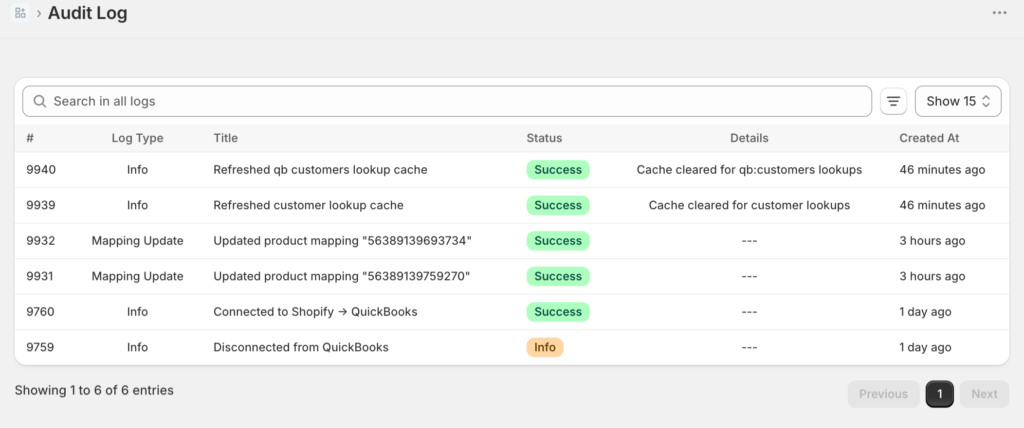
- 错误恢复。每个同步工具有时都会失败——API 故障、奇怪的退款、货币的特殊情况。问题是:谁会通知您,多久通知一次,以及修复的难度有多大?一个默默失败的工具比没有工具更糟糕,因为您会停止检查。
-
多店支持。如果您经营两个店面(或计划这样做),该工具会将此视为正常设置,还是将其视为两个完整订阅和一个变通方法?
-
批量定价模式。按订单定价和固定定价在每月 300 个订单时看起来相似。但在每月 3000 个订单时,账单会非常不同。请模拟您未来十二个月的业务量,而不是过去十二个月。
-
会计师访问权限。您的注册会计师能否在不使用您的管理员登录信息的情况下查看数据——映射、同步历史、日记账分录?如果不能,他们提出的每一个问题都将成为您的任务。
请注意列表中没有什么:单纯的价格。价格是第五个标准的“结果”,而不是起点。请记住这一点——这正是本文结尾所在。
以下是这五种工具的对比情况。
A2X — 现有者
A2X是您的会计最有可能已经听说过的名字,而且这种声誉是实至名归的。它在电子商务到账簿的转换方面做得比几乎任何人都久,其准确性声誉很高,并且是许多会计圈的首选推荐——尤其对于亚马逊卖家来说,其渠道覆盖范围是一个真正的差异化优势。如果您同时在Shopify和亚马逊上销售,并希望一个工具能为两者发布汇总、整洁的日记账分录,那么A2X是可靠的选择。
优势所在:准确性记录、亚马逊和多渠道覆盖、在会计和簿记员中享有深厚的信任。
需要考虑的方面:A2X的定价层级随订单量而扩展,因此账单会随着您的业务增长而增长——请根据您明年的业务量来估算成本,而不是今年的,并在决定前查看其当前定价。该产品是为会计师设计的,这有利有弊:簿记员会感到得心应手,而一些店主会发现设置和术语假设他们拥有比实际更多的会计知识。
如果您直接权衡此项,我们撰写了一篇全面的对比文章:LedgerPort vs A2X。如果您搜索A2X替代品来到这里,也应该阅读此文——首先要确定您是否真的需要一个。
Synder — 渠道收集器
Synder的卖点是广泛性。它连接了大量的销售渠道和支付处理器,并且可以同步到单个交易级别,而不仅仅是支付汇总。如果您的业务确实跨越了多个渠道——Shopify加上几个市场加上来自其他地方的Stripe支付——Synder可以将所有这些整合到一个账簿中,并在您需要时提供每笔交易的详细信息。
优势所在:渠道覆盖范围、每笔交易的粒度、适用于不寻常的多渠道设置的灵活性。
需要考虑的方面:这种灵活性也是风险所在。在有意义的交易量下进行每笔交易的同步意味着数千条条目流入QuickBooks,而您获得的每一个配置选择都可能是一个错误的配置选择。规模较大的店主有时会发现自己在清理同步的输出——这正是导致您阅读本文的根本原因。Synder会奖励那些愿意投入设置和持续监督的人;它会惩罚那些设置后就不管的人。
直接对比:LedgerPort vs Synder。
Webgility — 桌面重量级选手
如果您使用的是QuickBooks Desktop而不是QuickBooks Online,那么Webgility是您应该了解的工具——它是少数几个能很好地支持Desktop的严肃选项之一,对于一些成熟的企业来说,这本身就决定了选择。它还超越了簿记,进入了库存和订单管理,这使其更像一个运营平台而不是同步层。
优势所在:QuickBooks Desktop支持、库存和订单管理功能、适合希望一个更强大的系统完成多项工作的企业。
需要考虑的因素:“更强大”是关键。你支付的是纯粹同步问题不需要的功能——查看它们当前的定价,但预期价格会比支付翻译工具高——并且实施是一个比十五分钟连接更大的项目。如果你的实际问题是“我的Shopify付款在QBO中无法对账”,那么Webgility对于这项工作来说功能过于强大了。
直接比较:LedgerPort vs Webgility。
MyWorks — WooCommerce专家
MyWorks 在 WooCommerce 方面建立了声誉,其深度也体现了出来。如果您的商店运行在 Woo 上,并且您希望对订单、客户和库存如何流入 QuickBooks 进行细粒度、实时、字段级别的控制,那么 MyWorks 对 WooCommerce 数据模型的了解程度在同类产品中是首屈一指的。
优势所在: WooCommerce 深度、细粒度字段映射、Woo 商店的实时同步选项。
需要考虑的方面:专业化是其权衡。这是一个以 Woo 为中心的产品;如果您主要是 Shopify 商店 — 或者是一个计划扩展到 Shopify 的 Woo 商店 — 那么您正在为对您未来不太重要的平台购买深度。而细节级别的同步提出了与 Synder 相同的问题:更多的条目和更多的映射决策意味着一个小的配置错误有更多的地方可以悄悄地累积。
直接比较:LedgerPort vs MyWorks。
LedgerPort — 优先结算的对账工具(我们的产品)
这是我们的产品,所以请随意应用您认为诚实应得的任何折扣 — 但这是最直接的版本。
LedgerPort 的创建只有一个目的:让 Shopify 的付款与 QuickBooks 每次都能匹配。它是付款优先 — 它从实际存入您银行的存款开始,然后向后工作,自动将总销售额、退款、Shopify Payments 费用和调整分到正确的类别中。设置大约需要十五分钟。定价是固定的,而不是按订单收费:有一个免费套餐(每月最多 30 个订单),付费套餐起价为 25 美元/月,最多支持 1,000 个订单 — 账单不会随着您发货的每个订单而增加。它支持 Shopify(包括 Plus)和 WooCommerce,Scale 套餐及以上支持多商店,付费套餐提供 14 天无理由退款保证。
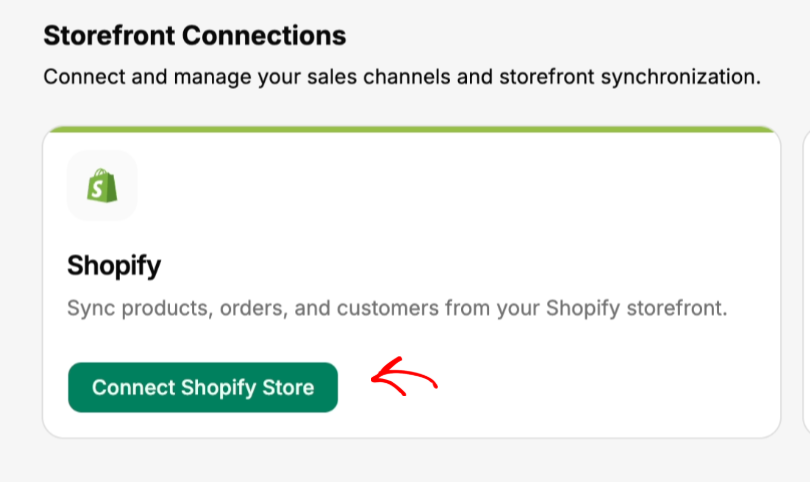
这十五分钟实际包含的内容,所以这是一个演练而不是一个声明。入职是一个字面上的仪表板三项清单:连接您的商店,连接 QuickBooks,启用自动同步。商店连接有两种方式 — 从 Shopify 应用商店安装,或从仪表板输入 your-store.myshopify.com,批准 Shopify 显示的权限列表,状态将变为“已连接”。
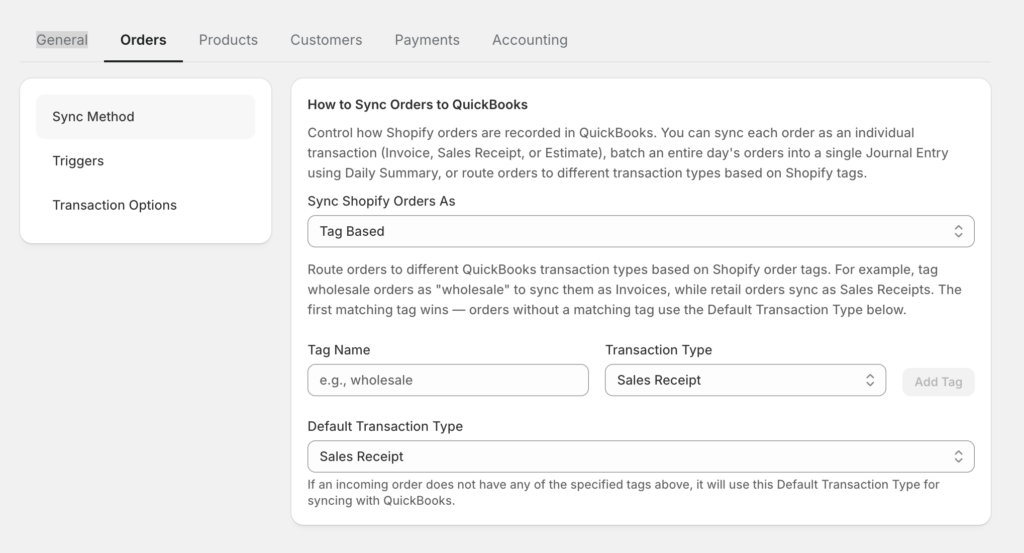
在快速设置下,路由控制比“先付款”可能暗示的要多。订单可以通过五种不同的方式发布到 QuickBooks — 销售收据、发票、估价单、每日汇总(对于会计师从总数工作的、交易量大的商店,每天生成一个日记账分录),或基于标签,它根据 Shopify 标签路由每个订单:标记一个订单为 wholesale,它将成为具有未结应收账款的发票;标记为 retail,它将作为销售收据发布;标记为 do-not-sync,它将完全不进入您的账簿。坦白说,关于细则:每日汇总和基于标签是更高级的功能 — 定价包含当前级别。
而且 WooCommerce 的覆盖范围并非事后添加。它是一个原生的 WordPress 插件,具有实时 webhook 同步 — 订单、退款、产品和客户在发生时被推送,无需 CSV 导出 — 并完全兼容 HPOS。运行 Shopify 和 Woo 店铺的商家可以在一个 LedgerPort 账户中管理两者。
而且您不必凭空相信这十五分钟的声明:我们完整的设置和故障排除文档是公开的 — 在连接任何内容之前,请阅读 LedgerPort 入门和 常见同步错误及解决方法,然后自行判断。
优势所在:作为核心设计,付款对账和费用分离,大批量交易时价格固定且可预测,设置快速,Shopify + WooCommerce 整合。
需要考虑的 — 坦白说:LedgerPort 是此列表中最新的工具,这意味着其会计师信任的十年记录不如 A2X。而且它不覆盖亚马逊、eBay 或其他市场。如果市场渠道是您收入的重要组成部分,那么 LedgerPort 今天就是错误的选择,而 A2X 或 Synder 才是正确的选择。我们宁愿在此处告诉您,也不愿您在第二周才发现。
哪种工具适合哪个商店
通常情况下,此类表格会低估一个买家:运营多个商店的经营者,以及运营多个客户商店的公司。LedgerPort 的结构化解决方案是业务 — 每个商店或客户都是一个与一个 QuickBooks 公司配对的店面,与其他店面完全隔离,拥有自己的货币、时区、连接和同步设置,所有这些都在一个登录下。业务配额根据计划级别进行扩展,在 Agency 级别可达无限 — 而非在此类别中常见的每个商店一个订阅模式,其中第三个商店意味着第三笔账单。
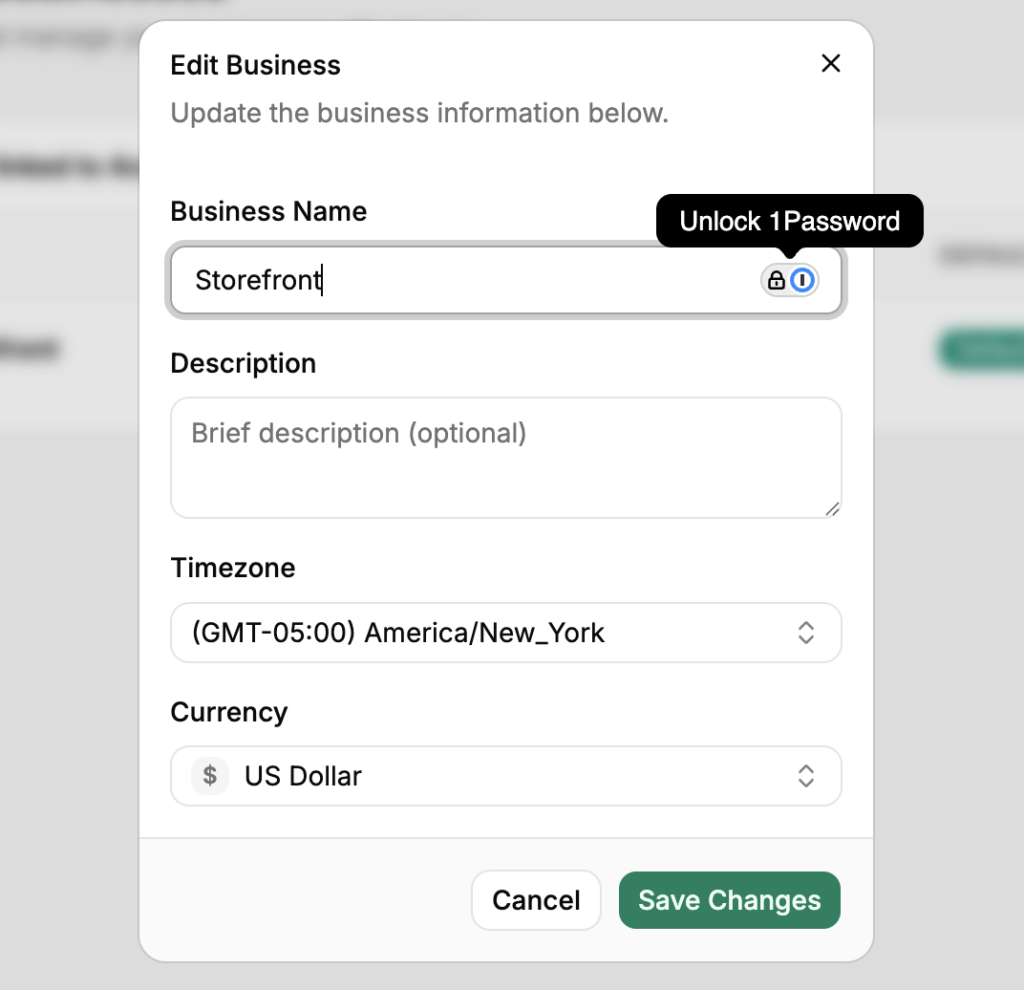
特别是对于会计师事务所,有一个正式的 CPA 合作伙伴计划:从一个仪表板进行分层客户管理,批发计费,在 20% 的收入分成和 20% 的客户折扣之间进行选择,一个主模板,将一个标准化的会计科目表配置应用于每个客户,以及面向客户的白标门户。以上四个工具中没有一个提供类似的计划 — 如果您是一家事务所,这是普通比较表中甚至没有的一行。所以我们添加了它。
| 你的情况 | 从...开始 |
|---|---|
| Shopify + Amazon(或混合型市场) | A2X — 市场覆盖和会计师信任 |
| 许多渠道,需要每笔交易的明细,愿意自行管理设置 | Synder — 广泛,但需要监督 |
| QuickBooks Desktop,或者您也需要库存/订单管理 | Webgility — 重量级选手,价格也与之匹配 |
| 仅限 WooCommerce,需要深入的字段级控制 | MyWorks — Woo 专家 |
| Shopify(或 Shopify + Woo)在 QBO 上,收款对账是痛点,订单量不断增长 | LedgerPort — 优先收款,统一价格,每月 25 美元起 |
| 每月约 30 个订单以下,只想干净的账簿而无需账单 | LedgerPort 免费套餐 — 在这个规模下真正免费 |
| 管理多个客户店铺的事务所 | LedgerPort 合作伙伴计划/代理商套餐 — 单一登录,隔离的客户账簿,批发计费 |
对于表格未涵盖的任何内容:预测您未来十二个月的订单量,为每种工具按该数量定价,并查看每个供应商(包括我们)的当前价格——因为发布的汇总信息很快就会过时。
软件,还是簿记服务?
有些读者在查看此比较时,实际上是在寻找 Shopify 店铺的最佳簿记服务——即一个能完全解决问题的人,而不是另一个需要配置的应用程序。这是一个合理的答案,了解两者之间的关系很有价值:每个优秀的电子商务簿记服务都运行在本文中的某个工具之上。该服务是人工加上同步层;无论您是否知道,您都在同时选择两者。
因此,如果您正在评估服务而不是软件,有两个问题可以穿透大部分营销宣传。第一:您使用哪种同步工具,我可以在其中看到我的账簿吗?手动电子表格对账的服务将比运行适当的优先收款同步的服务更慢、更容易出错——第一个标准中的相同故障模式适用,只是隐藏在月度发票后面。第二:如果我们分道扬镳,QuickBooks 文件归谁所有?答案应该是您,明确无误。
LedgerPort 的 CPA 合作伙伴计划中的许多事务所正是这种服务——簿记员和会计师事务所,他们专门为 Shopify 和 WooCommerce 客户服务,并在平台内将每个客户的账簿作为独立业务进行管理。如果您宁愿将所有事情都交给别人处理,那么聘请一个已经运行优先收款同步层的事务所,就能同时获得自动化和人工服务。
诚实的结局
联盟列表文章无法说出的部分:此列表中的每个工具都有效。每个工具都有成千上万的商店,它们的账本每月都能因此而干净地结清。这个比较中没有反派。
这正是为什么午夜六标签的仪式感觉如此不可能——你正在寻找错误的答案来排除,而没有一个。只有错误的匹配。购买了Woo专家的亚马逊卖家。购买了按订单定价的4000订单商店,因为在400个订单时最便宜。购买了市场上配置最灵活的工具但从未配置过的“设置即忘”的所有者。
昂贵的错误不是选择了糟糕的工具。而是根据价格标签而不是故障模式来选择——选择最便宜的翻译器而不问句子变得复杂时会发生什么。你已经知道那要付出什么代价,因为你已经付过一次了:一个绿色的勾号,一个月悄无声息的错误分类,以及一个有你名字的清理项目。
所以,请根据标准来选择,而不是根据标签。如果你的情况与该表中的LedgerPort行相匹配——Shopify或Woo,QuickBooks Online,需要与银行匹配的付款——评估我们的最快方法不是另一个标签。在免费计划上连接一个商店,同步一个真实的付款,并将其与你的银行存款进行核对。这就是第一个标准中的费用分离测试,使用你自己的数据运行,大约需要十五分钟。
既然这是诚实的结尾,它应该有一个诚实的证明。这是我们自己取消按钮的截图:
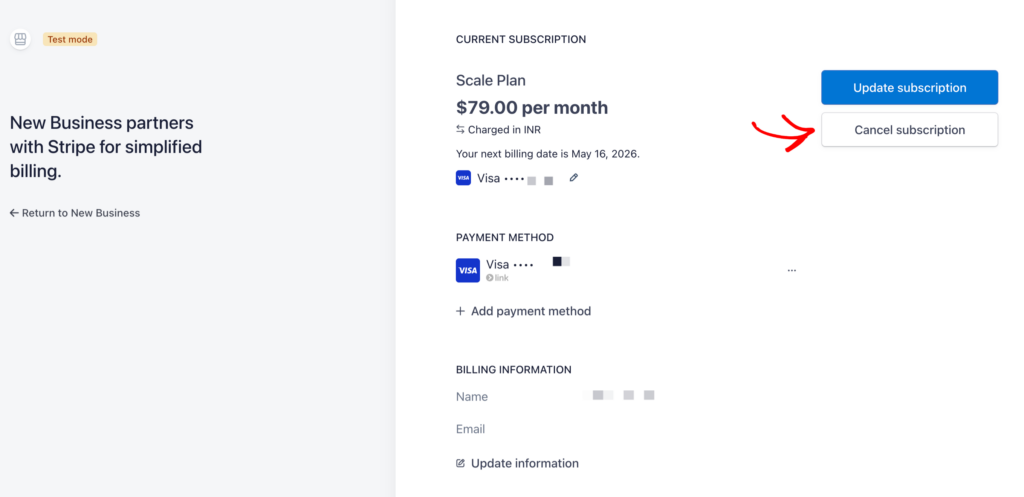
其背后的条款,坦白地说:没有取消费用,也没有锁定。订阅将持续到账单周期结束,然后账户将回退到一个功能性的免费套餐——你的数据、映射和配置将被保留,并且所有已同步到QuickBooks的内容将保持原样。稍后重新激活,你的连接和映射将恢复,无需重新设置。根据其供应商是否会向你展示此屏幕来评判此综述中的每个工具。
如果您仍在比较,这四个正面交锋比此综述所能涵盖的更深入:LedgerPort vs A2X · LedgerPort vs Synder · LedgerPort vs Webgility · LedgerPort vs MyWorks — 以及定价在此,没有“联系销售”的游戏。
