

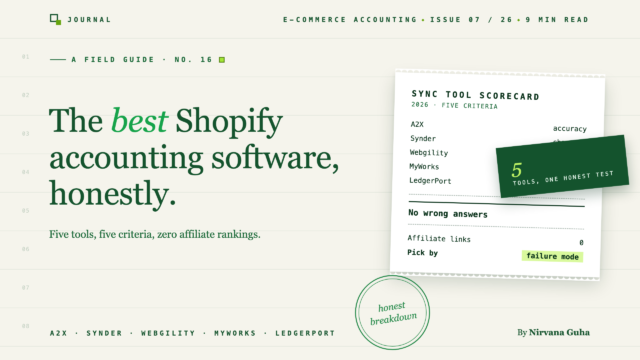
خمس أدوات، خمسة أوضاع فشل مختلفة. المقارنة التي لن تكتبها جولات التسويق بالعمولة.
إنها الساعة 11:40 مساءً يوم الثلاثاء ولديك ست علامات تبويب مفتوحة. A2X. Synder. Webgility. اثنان من المقالات - أحدهما بعنوان "أفضل 10 برامج محاسبة لـ Shopify" ، والآخر "أفضل برامج محاسبة لـ Shopify" - والتي تصنف فائزين مختلفين. وخيط Reddit حيث يسأل صاحب متجر عن أفضل تطبيق محاسبة لـ Shopify ويحصل على سبع إجابات متناقضة وواثقة.
لقد فعلت هذا من قبل. في المرة الأخيرة، اخترت أداة، وربطتها، وشاهدت علامة الصح الخضراء "تمت المزامنة" تظهر — ثم قضيت الشهر التالي تكتشف ما لم يعنيه "تمت المزامنة". الرسوم مجمعة في الإيرادات. المبالغ المستردة تصل في الفترة الخاطئة. دفعة لم تتطابق بعد مع إيداع البنك، إلا أن الأرقام الخاطئة كانت الآن في QuickBooks تلقائيًا. لم تقضِ على أعمال التنظيف. لقد اشتركت فيها.
لذا ها أنت ذا مرة أخرى، وكل موقع مراجعة تفتحه يصنف من يدفع أعلى عمولة تسويق بالعمولة. مما يجعل من المغري جدًا تصديق أبسط قصة ممكنة: هذه الأدوات كلها تفعل الشيء نفسه — اختر الأرخص وانتقل.
هذه هي الكذبة. وهي بالضبط المنطق الذي أنتج شهر التنظيف الأخير لديك. تختلف هذه الأدوات بالضبط في النقاط التي تؤلم: مدى دقة فصل الرسوم، وماذا يحدث عند فشل المزامنة، وكيفية التعامل مع متاجر متعددة، وما تكلفته عند الحجم، وما إذا كان محاسبك يمكنه الدخول دون استعارة تسجيل الدخول الخاص بك.
إفصاح واحد قبل أي شيء آخر: نحن نصنع إحدى هذه الأدوات. LedgerPort خاصتنا. ستكتشف ذلك بحلول الفقرة الثانية عشرة على أي حال، لذا نفضل أن نقولها في الفقرة الخامسة — ثم نكسب ثقتك من خلال إخبارك، على وجه التحديد، أين تكون الأدوات الأربعة الأخرى هي الخيار الصحيح. لأنه بالنسبة لبعض المتاجر التي تقرأ هذا، فهي كذلك.
أولاً، وضح ما هي هذه الأدوات بالفعل
نصف الارتباك في هذه الفئة يأتي من الاسم. عندما يبحث الناس عن برامج محاسبة شوبيفاي، فإنهم عادة ما يكون لديهم بالفعل برنامج محاسبة. يسمى QuickBooks Online، وهو جيد.
QuickBooks هو دفتر الأستاذ — نظام السجلات حيث تعيش إيراداتك ورسومك ومبالغك المستردة وضرائبك في النهاية. لا تحل أي من الأدوات الخمس في هذه المشاركة محله. كلها تجلس فوقه، وتقوم بالترجمة.
مشكلة الترجمة حقيقية. تودع Shopify الأموال في حسابك كمدفوعات صافية: دفعة من الطلبات، مطروحًا منها المرتجعات، مطروحًا منها رسوم Shopify Payments، مطروحًا منها التسويات، تصل كمبلغ إجمالي واحد كل بضعة أيام. يريد QuickBooks العكس - المبيعات الإجمالية، مع فصل الرسوم والمرتجعات كبنود منفصلة خاصة بها. النظامان يتحدثان لغات مختلفة، وإذا لم يقم أحد بالترجمة، فلن تتطابق مدفوعاتك مع سجلاتك أبدًا. (لقد كتبنا شرحًا كاملاً لهذه الآلية في كيفية تسوية مدفوعات Shopify في QuickBooks إذا كنت تريد التفاصيل.)
لذلك، فإن الاسم الصادق لهذه الفئة ليس "برنامج محاسبة". إنه طبقة المزامنة - المترجم بين Shopify ودفترك. A2X و Synder و Webgility و MyWorks و LedgerPort كلها مترجمات. السؤال هو ما يفعله كل واحد عندما تصبح الجملة معقدة.
ما الذي يميز أفضل برامج محاسبة شوبيفاي
معظم قوائم برامج محاسبة Shopify تقيم الميزات: عدد التكاملات، عدد الشعارات، ما إذا كان هناك تطبيق جوال. هكذا ينتهي بك الأمر بجدول بيانات حيث تحصل كل أداة على 8/10 ولا تتعلم شيئًا.
الاختلافات التي تكلفك المال بالفعل تظهر في خمسة أماكن:
- دقة فصل الرسوم. هل تفصل الأداة بشكل صحيح رسوم Shopify Payments والمرتجعات والتسويات عن إجمالي الإيرادات - أم أنها تنشر مبلغًا إجماليًا يبدو متوافقًا حتى يفتحه محاسبك؟ هذا هو أكبر مصدر "تمت المزامنة ولكن سجلاتي لا تزال خاطئة".

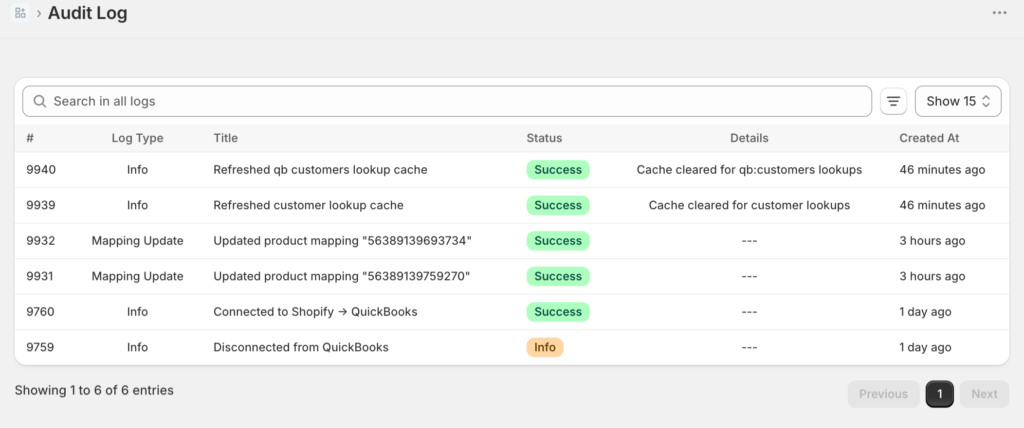
- استرداد الأخطاء. تفشل كل أداة مزامنة في بعض الأحيان - خلل في واجهة برمجة التطبيقات، أو استرداد غريب، أو حالة عملة استثنائية. السؤال هو: من يخبرك، وبأي سرعة، ومدى صعوبة الإصلاح؟ الأداة التي تفشل بصمت أسوأ من عدم وجود أداة، لأنك تتوقف عن التحقق.
-
دعم المتاجر المتعددة. إذا كنت تدير واجهتين للمتاجر (أو تخطط لذلك)، فهل تتعامل الأداة مع ذلك كإعداد عادي أم كاشتراكين كاملين وحل بديل؟
-
نموذج التسعير عند الحجم. يبدو التسعير لكل طلب والتسعير الثابت متشابهين عند 300 طلب شهريًا. عند 3000، تكون الفواتير مختلفة جدًا. قم بنمذجة الأشهر الاثني عشر القادمة، وليس الشهر الماضي.
-
وصول المحاسب. هل يمكن لمحاسبك رؤية البيانات - التعيينات، وسجل المزامنة، وإدخالات دفتر اليومية - دون استخدام تسجيل دخول المالك الخاص بك؟ إذا لم يكن الأمر كذلك، فإن كل سؤال لديهم يصبح مهمة لك.
لاحظ ما هو ليس في القائمة: السعر وحده. السعر هو نتيجة المعيار الخامس، وليس نقطة البداية. احتفظ بهذه الفكرة - إنها المكان الذي يعيش فيه نهاية هذا المنشور.
إليك كيف تتكدس الأدوات الخمس.
A2X — القائم بالعمل
A2X هو الاسم الذي من المحتمل أن يكون محاسبك قد سمعه بالفعل، وهذه السمعة مكتسبة. لقد كان يقوم بترجمة التجارة الإلكترونية إلى دفتر الأستاذ لفترة أطول من أي شخص آخر تقريبًا، وسمعته في الدقة قوية، وهو التوصية الافتراضية في العديد من الدوائر المحاسبية - خاصة للبائعين على أمازون، حيث يعد تغطية القنوات الخاصة به فارقًا حقيقيًا. إذا كنت تبيع على شوبيفاي *و* أمازون وتريد أداة واحدة تنشر إدخالات دفتر يومية موجزة ومنظمة لكليهما، فإن A2X هو الخيار الآمن.
نقاط القوة: سجل حافل بالدقة، تغطية أمازون والقنوات المتعددة، ثقة عميقة بين المحاسبين وكتبة الحسابات.
ما يجب مراعاته: تتدرج مستويات تسعير A2X مع حجم الطلبات، لذا يزداد الفاتورة مع نموك - قم بنمذجة تكاليفك بناءً على حجم العام المقبل، وليس هذا العام، وتحقق من أسعارهم الحالية قبل اتخاذ القرار. والمنتج مصمم مع وضع المحاسبين في الاعتبار، وهذا له وجهان: يشعر كتبة الحسابات بالراحة، بينما يجد بعض أصحاب المتاجر أن الإعداد والمصطلحات تفترض معرفة محاسبية أكثر مما لديهم.
إذا كنت تقارن هذا مباشرة، فقد كتبنا مقارنة شاملة: LedgerPort مقابل A2X. إنها أيضًا الصفحة التي يجب قراءتها إذا وصلت إلى هنا بحثًا عن بدائل A2X - ابدأ بما إذا كنت تحتاجه بالفعل.
Synder — جامع القنوات
عرض Synder هو الاتساع. فهو يربط قائمة طويلة من قنوات المبيعات ومعالجات الدفع ويمكنه المزامنة على مستوى المعاملة الفردية، وليس فقط ملخصات الدفع. إذا كانت أعمالك تمتد حقًا عبر قنوات متعددة - شوبيفاي بالإضافة إلى عدد قليل من الأسواق بالإضافة إلى مدفوعات Stripe من مكان آخر - يمكن لـ Synder سحب كل ذلك نحو دفتر أستاذ واحد، مع تفاصيل المعاملات عند الرغبة.
نقاط القوة: تغطية القنوات، دقة المعاملات الفردية، المرونة لإعدادات القنوات المتعددة غير العادية.
ما يجب مراعاته: هذه المرونة هي أيضًا الخطر. المزامنة لكل معاملة بحجم كبير تعني آلاف الإدخالات التي تتدفق إلى QuickBooks، وكل خيار تكوين تحصل عليه هو خيار تكوين يمكنك أن تخطئ فيه. يجد أصحاب المتاجر على نطاق واسع أنفسهم أحيانًا يقومون بتنظيف *مخرجات* المزامنة - وهذا هو الشبح الذي دفعك إلى هذا المنشور. يكافئ Synder شخصًا مستعدًا للاستثمار في الإعداد والإشراف المستمر؛ ويعاقب الإعداد والنسيان.
مقارنة مباشرة: LedgerPort مقابل Synder.
Webgility — الثقيل لسطح المكتب
Webgility هي الأداة التي يجب معرفتها إذا كنت تستخدم QuickBooks Desktop بدلاً من QuickBooks Online - فهي واحدة من الخيارات الجادة القليلة التي تدعم Desktop بشكل جيد، وبالنسبة لبعض الشركات القائمة، فإن هذا وحده يحسم الأمر. كما أنها تتجاوز مسك الدفاتر إلى إدارة المخزون والطلبات، مما يجعلها أقرب إلى منصة عمليات من طبقة مزامنة.
نقاط القوة: دعم QuickBooks Desktop، ميزات إدارة المخزون والطلبات، مناسبة للشركات التي تريد نظامًا واحدًا أثقل يقوم بعدة وظائف.
ما يجب مراعاته: الأثقل هي الكلمة التشغيلية. أنت تدفع مقابل إمكانيات لا تحتاجها مشكلة المزامنة البحتة - تحقق من أسعارهم الحالية، ولكن توقع سعرًا أعلى من أدوات ترجمة الدفع - والتنفيذ هو مشروع أكبر من اتصال لمدة خمس عشرة دقيقة. إذا كانت مشكلتك الفعلية هي "مدفوعات Shopify الخاصة بي لا تتوافق في QBO"، فإن Webgility هي آلة كبيرة لهذه المهمة.
مقارنة مباشرة: LedgerPort مقابل Webgility.
MyWorks — أخصائي WooCommerce
بنت MyWorks سمعتها على WooCommerce، ويتجلى العمق. إذا كان متجرك يعمل بنظام Woo وتريد تحكمًا دقيقًا وفي الوقت الفعلي وعلى مستوى الحقول في كيفية تدفق الطلبات والعملاء والمخزون إلى QuickBooks، فإن MyWorks يعرف نموذج بيانات WooCommerce جيدًا مثل أي شخص في هذا المجال.
أين تكون قوية: عمق WooCommerce، تعيين الحقول الدقيق، خيارات المزامنة في الوقت الفعلي لمتاجر Woo.
ما يجب مراعاته: التخصص هو المقايضة. إنه منتج يركز على Woo؛ إذا كنت متجر Shopify بشكل أساسي - أو متجر Woo يخطط لتوسيع Shopify - فأنت تشتري عمقًا في المنصة التي تقل أهميتها لمستقبلك. ويثير مزامنة التفاصيل نفس السؤال الذي تطرحه Synder: المزيد من الإدخالات والمزيد من قرارات التعيين تعني المزيد من الأماكن التي يمكن أن يتراكم فيها خطأ تكوين صغير بهدوء.
مقارنة مباشرة: LedgerPort مقابل MyWorks.
LedgerPort — مُسوي المدفوعات أولاً (خاصتنا)
هذا هو منتجنا، لذا قم بتطبيق أي خصم تعتقد أن الصدق يستحقه - ولكن إليك النسخة المباشرة.
تم بناء LedgerPort حول مهمة واحدة: مطابقة مدفوعات Shopify مع QuickBooks، في كل مرة. إنها تركز على الدفع أولاً - تبدأ من الإيداع الذي وصل فعليًا إلى حسابك المصرفي وتعمل للخلف، وتفصل المبيعات الإجمالية، والمبالغ المستردة، ورسوم مدفوعات Shopify، والتعديلات إلى الفئات الصحيحة تلقائيًا. يستغرق الإعداد حوالي خمس عشرة دقيقة. التسعير ثابت، وليس لكل طلب: هناك خطة مجانية (تصل إلى 30 طلبًا شهريًا)، وتبدأ الخطط المدفوعة من 25 دولارًا شهريًا لما يصل إلى 1000 طلب - لا يرتفع الفاتورة مع كل طلب تشحنه. وهو يدعم Shopify (بما في ذلك Plus) و WooCommerce، ومتجر متعدد على خطة Scale وما فوق، وهناك ضمان استعادة الأموال لمدة 14 يومًا بدون طرح أسئلة على الخطط المدفوعة.
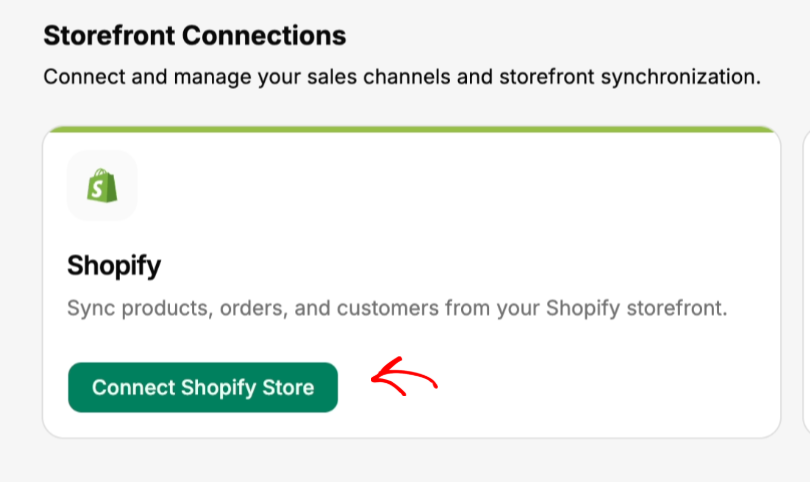
إليك ما تحتويه الخمس عشرة دقيقة فعليًا، لذا فهي جولة إرشادية وليست مجرد ادعاء. الإعداد عبارة عن قائمة تحقق حرفية من ثلاثة عناصر على لوحة المعلومات: قم بتوصيل متجرك، قم بتوصيل QuickBooks، قم بتمكين المزامنة التلقائية. يتصل اتصال المتجر بإحدى طريقتين - قم بالتثبيت من متجر تطبيقات Shopify، أو أدخل your-store.myshopify.com من لوحة المعلومات، ووافق على قائمة الأذونات التي تظهرها لك Shopify، ويتحول الحالة إلى متصل.
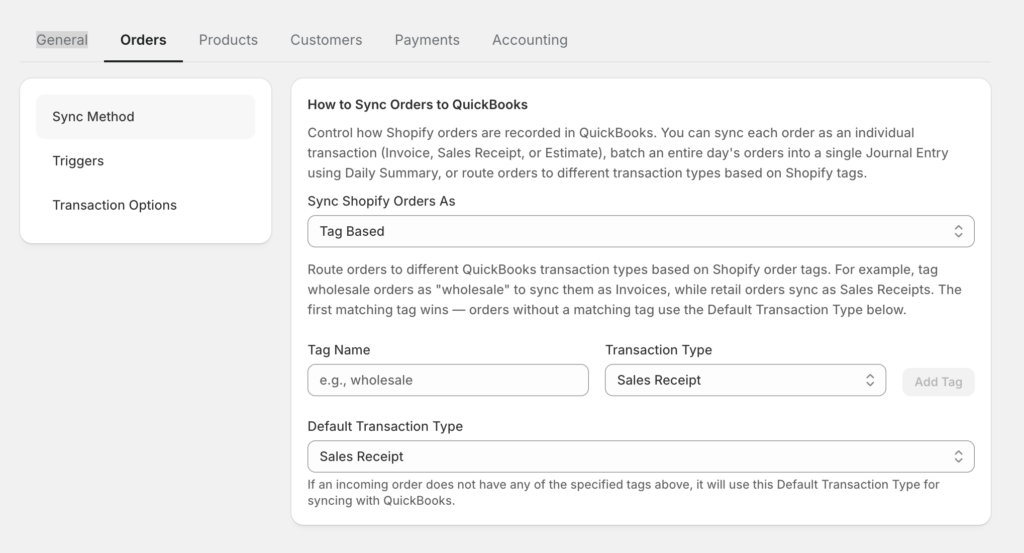
تحت الإعداد السريع، يوجد تحكم توجيه أكثر مما قد توحي به عبارة "الدفع أولاً". يمكن نشر الطلبات في QuickBooks بخمس طرق مختلفة — إيصال مبيعات، فاتورة، تقدير، ملخص يومي (إدخال دفتر يومية واحد في اليوم، للمتاجر ذات الحجم الكبير التي يعمل محاسبها من الإجماليات)، أو مستند إلى العلامات، والذي يوجه كل طلب حسب علامات Shopify الخاصة به: ضع علامة على طلب wholesale ليصبح فاتورة مع مستحقات مفتوحة، retail وينشر كإيصال مبيعات، do-not-sync ولا يلمس كتبك على الإطلاق. لكي نكون صريحين بشأن التفاصيل الدقيقة: الملخص اليومي والمستند إلى العلامات هي ميزات ذات مستوى أعلى — التسعير يحتوي على المستويات الحالية.
وتغطية WooCommerce ليست منفذًا ثانويًا. إنها إضافة WordPress أصلية مع مزامنة ويب هوك في الوقت الفعلي — يتم دفع الطلبات، والمبالغ المستردة، والمنتجات، والعملاء فور حدوثها، ولا توجد تصديرات CSV — وتوافق كامل مع HPOS. يدير التاجر الذي يدير متاجر Shopify و Woo واجهات متجريه من حساب LedgerPort واحد.
ولست مضطرًا لتصديق المطالبة التي تستغرق خمسة عشر دقيقة: وثائق الإعداد واستكشاف الأخطاء وإصلاحها الكاملة لدينا متاحة للجمهور — اقرأ البدء مع LedgerPort و أخطاء المزامنة الشائعة وكيفية إصلاحها قبل توصيل أي شيء، واحكم بنفسك.
نقاط القوة: تسوية الدفع وفصل الرسوم كتصميم أساسي، تسعير ثابت يمكن التنبؤ به عند الحجم الكبير، إعداد سريع، Shopify + WooCommerce تحت سقف واحد.
ما يجب مراعاته — بصراحة: LedgerPort هي الأداة الأحدث في هذه القائمة، مما يعني سجلًا أقصر من عقد من ثقة المحاسبين لدى A2X. وهي لا تغطي Amazon أو eBay أو الأسواق الأخرى. إذا كانت قنوات السوق جزءًا مهمًا من إيراداتك، فإن LedgerPort هو الخيار الخاطئ اليوم، و A2X أو Synder هو الخيار الصحيح. نفضل أن نخبرك بذلك هنا بدلاً من أن تكتشفه في الأسبوع الثاني.
أي أداة لأي متجر
مشترٍ واحد عادة ما تقلل هذه الطاولة من خدمته: المشغل الذي يدير أكثر من متجر واحد، والشركة التي تدير العديد من متاجر العملاء. الحل الهيكلي لـ LedgerPort هو الأعمال — كل متجر أو عميل هو واجهة متجر واحدة مقترنة بشركة QuickBooks واحدة، معزولة تمامًا عن الآخرين، مع عملتها الخاصة، ومنطقتها الزمنية، واتصالاتها، وإعدادات المزامنة الخاصة بها، وكل ذلك تحت تسجيل دخول واحد. تتوسع حصص الأعمال حسب مستوى الخطة، حتى غير محدودة في مستوى الوكالة — مقابل نموذج الاشتراك الواحد لكل متجر الذي هو شائع في أماكن أخرى في هذه الفئة، حيث يعني المتجر رقم ثلاثة فاتورة رقم ثلاثة.
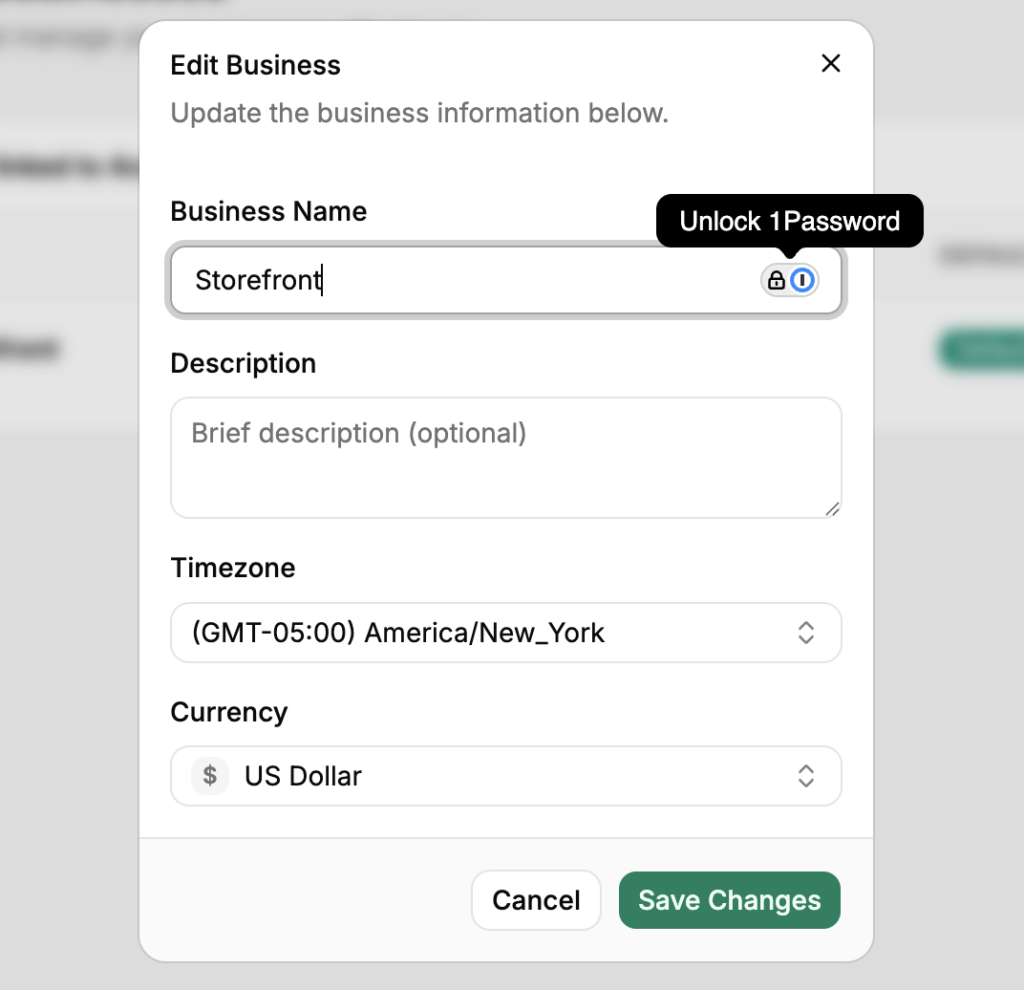
بالنسبة لشركات المحاسبة على وجه التحديد، هناك برنامج رسمي لشركاء CPA: إدارة العملاء الهرمية من لوحة تحكم واحدة، والفواتير بالجملة، وخيار بين مشاركة الإيرادات بنسبة 20٪ وخصم العميل بنسبة 20٪، وقالب رئيسي يطبق تكوين مخطط حسابات موحد عبر كل عميل، وبوابات تواجه العميل تحمل علامة بيضاء. لا تقدم أي من الأدوات الأربع المذكورة أعلاه برنامجًا مكافئًا - إذا كنت شركة، فهذا صف لا تحتويه جداول المقارنة المعتادة. لذلك أضفناه.
| وضعك | ابدأ بـ |
|---|---|
| شوبيفاي + أمازون (أو مزيج مكثف من الأسواق) | A2X — تغطية الأسواق وثقة المحاسبين |
| قنوات متعددة، تريد تفاصيل لكل معاملة، على استعداد لإدارة الإعداد | Synder — اتساع، بتكلفة الإشراف |
| QuickBooks Desktop، أو تريد إدارة المخزون/الطلبات أيضًا | Webgility — العملاق، بسعر يناسبه |
| WooCommerce فقط، تريد تحكمًا عميقًا على مستوى الحقول | MyWorks — متخصص WooCommerce |
| Shopify (أو Shopify + Woo) على QBO، تسوية المدفوعات هي المشكلة، حجم الطلبات المتزايد | LedgerPort — الدفع أولاً، تسعير ثابت يبدأ من 25 دولارًا شهريًا |
| أقل من حوالي 30 طلبًا شهريًا، تريد فقط كتبًا نظيفة بدون فاتورة | خطة LedgerPort المجانية — مجانية حقًا بهذا الحجم |
| شركة تدير العديد من متاجر العملاء | برنامج شركاء LedgerPort / مستوى الوكالة — تسجيل دخول واحد، كتب معزولة لكل عميل، فواتير بالجملة |
لأي شيء لا تغطيه الطاولة: قم بنمذجة حجم طلباتك لمدة اثني عشر شهرًا، وحدد سعر كل أداة بهذا الرقم، وتحقق من الأسعار الحالية على موقع كل بائع - بما في ذلك موقعنا - لأن الملخصات المنشورة تصبح قديمة بسرعة.
برنامج، أم خدمة مسك دفاتر؟
يصل بعض القراء إلى هذه المقارنة وهم يبحثون بالفعل عن أفضل خدمة مسك دفاتر لـ Shopify - شخص يحل المشكلة بأكملها، وليس تطبيقًا آخر للتكوين. هذا حل شرعي، ومن المفيد معرفة العلاقة بين الاثنين: كل خدمة مسك دفاتر تجارة إلكترونية جيدة تعمل على إحدى الأدوات في هذا المنشور. الخدمة هي إنسان بالإضافة إلى طبقة مزامنة؛ أنت تختار كليهما، سواء كنت تعرف ذلك أم لا.
لذلك إذا كنت تقيّم الخدمات بدلاً من البرامج، فإن سؤالين يتجاوزان معظم التسويق. أولاً: أي أداة مزامنة تستخدمها، وهل يمكنني رؤية كتباتي فيها؟ خدمة تقوم بالتسوية عن طريق جداول بيانات مدخلة يدويًا ستكون أبطأ وأكثر عرضة للأخطاء من تلك التي تعمل بمزامنة دفع أولى مناسبة - نفس حالات الفشل من المعيار الأول تنطبق، فقط مخفية خلف فاتورة شهرية. ثانيًا: من يملك ملف QuickBooks إذا انفصلنا؟ يجب أن تكون الإجابة أنت، بشكل لا لبس فيه.
العديد من الشركات في برنامج شركاء CPA الخاص بـ LedgerPort هي بالضبط هذا النوع من الخدمات - مسؤولو دفاتر وشركات محاسبة متخصصون في عملاء Shopify و WooCommerce ويديرون كتب كل عميل كعمل معزول داخل المنصة. إذا كنت تفضل تسليم الأمر بالكامل، فإن توظيف شركة تعمل بالفعل على طبقة مزامنة دفع أولى يمنحك الأتمتة *وال* الإنسان.
النهاية الصادقة
هذا هو الجزء الذي لا تستطيع قوائم التسويق بالعمولة قوله: كل أداة في هذه القائمة تعمل. كل واحدة منها لديها آلاف المتاجر التي تغلق كتبها بسلاسة كل شهر بسببها. لا يوجد شرير في هذه المقارنة.
وهذا هو السبب بالضبط الذي يجعل طقس علامات التبويب الست في منتصف الليل يبدو مستحيلاً - أنت تبحث عن الإجابة الخاطئة لاستبعادها، ولا توجد إجابة واحدة. هناك فقط مطابقات خاطئة. بائع أمازون الذي اشترى أخصائي Woo. المتجر ذو الـ 4000 طلب الذي اختار التسعير لكل طلب لأنه كان الأرخص عند 400. المالك الذي يضبط وينسى والذي اشترى الأداة الأكثر قابلية للتكوين في السوق ولم يقم بتكوينها أبدًا.
الخطأ المكلف ليس اختيار أداة سيئة. إنه الاختيار حسب السعر بدلاً من طريقة الفشل - اختيار المترجم الأرخص دون السؤال عما يحدث عندما تصبح الجملة معقدة. أنت تعرف بالفعل تكلفة ذلك، لأنك دفعته مرة واحدة: علامة اختيار خضراء، وشهر من سوء التصنيف الهادئ، ومشروع تنظيف يحمل اسمك عليه.
لذا اختر بناءً على المعايير، وليس الملصق. وإذا كان وضعك يطابق صف LedgerPort في هذا الجدول - Shopify أو Woo، QuickBooks Online، المدفوعات التي تحتاج إلى مطابقة البنك - فإن أسرع طريقة لتقييمنا ليست علامة تبويب أخرى. قم بتوصيل متجر بالخطة المجانية، وقم بمزامنة دفعة حقيقية، وتحقق منها مقابل إيداعك البنكي. هذا هو اختبار فصل الرسوم من المعيار الأول، يتم تشغيله على بياناتك الخاصة، في حوالي خمسة عشر دقيقة.
وبما أن هذه هي النهاية الصادقة، فيجب أن تحصل على أثر صادق. إليك لقطة شاشة لزر الإلغاء الخاص بنا:
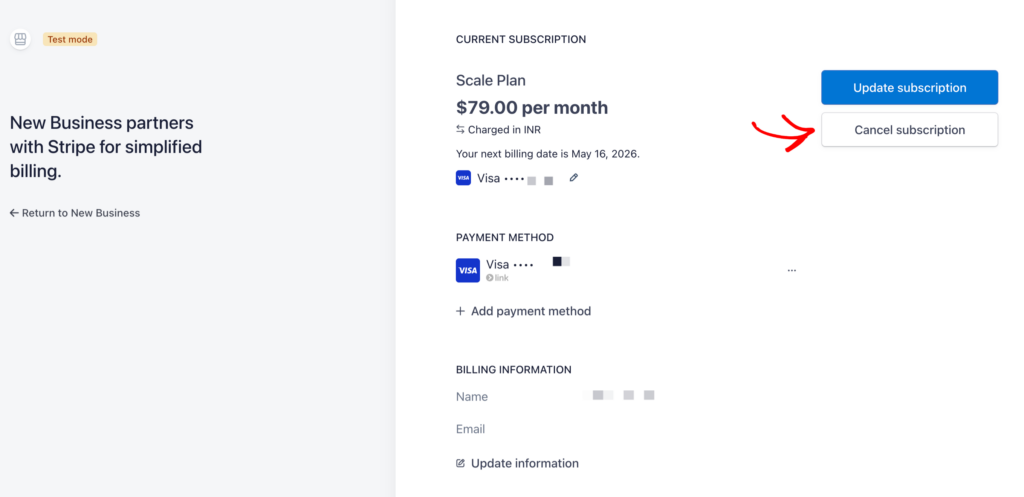
الشروط وراء ذلك، بوضوح: لا توجد رسوم إلغاء ولا قيود. يستمر الاشتراك حتى نهاية فترة الفوترة، ثم يعود الحساب إلى طبقة مجانية وظيفية - يتم الاحتفاظ ببياناتك، وخرائطك، وتكوينك، وكل ما تمت مزامنته بالفعل مع QuickBooks يبقى كما هو منشور تمامًا. أعد التنشيط لاحقًا وستعود اتصالاتك وخرائطك دون إعادة إعداد. قم بتقييم كل أداة في هذه المقارنة بناءً على ما إذا كان البائع الخاص بك سيظهر لك هذه الشاشة.
ابدأ مجانًا وقم بتسوية دفعتك الأولى →
إذا كنت لا تزال تقارن، فإن المواجهات الأربع تتعمق أكثر من هذه المقارنة: LedgerPort مقابل A2X · LedgerPort مقابل Synder · LedgerPort مقابل Webgility · LedgerPort مقابل MyWorks - و التسعير هنا، بدون ألعاب "اتصل بالمبيعات".
