
You can upgrade your LedgerPort plan at any time from inside the app. Upgrading takes effect immediately, so features on the new plan become available as soon as the payment is confirmed.
How to Upgrade
- From the left sidebar, click Settings.
- Click the Billing tab.
- Under your current plan, click Change Plan/Upgrade Plan.
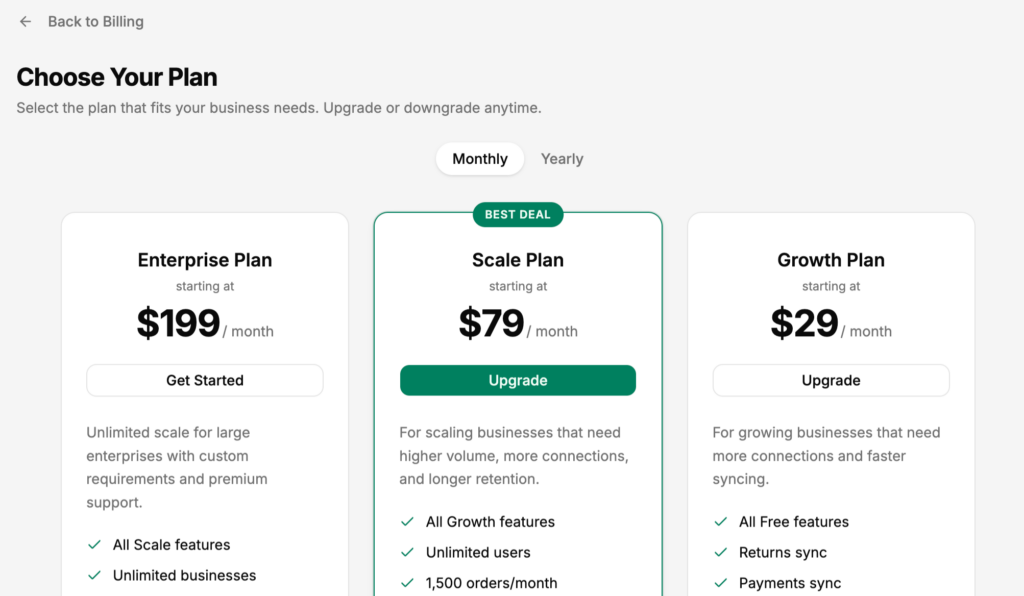
- Review the available plans and click Select on the one you want.
- Enter your payment details and confirm the upgrade.
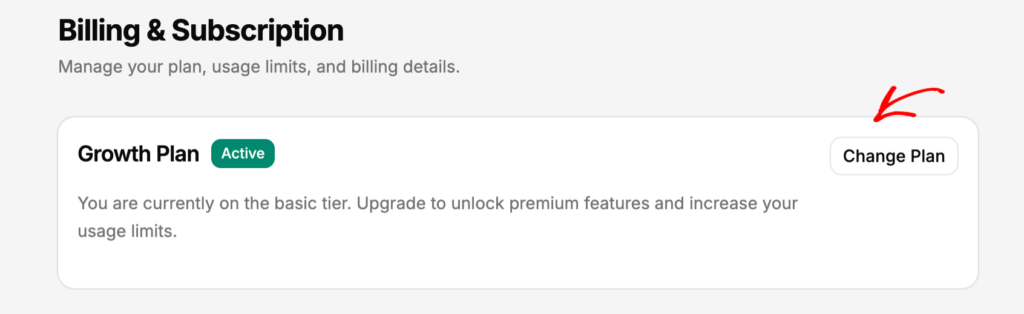
Your new plan activates immediately. Features that were previously locked will become available right away.
What Changes When You Upgrade
Free to Growth Auto-sync becomes available. You can enable it from Sync Config » General. Your order limit increases to 1,000/mo, log retention extends to 30 days, and you get a second team seat.
Growth to Scale Auto-sync frequency increases from 60 minutes to 15 minutes. You can manage up to 3 businesses. Log retention extends to 90 days. Daily Summary sync, Tag-Based routing, and Class/Location mapping all unlock.
Scale to Enterprise Order limit becomes unlimited. You can manage up to 10 businesses with 10 team seats. Log retention becomes unlimited. Estimate sync becomes available.
Any plan to Agency Contact the LedgerPort team to discuss Agency pricing. The Agency plan is designed for accounting firms managing multiple clients and includes wholesale billing, an unlimited business dashboard, and a dedicated account manager. See CPA Partner Program Details for more information.
Billing Cycle and Proration
Upgrades are billed immediately. If you are mid-cycle on your current plan, LedgerPort calculates a prorated credit for the unused portion and applies it toward your new plan cost.
Your billing date resets to the date of the upgrade, and future renewals will fall on that date each month.
If you run into any issues, contact us and our support team will be happy to help.