
You can cancel your LedgerPort subscription at any time from inside the app. There are no cancellation fees and no lock-in periods.
Before You Cancel
A few things to know before cancelling:
- Your data is not deleted immediately. After cancellation, your account moves to the Free plan. Sync history, mappings, and configuration remain accessible, but within Free plan limits (30 orders/mo, 7-day log retention, manual sync only).
- Auto-sync stops. If you are on Growth or above, auto-sync will be disabled once the plan ends.
- Your QuickBooks data is not affected. Cancelling LedgerPort does not remove or change anything that has already been synced to QuickBooks.
- Log retention may reduce. If your current plan has extended log retention (30, 90, or unlimited days), older entries beyond the Free plan’s 7-day window will no longer be accessible after the plan ends.
If you are cancelling because of a specific issue, our support team can often help resolve it. Contact us before cancelling if you would like assistance.
How to Cancel
- From the left sidebar. Click the Billing tab.
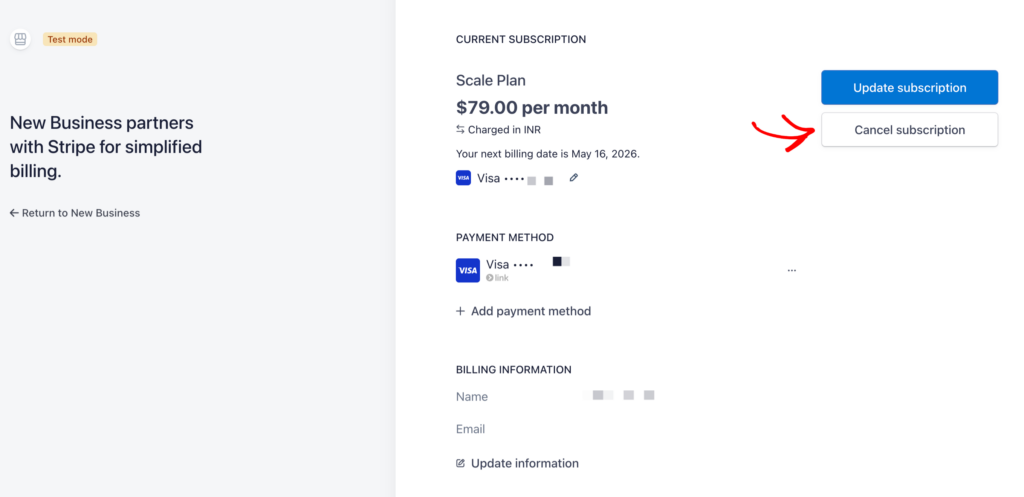
- Scroll to the bottom of the page and click Cancel Subscription.
- Select a reason for cancelling (optional) and click Confirm Cancellation.
Your subscription will remain active until the end of your current billing period. After that, your account moves to the Free plan.
What Happens After Cancellation
- You will receive a confirmation email with the date your paid plan ends.
- On that date, your account automatically switches to Free.
- Auto-sync is disabled. Any orders above the Free plan’s 30/mo limit will not sync automatically.
- Sync logs older than 7 days will no longer be accessible.
- You can still use manual sync and access all core features within Free plan limits.
Reactivating After Cancellation
If you decide to come back, you can reactivate at any time.
- Log in to app.ledgerport.com.
- Go to Settings » Billing.
- Click Upgrade Plan and choose your preferred plan.
Your existing connections, mappings, and configuration will still be in place. You will not need to set anything up again.
If you run into any issues, contact us and our support team will be happy to help.