

- 1Ang Pagkakasundo sa Sabado ng Gabi (Bakit Mo Ito Binabasa)
- 2Ang Mga Benepisyo na Nakalista sa Bawat Artikulo (At Bakit Hindi Sila Mali)
- 3Ang Benepisyo na Walang Nagsusulat Tungkol Dito: Pagkakasundo ng Payout-to-Revenue
- 4Ano Talaga ang Nagbabago sa Iyong Buwanang Pagsasara
- 5Kapag Pinapalala ng Automation ang mga Bagay (Pagiging Tapat)
- 6Paano Malaman Kung Handa Ka Na
- 7Ano ang tunay na kailangan ng “handa”
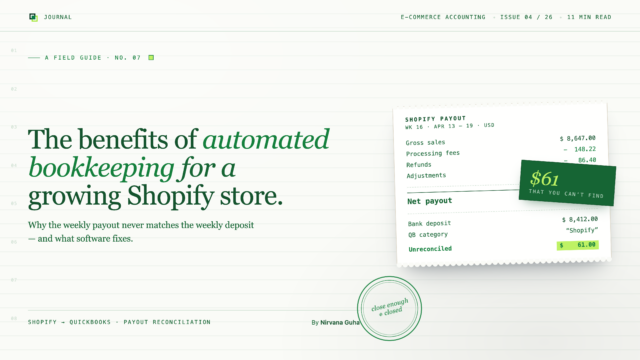
11 PM na ng Sabado. Dapat nanonood ka ng pelikula kasama ang iyong partner. Sa halip, nasa iyong laptop ka na may tatlong bukas na tab sa browser: Shopify Payouts, ang iyong mga transaksyon sa bangko sa QuickBooks, at isang Google Sheet kung saan sinusubukan mong alamin kung bakit ang isang deposito na $8,412 ay hindi tumutugma sa $8,647 na kinita mo sa iyong Shopify dashboard noong linggong iyon.
Dalawang oras ka nang nandiyan. Mayroon ka pang $61 na kulang at hindi mo mahanap kung saan ito napunta. Ang ilan dito ay mga bayarin sa Stripe. Ang ilan dito ay isang refund mula sa isang customer sa Texas. Ang ilan dito ay malamang isang pagsasaayos ng chargeback na hindi mo alam. Isasara mo ang laptop. Aalamin mo ito sa susunod na linggo.
Hindi mo aalamin.
Kung naghanap ka ng “automated bookkeeping benefits” at napunta ka rito, malamang nabasa mo na ang tatlo o apat sa mga generic na bersyon ng post na ito. Pagtitipid sa oras. Mas kaunting mga pagkakamali. Real-time na visibility. Pagsunod sa buwis. Lahat ay nagsusulat ng parehong pitong benepisyo. Wala sa mga ito ang mali. Ngunit halos wala sa mga ito ang isinulat para sa isang taong nagpapatakbo ng isang Shopify store na may 1,500 order bawat buwan. Kaya narito ang tapat na bersyon — ang mga benepisyo na talagang mahalaga para sa isang e-commerce operator, ang mga numero na dapat mong asahan, at ang isang benepisyo na walang naglalagay sa listahan, na marahil ang dahilan kung bakit mo ito binabasa.
Ang Pagkakasundo sa Sabado ng Gabi (Bakit Mo Ito Binabasa)
Ang dahilan kung bakit mahirap hanapin ang $61 na iyon ay hindi dahil sa hindi ka magaling sa matematika. Ito ay dahil ang Shopify ay hindi naglalabas ng iyong kita. Ang Shopify ay naglalabas ng net payout — gross sales minus fees, minus refunds, minus adjustments, minsan minus chargeback, minsan minus maliit na pagkakaiba sa conversion ng pera. Ang netong numerong iyon ay napupunta sa iyong bangko bilang isang solong deposito.
Ang QuickBooks, sa kabilang banda, ay hindi alam ang alinman doon. Nakakakita ito ng $8,412 na deposito mula sa “Shopify.” Wala itong ideya kung ano ang kinakatawan ng depositong iyon. Kaya ang trabaho ng bookkeeping ng isang Shopify store ay talagang ang trabaho ng pagsasalin ng isang numero sa lima o anim na linya ng item na mauunawaan ng QuickBooks — gross sales, platform fees, payment processing fees, refunds, adjustments, at minsan sales tax. Bawat payout. Bawat linggo. Bawat buwan.
Ang pagsasalin na iyon ang trabaho. Ito ang trabaho kung ginagawa mo ito gamit ang kamay sa Sabado ng gabi o kung ginagawa ito ng isang tool para sa iyo. Ang tanong kung dapat mo bang “i-automate ang iyong bookkeeping” ay talagang isang tanong tungkol sa kung sino ang gumagawa ng pagsasalin — ikaw o ang software.
Ang Mga Benepisyo na Nakalista sa Bawat Artikulo (At Bakit Hindi Sila Mali)
Bago tayo pumunta sa bahagi na partikular sa iyong Shopify store, sulit na maging patas sa mga generic na benepisyo. Totoo ang mga ito. Kailangan lang nilang lagyan ng mga numero.
Pagtitipid sa oras. Ang datos sa industriya mula sa iba't ibang mapagkukunan ay naglalagay ng pagtitipid sa oras mula sa paglipat mula sa manu-manong pagbubukod-tala patungo sa awtomatiko sa pagitan ng 40 hanggang 60 porsyento. Para sa isang Shopify store na gumagawa ng sarili nitong mga libro, karaniwan itong nangangahulugan ng tatlo hanggang limang oras na balik bawat linggo — oras na napupunta sa mga export, paglilinis, at paghahanap ng rekonsilasyon.
Pagbawas ng pagkakamali. Ang manu-manong pagbubukod-tala ay may rate ng pagkakamali sa transaksyon na humigit-kumulang 1 hanggang 3 porsyento. Ang mga awtomatikong sistema na kumukuha ng datos nang direkta mula sa mga API ng pinagmulan ay karaniwang nananatili sa ilalim ng kalahating porsyento. Kung nagpoproseso ka ng 1,500 na order bawat buwan, ang pagkakaiba sa pagitan ng 2 porsyentong rate ng pagkakamali at 0.5 porsyentong rate ay 30 maling transaksyon kumpara sa pito — at ang mga maling transaksyon ay palaging tila ang mga napapansin ng iyong CPA.
Pagbawas ng gastos. Ang manu-manong pagproseso ng invoice ay nagkakahalaga sa pagitan ng $16 at $22 bawat invoice kapag isinama mo ang paggawa. Ang awtomatikong pagproseso ay nagpapababa nito sa humigit-kumulang $6. Para sa mas malalim na pagtingin sa kung ano talaga ang gastos ng manu-manong pagbubukod-tala sa e-commerce sa buong taon, ang pagtalakay na ito sa $7,500 na pagkakamali na ginagawa ng karamihan sa mga may-ari ng Shopify store ay nagpapaliwanag ng matematika sa makatotohanang dami ng order.
Real-time na pananaw sa pananalapi. Sa halip na maghintay hanggang ika-15 ng susunod na buwan upang makita kung paano nagpunta ang nakaraang buwan, maaari mong makita ang iyong mga numero lingguhan — o araw-araw. Para sa isang negosyong e-commerce na may mahigpit na mga margin at mga desisyon sa imbentaryo na kailangang gawin, hindi ito isang vanity metric. Ito ang pagkakaiba sa pagitan ng pag-order ng iyong susunod na round ng imbentaryo gamit ang kasalukuyang datos at pag-order nito gamit ang datos na tatlong linggo na ang nakalipas.
Mas malinis na paghahanda sa buwis. Kapag ang sales tax, mga bayarin sa platform, at mga refund ay awtomatikong pinaghihiwalay sa buong taon, ang iyong CPA ay hindi gumugugol ng unang linggo ng Abril sa pagsubok na alamin kung ano ang napupunta saan. Ang panahon ng buwis ay nagiging isang pagsusuri sa halip na isang muling pagbuo.
Scalability. Ang paglipat mula sa 500 na order bawat buwan patungo sa 2,000 na order bawat buwan ay hindi kailangang mangahulugan ng pag-triple ng iyong oras sa pagbubukod-tala. Sa automation, ang pinagbabatayan na gawain ay nananatiling halos pare-pareho — ang software ay humahawak ng dami na kung hindi man ay magiging mas maraming oras ng kawani o mas malaking invoice ng bookkeeper.
Lahat ng ito ay totoo. Lahat ng ito ay magagamit din sa isang law firm, isang dental practice, o isang consulting business. Na nangangahulugang wala sa mga ito ang nagpapaliwanag kung bakit ikaw, partikular, ay nasa iyong laptop ng 11 PM sa Sabado. Ang bagay na nagpapaliwanag niyan ay wala sa generic na listahan.
Ang Benepisyo na Walang Nagsusulat Tungkol Dito: Pagkakasundo ng Payout-to-Revenue
May paniniwala sa ilalim ng eksena sa Sabado ng gabi na ganito ang tunog: ang awtomatikong pagbubukod-tala ay maganda sa teorya, ngunit ang mga generic na tool ay hindi talaga gumagana para sa isang Shopify store — masyadong kumplikado ang aking mga payout, at mas mabuti akong gawin ito nang manu-mano hanggang sa sapat na ang laki ng negosyo upang bigyang-katwiran ang tunay na imprastraktura. Ang paniniwalang iyon ay tila totoo dahil ito ay nagmula sa karanasan. Ito rin ang bagay na nagpapanatili sa iyo sa sopa kasama ang iyong laptop tuwing weekend.
Narito ang benepisyong pinakamahalaga para sa isang operator ng e-commerce, at na halos walang artikulo tungkol sa “mga benepisyo ng automated bookkeeping” ang bumabanggit: nalulutas ng automation ang problema sa pagsasalin ng net-payout-to-gross-revenue, at hindi ito magagawa ng manual bookkeeping.
Iyan ay isang malakas na pahayag, kaya't maging tiyak tayo sa ibig sabihin nito.
Kapag sinubukan mong manu-manong i-reconcile ang isang Shopify payout, binubuo mo muli ang pagsasalin sa pamamagitan ng kamay sa bawat oras. Magbubukas ka ng isang Shopify payout report, itatala mo ang kabuuang benta, ibabawas mo ang mga bayarin sa Stripe (na kung saan ay ang kabuuan ng mga porsyentong bayarin, mga nakapirming bayarin, at anumang mga surcharge sa internasyonal na card), ibabawas mo ang mga refund na inisyu sa panahon ng payout window (na maaaring o hindi tumutugma sa mga order sa payout), at ibabawas mo ang anumang tinatawag ng Shopify na “adjustment” — isang lalagyan na kasama ang mga chargeback, bahagyang refund, at mga pagkakaiba sa conversion ng pera. Pagkatapos ay i-cross-reference mo ang nagreresultang numero laban sa deposito sa bangko.
Ang dahilan kung bakit ka nagkakaroon ng $61 na pagkakaiba ay halos hindi kailanman dahil mali ang isang numero. Ito ay dahil ang isa sa mga line item na iyon ay kabilang sa ibang payout window, o ang isang refund ay inisyu sa isang order na mas nauna pa sa kasalukuyang payout period, o ang Shopify ay nag-adjust ng isang dalawang linggong lumang benta at inilagay ang adjustment sa payout ngayong linggo nang hindi ito malinaw na nilalagyan ng label.
Ito ay isang structural na problema, hindi isang problema sa pagsisikap. Ang paggugol ng anim na karagdagang oras dito ay hindi ito aayusin, dahil ang data na ginagamit mo — isang CSV export ng isang payout — ay hindi naglalaman ng impormasyong kailangan upang malutas ang hindi pagtutugma hanggang sa sentimo. Maaari kang lumapit. Hindi ka maaaring maging eksakto. At ang “malapit” sa isang Q4 tax review ay isang problema.
Ang ginagawa ng automation, kapag ang tool ay ginawa para sa e-commerce, ay ang paghawak sa buong trail ng bawat order, refund, bayarin, at adjustment sa isang sistema at pagtutugma nito sa mga payout sa antas ng line-item. Ang bawat net payout ay hinahati sa mga aktwal na bahagi nito: ganito karami ang gross revenue, ganito karami ang mga bayarin sa platform, ganito karami ang mga bayarin sa pagproseso ng pagbabayad, ganito karami ang mga refund, ganito karami ang mga adjustment. Ang bawat isa sa mga bahaging iyon ay napupunta sa sarili nitong account sa QuickBooks. Ang deposito ay tumutugma. Sa bawat oras. Nang walang Sabado ng gabi. Ang pahina ng how-it-works ng LedgerPort ay nagpapaliwanag ng mga mekanismo ng translation layer na ito nang mas detalyado.
Iyan ang benepisyo na hindi nakalista sa anumang generic na artikulo. Para sa isang operator ng Shopify o WooCommerce, ito ang tanging benepisyo na mahalaga, dahil ito lamang ang nagpapahintulot sa pinagbabatayan na trabaho na maging structurally posible sa halip na humigit-kumulang.
Ano Talaga ang Nagbabago sa Iyong Buwanang Pagsasara
Upang gawing konkreto ito, narito ang isang paghahambing ng bago at pagkatapos para sa isang Shopify store na gumagawa ng 1,500 order bawat buwan.
BAGO ANG AUTOMATION
4–6 oras/buwan
Mga CSV export, spreadsheet reconciliation, hindi maipaliwanag na $30–$80 na mga adjustment
PAGKATAPOS NG AUTOMATION
10–15 min/buwan
Pagsusuri ng Dashboard, mga pre-reconciled na payout, malinis na paghihiwalay ng bayarin
Bago ang automation. Sa unang weekend ng bawat buwan, naglalaan ka ng apat hanggang anim na oras. Dina-download mo ang mga payout ng nakaraang buwan mula sa Shopify — karaniwan ay apat o lima sa mga ito. Ini-export mo ang bawat isa sa CSV. Binubuksan mo ang QuickBooks at kinukuha ang mga bank deposit. Pinoproseso mo ang bawat payout, tinutugma ang mga numero, nagsusulat ng mga journal entry para sa mga bayarin at refund, sinusubukang i-reconcile hanggang sa pinakamaliit na sentimo. Karamihan ay nagagawa mo. Dalawa o tatlong payout ang may maliliit na hindi pagtutugma na hindi mo maipaliwanag — karaniwan ay nasa $30 hanggang $80 — at ini-record mo ang mga ito sa isang “Shopify adjustments” account dahil kailangan mong isara ang buwan. Magtatanong ang iyong CPA tungkol sa account na iyon sa Pebrero.
Pagkatapos ng automation. Binubuksan mo ang isang dashboard sa unang araw ng buwan. Bawat payout mula sa nakaraang buwan ay na-reconcile na sa deposit sa iyong bangko. Ang mga bayarin ay nakahiwalay na sa sarili nitong account. Ang mga refund ay naitala na. Anumang adjustment ay na-categorize na. Ang dating apat hanggang anim na oras ay ngayon sampu hanggang labinlimang minuto na lang ng pagrepaso — pag-scan para sa anumang hindi karaniwan at pag-apruba sa anumang na-flag ng sistema para sa iyong atensyon. Ang iyong mga libro ay nagsasara sa parehong araw. Hindi magtatanong ang iyong CPA tungkol sa adjustments account dahil hindi ito umiiral.
Nagbabago rin ang hugis ng data. Ang isang buwan na may 3,000 order ay hindi nangangahulugang 3,000 tala sa QuickBooks. Ang Daily Summary sync method ng LedgerPort ay nagpo-post ng isang journal entry bawat araw na pinagsasama-sama ang lahat ng mga order sa araw na iyon — kaya ang parehong buwan ay lumalabas bilang humigit-kumulang 30 entry sa halip na 3,000. Iyon ang aktwal na mekanismo sa likod ng “nananatiling malinis at mapapamahalaan ang iyong QuickBooks”: ito ay isang pagpipilian sa dropdown sa Sync Config » Orders, hindi isang pagsisikap sa bookkeeping, at ang mga tindahan na nais ng detalye sa antas ng order ay maaaring panatilihin ang mga Sales Receipt bawat order sa halip. Ang aming gabay sa pag-record ng mga benta ng Shopify sa QuickBooks ay nagpapaliwanag kung kailan ang bawat pamamaraan ay makabuluhan.
Ang pagsasara ay hindi na rin isang solo na aktibidad. Sa halip na mag-email ng mga export sa iyong bookkeeper — o mas malala pa, pagbabahagi ng iyong login — iimbitahan mo sila gamit ang kanilang sariling upuan sa ilalim ng Settings » Team » Invite Member. Ang isang tungkuling Member ay maaaring tingnan ang mga sync log, magpatakbo ng mga manual sync, at suriin ang mga mapping, ngunit hindi maaaring hawakan ang sync configuration o pagsingil; inirerekomenda ng mga dokumento ang buong tungkuling Admin para sa “isang pinagkakatiwalaang accountant o business partner.” Pagdating ng katapusan ng buwan, sinusuri ng iyong bookkeeper ang pagsasara mula sa kanilang sariling login sa halip na maghintay sa iyo para sa mga export.
ORAS NA NABALIK
12 linggo
Bawat taon, pabalik sa iyong kalendaryo
Isang linggong natipid bawat buwan ay 12 linggo bawat taon — sapat na para mabawi ang gastos ng automation software nang maraming beses, at hindi pa kasama ang halaga ng hindi paggawa nito sa Sabado ng gabi.
Kapag Pinapalala ng Automation ang mga Bagay (Pagiging Tapat)
Maraming nilalaman tungkol sa automated bookkeeping ang isinulat ng mga kumpanyang nagbebenta ng automated bookkeeping, at madalas nilang hindi isinasama ang mga failure modes. Narito ang mga dapat mong malaman bago ka mag-sign up para sa anumang bagay.
Maling-angkop na mga tool. Ang mga generic na automation tool na gumagana nang maayos para sa isang consulting business ay hindi kinakailangang gumana para sa e-commerce. Marami sa kanila ang umaasa sa malinis na mga invoice bilang source documents. Ang Shopify ay hindi gumagawa ng mga invoice sa tradisyonal na kahulugan — gumagawa ito ng mga payout report na may ibang-iba na istraktura. Ang isang tool na hindi ginawa na isinasaalang-alang ang istrukturang iyon ay teknikal pa rin na mag-a-automate ng iyong bookkeeping, ngunit iiwan nitong hindi nalutas ang problema sa reconciliation. Na nangangahulugang ikaw pa rin ang nasa iyong laptop ng 11 PM.
Mga problema sa chart of accounts. Ang automation ay maaari lamang mag-book ng mga entry sa mga account na iyong naitayo nang tama. Kung ang iyong chart of accounts ay pinagsasama ang “Shopify fees” at “Stripe fees” sa isang catch-all expense, gagawin din ng automation ang parehong bagay nang mas mabilis. Magkakaroon ka ng mas malinis na data ngunit hindi pa rin ang tamang istraktura. Ang pagtatayo nito nang tama sa simula — o pagpapagawa nito sa iyong CPA — ang pinakamataas na leverage na magagawa mo bago mag-automate.
Inaasahan na ang automation ay gagawa ng mga desisyon. Hindi nagpapasya ang automation kung ang gastos na $300 ay cost of goods sold o marketing expense. Hindi nito pinipili kung ang refund ay para sa sirang produkto o dahil nagbago lang ang isip ng customer. Ang mga iyon ay mga desisyon sa bookkeeping na kailangan pa rin ng tao. Ang ginagawa ng automation ay inaalis ang mekanikal na trabaho sa data sa paligid ng mga desisyong iyon para makapag-focus ka sa paggawa ng mga ito.
Inaasahan ang agarang pag-setup. Anumang tool na nangangako na maaari mong ikonekta ang iyong Shopify store at ma-reconcile sa loob ng limang minuto ay alinman sa sobra-sobra ang sinasabi nito o lumulutas ng mas maliit na problema kaysa sa tunay mong problema. Ang tunay na setup, na ginawa nang tama, ay tumatagal sa pagitan ng dalawa at anim na oras na nakakalat sa iyong unang linggo, depende sa kung gaano karaming historical data ang kailangan mong linisin. Mas mabilis pa rin iyon kaysa sa isang buwan ng manu-manong reconciliation, ngunit hindi ito limang minuto. Kung gusto mong makita kung paano nakakaapekto ang gastos sa setup na iyon sa buwanang pagtitipid, ang LedgerPort’s pricing page ay naglalahad ng mga plano kasama ang mga karaniwang antas ng dami ng order.
Pagpapalakas ng maling configuration. Ang automation ay nagpapatupad ng anumang patakaran sa pagkilala ng kita na ibibigay mo dito, sa buong bilis. Sa LedgerPort, ang sync triggers ang nagpapasya kung kailan magiging isang QuickBooks transaction ang isang order — at kung paganahin mo ang Pending payment trigger, tapat na itatala ng tool ang mga hindi kumpirmadong pagbabayad bilang kita. Ang sariling dokumentasyon ng vendor ay nagpapahiwatig na ang pagtatakda ng “gamitin nang may pag-iingat.” Iyon ay automation na gumagana nang eksakto tulad ng naka-configure, at ito ay mali pa rin para sa karamihan ng mga tindahan. Ang inirerekomendang setup — sync sa Paid lamang — ay umiiral nang eksakto dahil ang isang pagpipilian sa trigger ay isang patakaran sa accounting, hindi isang teknikal na detalye.
Mga pagkabigo na nagtatago. Nabibigo ang automation. Ang mga dokumento ng LedgerPort ay nagngangalan ng isang expired na QuickBooks access token bilang ang pinakakaraniwang error sa sync. Ang pagkakaiba sa pagitan ng ligtas at mapanganib na automation ay hindi kung nagaganap ang mga pagkabigo — ito ay kung ang mga ito ay pinangalanan at maaaring ayusin o tahimik. Ang bawat pagtatangka sa sync dito ay nakakakuha ng status (Synced, Error, Pending, o On Hold) na may dokumentadong ayos, kaya ang isang sirang koneksyon ay lumalabas bilang isang pulang status na maaari mong aksyunan, hindi isang tahimik na butas sa iyong mga libro.
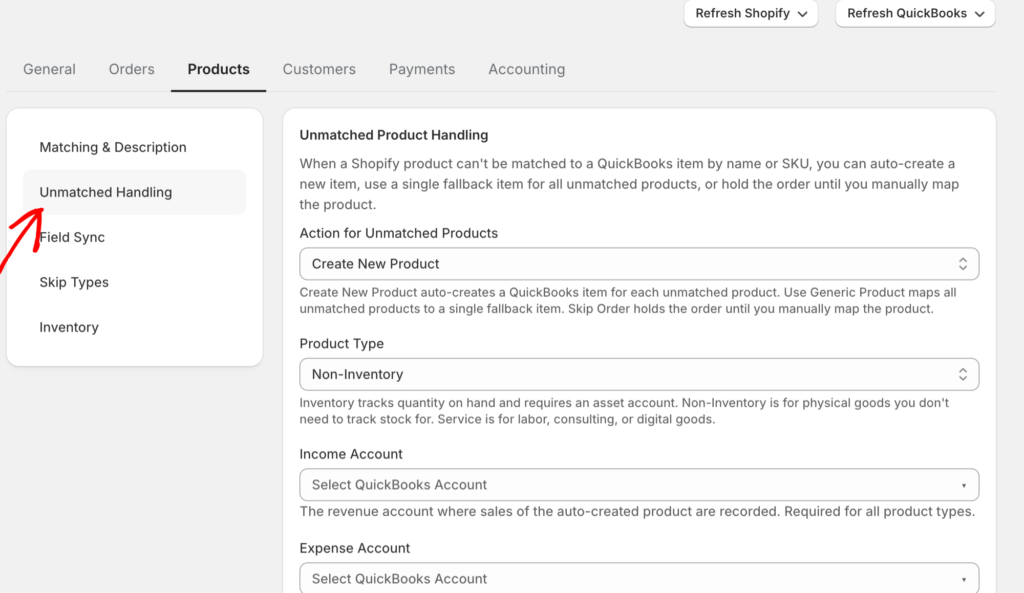
Paghuhula sa halip na paghinto. Ang mga nakakatakot na kuwento sa kategoryang ito ay nagmumula sa mga tool na nagpo-post ng isang bagay sa halip na umamin na hindi nila alam. Ang disenyo ng sagot ay makikita sa screenshot sa itaas: ang mga hindi natugmang produkto ay maaaring itakda sa “Wait,” na nagla-log ng error at nagho-hold sa order hanggang sa i-map mo ito — walang mali ang nai-post, walang nai-post nang tahimik. Ang magandang automation ay tumatangging manghula. At ang nakakaengganyo na kabilang panig ng lahat ng tatlong mode ng pagkabigo: ang pag-aayos ng maling pagpili ng trigger o isang hindi natugmang produkto ay isang 30-segundong pagbabago sa configuration, hindi isang dahilan para bumalik sa mga spreadsheet.
Paano Malaman Kung Handa Ka Na
Walang unibersal na sagot kung dapat mo bang i-automate ang iyong bookkeeping. Mayroong kapaki-pakinabang na hanay ng mga tanong.
Ilan ang mga order mo bawat buwan? Sa ibaba ng mga 200 order bawat buwan, ang tapat na manu-manong bookkeeping ay maaari pa ring ipagtanggol kung disiplinado ka dito. Sa pagitan ng 200 at 500, ang matematika ay nagsisimulang pabor sa automation. Sa itaas ng 500, ang gastos ng manu-manong bookkeeping — sa oras, sa mga pagkakamali, sa mga naantalang desisyon — ay maaasahang lumalagpas sa gastos ng automation, karaniwan sa malaking agwat.
Gaano kadalas nagkakatugma ang iyong mga numero? Kung isasara mo ang bawat buwan nang eksakto nang walang stress, maaaring hindi mo kailangang baguhin ang anuman. Kung karaniwan mong tinatapos ang buwan na may maliit na hindi maipaliwanag na agwat na iyong binibilog sa isang "adjustments" na lalagyan, ang hindi pagtutugma ay lalala at gayundin ang mga kahihinatnan. Ang oras para ayusin ito ay bago ang tax season o ang aplikasyon para sa pautang sa bangko ay gawin itong problema ng iba.
May sinabi ba ang iyong CPA? Ang mga accountant ay madalas na magalang tungkol sa magulong source data. Kung ang iyong accountant ay nagtanong ng malinaw na tanong tungkol sa mga payout ng Shopify nang higit sa isang beses, may sinasabi sila sa iyo. Ang malinis na data ay nagbabago ng relasyon — ginugugol nila ang iyong billable hours sa advisory work sa halip na sa paglilinis.
Ilang oras ang kasalukuyan mong month-end close? Kung ang sagot ay “Hindi ko alam, ginagawa ko lang hanggang matapos,” ang tunay na sagot ay halos tiyak na mas maraming oras kaysa sa nararapat. Ang isang month-end close para sa isang 1,500-order na Shopify store ay dapat tumagal ng wala pang 30 minuto ng aktibong trabaho. Anumang higit pa ay isang buwis sa iyong oras na lumalaki kasabay ng iyong kita.
Ano ang tunay na kailangan ng “handa”
May isa pang takot na sulit na alisin: na ang pagtanggap ng automation ay nangangahulugan ng isang proyekto sa pagpapatupad. Hindi ito. Sa kaso ng LedgerPort, ang buong onboarding surface ay isang tatlong-item na checklist sa dashboard — ikonekta ang iyong store, ikonekta ang QuickBooks, paganahin ang auto-sync — at ang paunang pag-setup ay tumatagal ng humigit-kumulang 15 minuto mula sa Shopify app. Ang mga kinakailangan ay admin access lamang sa iyong Shopify store at isang aktibong QuickBooks Online account. (Hindi suportado ang QuickBooks Desktop — sulit malaman bago ka magsimula.)
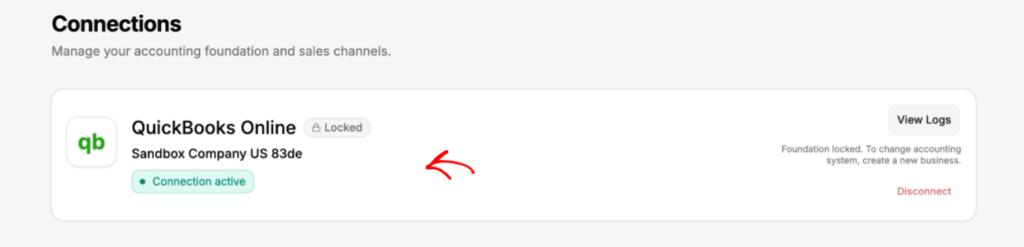
At ang unang sync ay hindi isang pagtalon ng pananampalataya — ito ay pinangangasiwaan. Pinipindot mo ang isang manual na Push to QuickBooks button, pagkatapos ay buksan ang View Sync Logs at i-scan para sa mga pulang status ng error bago mo pagkatiwalaan ang anumang bagay na tumakbo nang mag-isa. Kaya ang kahandaan, sa konkretong paraan, ay bumababa sa ito: maaari mo bang kumpletuhin ang tatlong checklist item at basahin ang isang log page. Kung ang mga tanong sa itaas ay nagturo sa iyo patungo sa pag-automate, iyon ang buong hadlang sa pagpasok.
Narito ang nakakatawang bahagi, ang bagay na malamang ay hindi mo pinuntahan dito upang basahin. Ang tanong ay hindi kung ang automated bookkeeping ay sulit. Ang data ng industriya ay ginagawang madaling oo para sa halos anumang e-commerce na negosyo na lampas sa ilang daang order bawat buwan. Ang tunay na tanong ay kung ang partikular na tool na iyong isinasaalang-alang ay talagang lumulutas sa iyong partikular na problema — na para sa isang Shopify o WooCommerce store ay ang net-payout-to-gross-revenue translation na karamihan sa generic bookkeeping automation ay hindi tinutugunan.
Kung nais mong makita kung ano ang hitsura ng pagsasaling iyon kapag awtomatiko itong hinahawakan, ginagawa mismo iyon ng LedgerPort. Itinutugma nito ang mga payout ng Shopify at WooCommerce sa gross revenue sa antas ng line-item, pinaghihiwalay ang mga bayarin at refund sa kanilang sariling mga account sa QuickBooks Online, at tinatapos ang hindi pagtutugma na nagpapagising sa iyo tuwing Sabado ng gabi. Maaari kang magsimula nang libre at ma-reconcile ang iyong unang payout bago matapos ang linggo.
Ang $61 na hindi pagtutugma ay hindi mo kasalanan. Ito ay isang problema sa pagsasalin. Kapag nalaman mo na iyon, ititigil mo ang pagsubok na lutasin ito nang manu-mano at magsisimulang magtanong ng mas magandang tanong: anong tool ang talagang gumagawa ng pagsasalin para sa iyo.