

Todas as segundas-feiras de manhã, a mesma coisa acontece.
Verifica a sua conta bancária. O pagamento da Shopify entrou — 4.312,87 €. Abre o QuickBooks. As suas vendas do fim de semana mostram 4.891,00 €. Olha para ambos os números por um momento. Abre a Shopify para verificar novamente. Os números continuam diferentes.
Já faz isto há dois anos. Já perguntou ao seu contabilista. Já pesquisou no Google. Já perguntou ao seu consultor fiscal, que lhe disse para apenas reconciliar a diferença manualmente. Faz isso todos os meses, e no mês seguinte a diferença é diferente. Às vezes são 200 €. Às vezes são 900 €. Um trimestre foi mais de 3.000 € e ainda não consegue explicar para onde foi.
A questão é: nada está errado.
Nem com a Shopify. Nem com o QuickBooks. Nem consigo. A diferença que tem observado não é um erro — é uma incompatibilidade estrutural entre dois sistemas que ambos pensam que lhe estão a dizer a verdade. E estão.
Como Funcionam os Pagamentos da Shopify
A Shopify não é um sistema de contabilidade. É uma plataforma de comércio eletrónico com um processador de pagamentos integrado, e o dinheiro que envia para o seu banco reflete isso.
Quando a Shopify deposita dinheiro na sua conta, não lhe está a enviar as suas vendas brutas. Está a enviar-lhe o que resta depois de retirar tudo o que lhe é devido:
- Taxas de transação (taxas de processamento da Shopify Payments — tipicamente 2,4–2,9% + 0,30 € por transação)
- Reembolsos emitidos durante o período de pagamento
- Deduções de chargeback e retenções de disputa
- Retenções de reserva (comum para lojas mais recentes ou lojas com risco elevado de chargeback)
- Cobranças de aplicações faturadas através da Shopify
A Shopify agrupa tudo isto numa janela contínua de 1 a 3 dias úteis, liquida tudo e envia-lhe um único número. Esse número é exato. É exatamente o que ganhou, menos exatamente o que era devido. A matemática está correta.
Mas é a receita bruta menos cinco categorias diferentes de deduções, colapsadas num único item, cobrindo transações de vários dias — e o seu extrato bancário não mostra nenhum detalhe.
UM DESMEMBRAMENTO REAL DO PAGAMENTO
Ambos os números — 4.891 € e 4.312,87 € — estão exatamente certos. Mas o seu banco só lhe mostra um deles.
O Que o QuickBooks Vê
O QuickBooks Online é um sistema de contabilidade. Regista a receita quando ocorre uma venda — o montante bruto que o cliente pagou. Não conhece automaticamente a estrutura de taxas da Shopify, o momento dos seus reembolsos ou o facto de um pagamento cobrir vários dias.
Se estiver a introduzir dados do Shopify no QuickBooks manualmente, está a:
A) Introduzir o valor bruto das vendas — caso em que a sua receita parece correta, mas o saldo de caixa nunca reconcilia com os seus depósitos bancários, e está a adivinhar manualmente para onde foram as taxas.
B) Inserir o valor do depósito — caso em que o seu caixa reconcilia, mas a sua receita é subavaliada por cada taxa, reembolso e ajuste que foi deduzido do pagamento.
Nenhuma das opções está correta. Ambas são o que as pessoas fazem quando não têm uma camada de tradução.
O seu contabilista não está a cometer um erro. O seu auditor não está a perder algo óbvio. Os dois sistemas estão a falar línguas diferentes, e tem tentado traduzir entre eles manualmente.
Nenhum Sistema Está Errado
Esta é a parte que confunde as pessoas quando a ouvem pela primeira vez, porque soa como uma não-resposta.
A Shopify está correta em enviar-lhe um pagamento líquido. É o que os processadores de pagamento fazem — eles lidam com o fluxo de dinheiro, deduzem as suas taxas e enviam-lhe o que resta.
O QuickBooks está correto em registar a receita bruta. É o que os sistemas de contabilidade fazem — eles rastreiam o que os clientes pagaram, porque é o que precisa para a precisão da demonstração de resultados, relatórios fiscais e para compreender o desempenho real do seu negócio.
O problema não é que um deles lhe esteja a mentir. O problema é que eles resolvem problemas diferentes em diferentes níveis da transação — e nada no meio está a traduzir entre eles.
O SHOPIFY VÊ
Pagamento líquido: 4.312,87 €
Vendas brutas menos taxas, reembolsos e ajustes — preciso para o fluxo de caixa.
O QUICKBOOKS PRECISA
Receita bruta: 4.891,00 € + deduções detalhadas
Cada componente mapeado para a conta correta — preciso para a demonstração de resultados e impostos.
O que precisa não é uma forma melhor de reconciliar a diferença manualmente. O que precisa é algo que fale ambas as línguas: que pegue na venda bruta da Shopify, mapeie cada dedução de taxa para a conta de despesa correta no QuickBooks, corresponda o pagamento às transações corretas e feche a diferença automaticamente.
O Que Realmente Corrige a Diferença
Existem duas formas de fechar a discrepância do pagamento.
Reconciliação manual significa exportar o seu relatório de pagamento do Shopify, cruzar cada transação e introduzir cada componente — taxas, reembolsos, ajustes — como linhas separadas no QuickBooks. Feito corretamente, demora 3–5 horas por mês. Feito rapidamente, produz novos erros. A maioria dos proprietários de lojas com receitas entre 1 milhão e 5 milhões de dólares gasta entre 30 e 60 horas por ano neste problema e ainda tem livros que não estão totalmente limpos. Se o vai fazer à mão, o método passo a passo completo está no nosso guia para reconciliar pagamentos do Shopify no QuickBooks.
Reconciliação automatizada significa usar uma ferramenta que faz o trabalho da camada de tradução por si: extrai cada pagamento da Shopify, divide-o nos seus componentes (vendas brutas, taxas de transação, reembolsos, ajustes), mapeia cada um para a conta correta do QuickBooks e regista automaticamente os lançamentos de diário.
LedgerPort faz isto todos os dias, sem intervenção. O seu pagamento entra no seu banco, e quando abre o QuickBooks, a entrada já lá está — dividida nas contas corretas, correspondida ao período correto, pronta para o seu auditor rever.
A lacuna que lhe demorou horas a não fechar completamente? Fecha automaticamente. A explicação que nunca conseguiu dar ao seu contabilista? Está na entrada do diário.
Receita recorde quando o dinheiro se move, não quando as encomendas aparecem
Parte da lacuna de pagamento é pura questão de tempo. Se a sua ferramenta de sincronização regista uma encomenda no momento em que aparece no Shopify — enquanto o pagamento ainda está Pendente ou Autorizado — o QuickBooks mostra a receita antes de existir qualquer pagamento. Os livros correm à frente do dinheiro, e a lacuna parece maior do que é.
No LedgerPort, o momento em que a receita é registada é uma configuração. Em Configuração de Sincronização » Encomendas » Gatilhos de Sincronização, escolhe quais dos seis estados de pagamento qualificam uma encomenda para sincronização — Pago, Autorizado, Pago Parcialmente, Pendente, Reembolsado, Reembolsado Parcialmente — juntamente com três estados de processamento. Uma encomenda sincroniza apenas quando satisfaz uma condição de cada grupo.
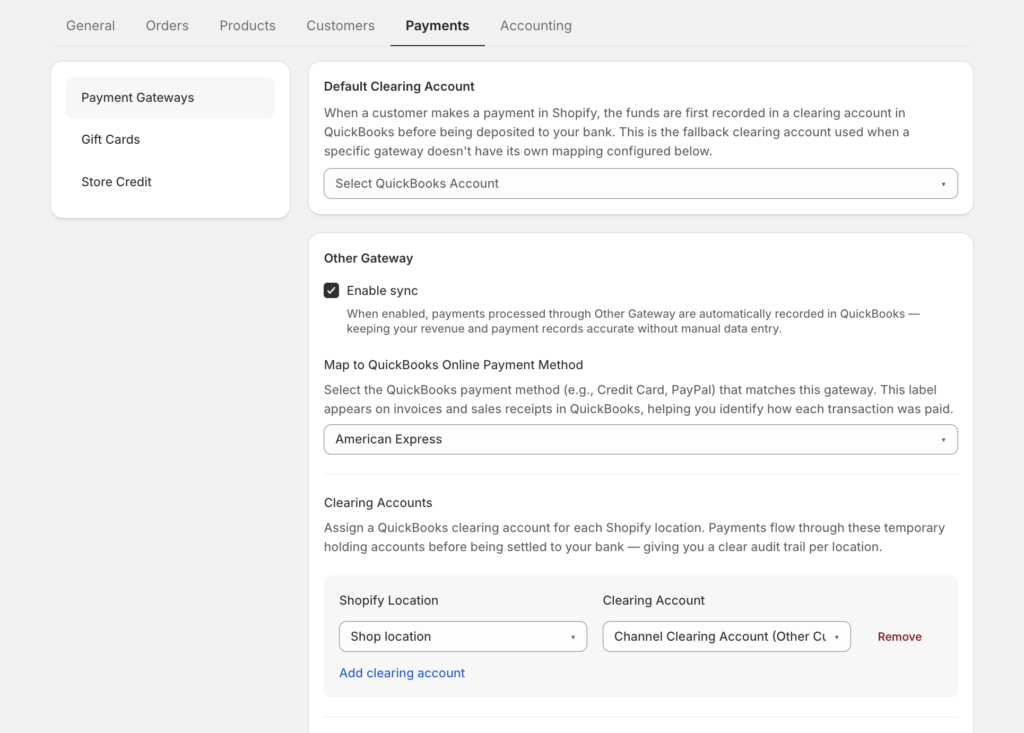
A recomendação oficial para a maioria das lojas: apenas Pago, com Não Processado e Processado ambos selecionados — para que o QuickBooks registe a receita no momento em que o dinheiro realmente se move, independentemente do estado do envio. A documentação sinaliza Pendente como “usar com cautela” exatamente pela razão acima, e as encomendas canceladas são excluídas por defeito, para que os cancelamentos nunca apareçam como receita.
Com gatilhos apenas de Pago, tudo nos seus livros representa dinheiro capturado. Essa é a pré-condição para que um pagamento corresponda em primeiro lugar.
Os reembolsos que nunca sincronizou
Aqui está uma versão clássica da incompatibilidade: um cliente recebe um reembolso, o Shopify deduz esse reembolso do pagamento, e o QuickBooks ainda mostra a venda completa — porque o reembolso nunca sincronizou. Nenhum erro, nenhum aviso. Os livros simplesmente desviam-se silenciosamente do banco.
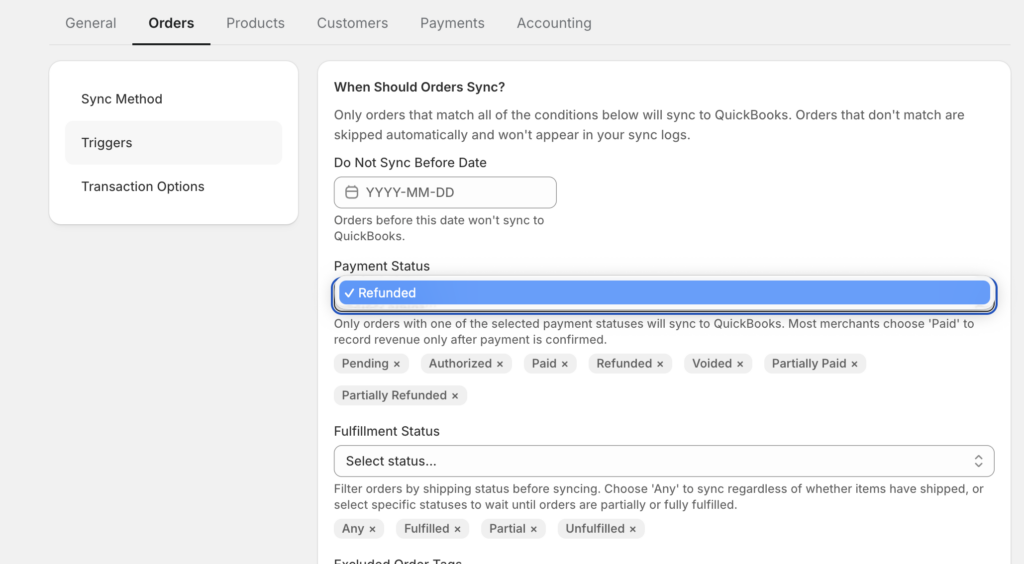
A correção são duas caixas de seleção. Em Configuração de Sincronização » Encomendas » Gatilhos de Sincronização, selecione Reembolsado e Reembolsado Parcialmente. Se nenhum deles estiver selecionado, os reembolsos são excluídos silenciosamente da sincronização — é por isso que esta categoria de incompatibilidade é tão persistente para lojas que configuraram a sua integração uma vez e nunca mais a reviram.
Uma vez ativada, um reembolso sincronizado cria um documento contabilístico real no QuickBooks: um Recibo de Reembolso para encomendas sincronizadas como Recibos de Venda, ou uma Nota de Crédito para encomendas sincronizadas como Faturas — ligada à transação original, com impostos e portes desdobrados como linhas separadas para corresponder exatamente ao Shopify. Reembolsos parciais geram um documento apenas para o montante reembolsado; a venda original permanece inalterada.
Uma ressalva: a encomenda original tem de estar já no QuickBooks, porque o reembolso anexa-se a ela. Mas esse é o único requisito. Duas caixas de seleção fecham uma categoria inteira de discrepância de pagamentos.
Encontre as encomendas que nunca chegaram
A terceira fonte oculta de lacunas: encomendas que falharam completamente a sincronização. Um produto não mapeado, um campo de faturação em falta, uma ligação expirada ao QuickBooks — qualquer um destes deixa um buraco nas receitas do QuickBooks que nenhum pagamento pode reconciliar, porque a venda simplesmente não existe.
O que importa é que estas falhas são nomeadas, não silenciosas. Cada tentativa de sincronização no LedgerPort tem um estado — Sincronizado, Erro, Pendente ou Em Espera — e filtrar o registo de auditoria para Estado = Erro é uma verificação de 30 segundos que revela tudo o que necessita de atenção. Os erros vêm com razões: "Produto Não Mapeado", "Campo Obrigatório em Falta" ou o "Ligação Não Saudável" de token expirado — que a documentação aponta como o erro de sincronização mais comum.
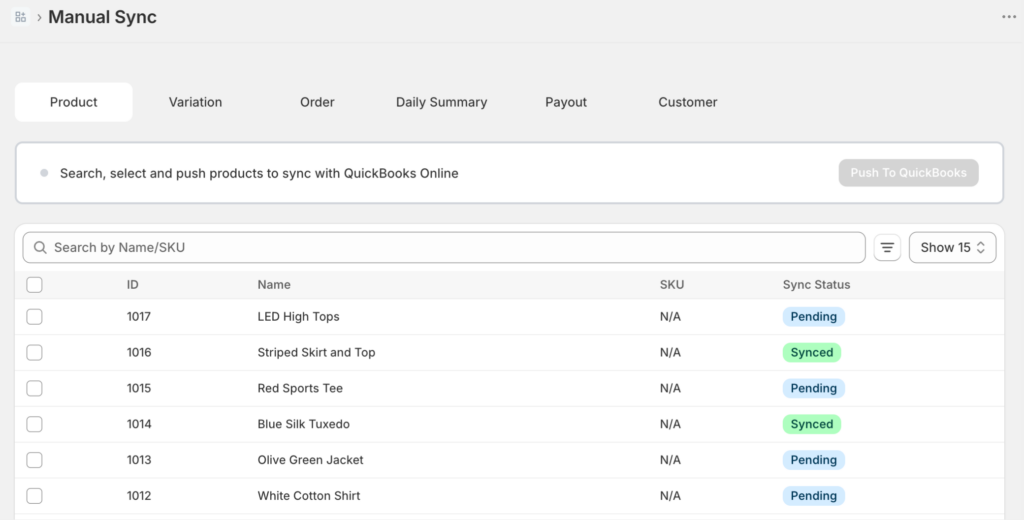
A ação de recuperação é curta: corrija a causa, selecione os registos falhados em Sincronização Manual, clique em Sincronizar Selecionados. Os registos falhados nunca se perdem e, se o QuickBooks limitar a taxa de uma grande remessa, as novas tentativas ocorrem automaticamente.
Fechar a lacuna de pagamentos é, em parte, estrutura — limpar contas, mapeamento de taxas — e, em parte, completude. A completude é um clique de filtro.
A ironia de toda esta situação é que passou dois anos convencido de que algo estava avariado. A matemática do Shopify estava errada, ou o QuickBooks estava desfasado, ou o seu contabilista não se apercebeu de algo, ou estava a fazer algo errado.
Não estava. Nem eles.
Ambos os sistemas estavam a fazer o seu trabalho corretamente durante todo o tempo. Simplesmente não tinha nada a ligá-los.