

- 1Why Your 1099-K, Your QBO, and Your Bank Balance Show Three Different Numbers
- 2The 5 Things Your CPA Actually Needs From Your Shopify Books
- 3The sixth thing: their own seat
- 4Three Signs Your Shopify Books Aren’t Ready (And What It Costs)
- 5Why This Happens — and the Fix That Makes Next Year Unremarkable
- 6“It’s too late this year” — it isn’t
It’s mid-January. You’ve spent the better part of a Saturday getting organized. You exported your Shopify Finance Summary. You downloaded your QBO profit and loss report. You made a folder, labeled it clearly, and sent everything to your CPA with a message that said “all set for this year.”
Two weeks later, your CPA calls.
“Your QBO revenue doesn’t match the 1099-K from Shopify Payments. Your fee expenses don’t show up the way I’d expect. I’m going to need a few hours to sort this out before I can even start the return.”
The invoice comes in $700 higher than quoted. You paid more to be told your records were wrong than it would have cost to fix them at the start of the year.
SURPRISE BILL
$700+
The average CPA cleanup surcharge when Shopify books aren’t tax-ready
It’s not a tax prep fee. It’s a bookkeeping reconstruction fee — charged before the CPA can even start the return.
The assumption that led here: exporting your Shopify reports and giving your CPA access to QBO is what tax prep means — you did the work, they handle the hard part. That’s the belief. It’s also wrong. Tax prep for a Shopify store isn’t about having documents. It’s about having documents that say the right things. A standard QBO setup almost certainly has income overstated, fees invisible, and sales tax sitting in the wrong account — and sending those documents to your CPA doesn’t fix any of it. It just means they find the problems instead of you.
Why Your 1099-K, Your QBO, and Your Bank Balance Show Three Different Numbers
When your CPA opens your file, they’re looking at three numbers that should all tell the same story about your Shopify revenue — and almost never do.
1099-K: gross transactions processed (before fees, refunds, or tax). QBO income: whatever got mapped to revenue — usually the net deposit. Bank account: the net disbursement after Shopify deducted everything. Three different numbers from the same store, the same month.
Your 1099-K from Shopify Payments shows gross transactions processed — the total dollar value of every order Shopify ran through its payment system for the year, before any deductions. Fees, refunds, and sales tax you collected are all in that number.
Your QBO income account shows whatever got mapped to it. For most stores on a standard setup, that’s the net bank deposit — the amount Shopify actually transferred after subtracting everything.
Your bank account shows the net disbursement: gross sales minus processing fees, minus refunds, minus sales tax Shopify collected on your behalf, sometimes spanning one to fourteen days of orders in a single transfer.
Three numbers. Same business. None of them agree — and structurally, none of them should, because they’re measuring different things. The problem is that your QBO file needs to explain the gap between all three. Without that explanation, your CPA can’t reconcile them — and the IRS uses an automated process to flag returns where reported income is substantially lower than the 1099-K gross. The gap between those numbers is where the real cost of disorganized Shopify books shows up, and most owners don’t see it coming until the notice arrives.
The 5 Things Your CPA Actually Needs From Your Shopify Books
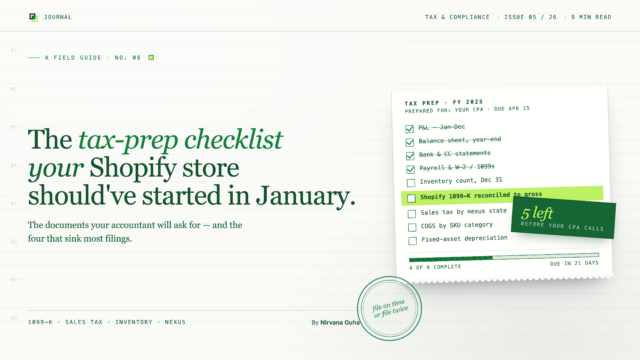
The checklist you came looking for exists — but it’s not a list of things to do in January. It’s a list of what your QBO file needs to already be showing, every month of the year, to hand over cleanly at tax time.
1. Gross income recorded, not the bank deposit amount.
Your income accounts should reflect what customers paid — the gross sale amount before Shopify deducted anything. If your QBO income matches your bank deposits, income is being recorded net: fees already removed, refunds already backed out, possibly tax collapsed in. That understates revenue and makes fee expenses invisible.
A CPA working from a net-deposit income figure has no way to tell what you actually sold, what it cost to process sales, or whether gross margin is what you think it is. The chart of accounts fix for this is a single structural decision — a clearing account that bridges gross income and net deposits — that most generic QBO setups never make.
2. Fees separated by type — not collapsed into one account.
Shopify creates three distinct fee types, each with a different cost structure and a different strategic meaning:
SUBSCRIPTION FEE
Fixed
Monthly platform cost; unrelated to volume; operating expense
TRANSACTION FEE
0.5–2%
Only charged without Shopify Payments; disappears when switched
PROCESSING FEE
2.9% + $0.30
Per-transaction; largest fee category; directly reduces gross margin
Collapsing all three into a single “Shopify Fees” account produces a number that means nothing in isolation. If gross margin looks lower than your pricing model predicts and fees are in one bucket, there’s no way to diagnose why — or whether switching payment processors would change anything.
3. Refunds recorded in the right accounting period.
When a customer returns an order, Shopify doesn’t create a separate bank transaction. The refund gets deducted from the next available payout. If that payout lands in April but the return was processed in March, the cash effect happened in April — and the accounting entry belongs there, not in March.
Posting refunds to the original order date creates a period mismatch: March revenue drops, but the March bank reconciliation still doesn’t balance because the cash didn’t move in March. These mismatches compound month over month. By year-end, your CPA is untangling twelve of them. The full period-correct treatment is in our guide to accounting for refunds and returns.
4. Sales tax recorded as a liability, not revenue.
In most US states, Shopify is a marketplace facilitator — it collects sales tax from customers and remits it directly to state authorities. You never touch that money. It doesn’t belong to your business. A $97 order where $7 is Shopify-collected tax is a $90 sale for your purposes, not a $97 sale.
If income accounts record gross order totals including that tax, phantom income appears on every order from a marketplace-facilitated state. At scale across a full year, that’s a meaningful number sitting in income that isn’t actually taxable — and will require a CPA to surgically remove it.
5. COGS that reflects landed cost, not invoice price.
For stores sourcing from overseas, the invoice price is not the actual cost. Freight, import duties, and customs brokerage belong in cost of goods sold — and they typically add 20–40% to what the supplier charged. A product invoiced at $5.00 with $0.80 in freight, $0.60 in duties, and $0.10 in brokerage actually cost $6.50 to land in your warehouse.
Using invoice price alone overstates gross margin on every sale. By the time a CPA asks why margins diverge from your pricing model, the only path is reconstructing a year of landed costs from purchase records.
The sixth thing: their own seat
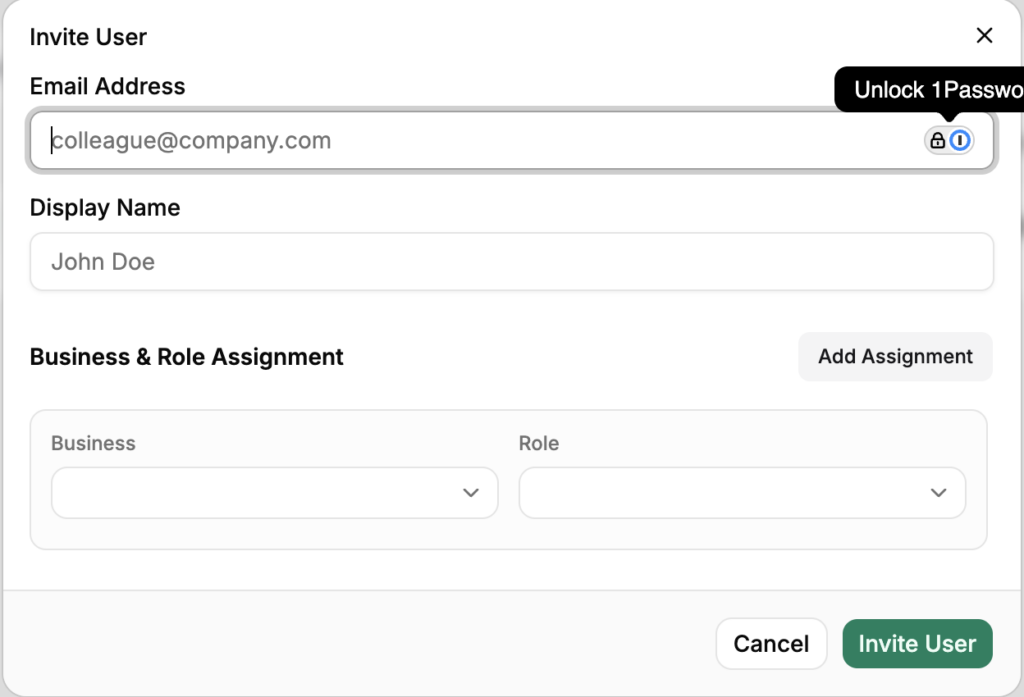
Everything above is about what the file shows. There’s one more thing your CPA needs that isn’t a number: access that doesn’t route through you. In LedgerPort, “give your CPA access” is a five-step procedure — Settings » Team » Invite Member » enter their email and pick a role » Send Invite. They click the emailed link and get their own login, in the docs’ own framing, “without sharing your login credentials.”
The role fits the engagement. Admin is what the docs recommend for “a trusted accountant or business partner” — full control over connections, sync configuration, and mappings, which is what an accountant fixing your setup actually needs. Member suits staff or a bookkeeper who should see sync logs, run manual re-syncs, and review mappings without being able to change the configuration. When the engagement ends, removal is one click and takes effect immediately.
One more line for sellers with several stores: each one shows up as a fully isolated business under the same login — its own connections, sync logs, and settings. Your CPA switches between clean per-store books from one seat instead of untangling a blended file, and nothing done in one business touches another.
Three Signs Your Shopify Books Aren’t Ready (And What It Costs)
You can assess your tax-readiness right now without calling anyone. Three questions in QBO:
Does your QBO revenue for any given month match your bank deposits for that month? If yes — if they’re the same number — income is being recorded net. Fees are invisible. Your reported income will be lower than what your 1099-K shows, and the gap needs explaining.
Do you have separate QBO accounts for Shopify’s subscription fee, transaction fees, and payment processing fees? If it’s all in one account, your CPA can’t see the true per-transaction cost and neither can you.
Can you explain the gap between your 1099-K gross and your QBO income for the year — by pointing to specific accounts? If the answer is “not really,” that’s the gap that gets flagged.
Each “I don’t know” represents a specific CPA billing risk — hours spent reconstructing what those answers should be. And if the numbers on your return diverge from your 1099-K without documentation, the IRS sends a CP2000 notice asking you to explain the difference.
There’s a fourth check worth running, and it lives in your sync settings rather than in QBO: unconfigured tax rates. In LedgerPort, an order whose tax rate has no matching configuration doesn’t post — it errors, on purpose, because the tool can’t determine where to record the tax. That’s the right failure mode, but it means unmapped tax quietly piles orders up in Error status until someone looks.
The fix is a setting, not a project. In Sync Config » Accounting you choose one of two modes: Line Item Tax, where every Shopify tax rate maps to a QuickBooks tax code and collected tax posts to a liability account you designate, or QuickBooks Automated Sales Tax, which hands the calculation to QBO’s own tax engine. Either way, re-syncing the affected orders from Manual Sync clears the backlog.
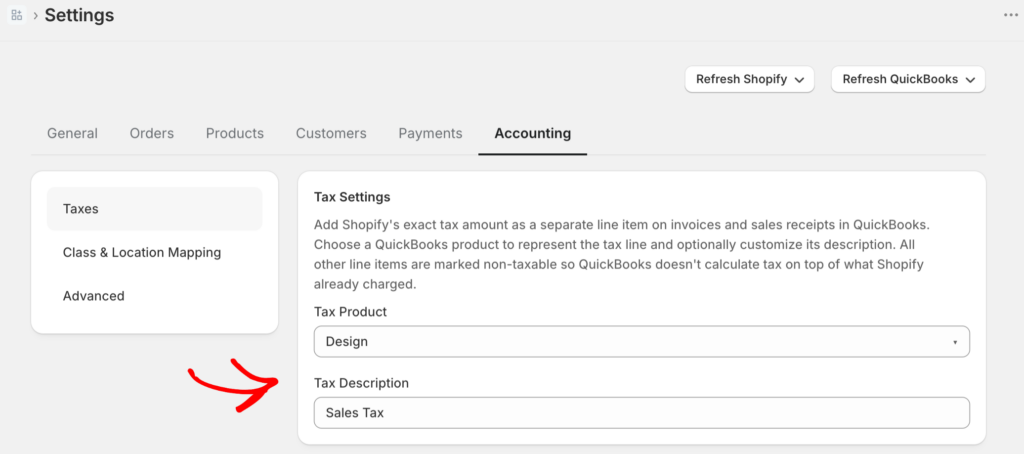
This connects straight back to item four on the checklist. Sales tax booked as income is the defect your CPA bills hours to surgically reverse in March. A tax-rate check in the sync settings is the five-minute version of that same audit — done in November, by you, for free.
Why This Happens — and the Fix That Makes Next Year Unremarkable
None of the above is a personal failing. A standard QBO setup assumes income arrives as gross revenue: a $100 sale posts as $100 of income, fees get recorded when paid. That’s how most businesses work.
Shopify works differently. It sends a net payout — gross sales minus processing fees, minus refunds, minus sales tax Shopify collected on your behalf — bundled into a single bank transfer covering one to fourteen days of orders. A QBO setup not built for that structure will misrecord at least three of the five items above, every month, automatically.
The fix is a one-time architectural change: a clearing account, separated fee accounts, a liability account for marketplace tax, contra-revenue timed to payout date. Built once, it receives Shopify data correctly on every payout cycle. Tax time stops being a reckoning and becomes a handoff — nothing to reconstruct, nothing to explain.
LedgerPort handles this mapping automatically — each Shopify payout posts gross sales, fee line items, refunds, and marketplace tax to their correct accounts, and the clearing account closes without manual work. Your books stay tax-ready every month of the year, not just the one before your CPA appointment.
“It’s too late this year” — it isn’t
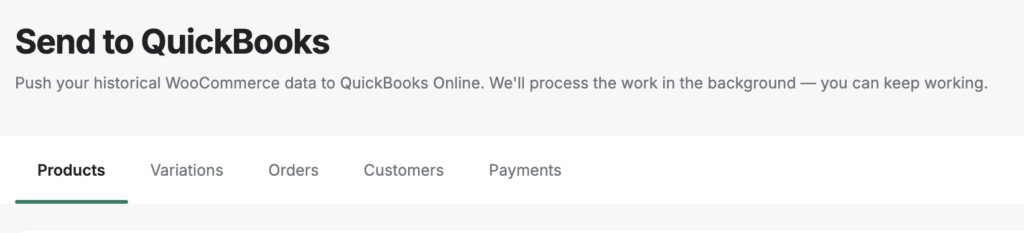
The standard objection to fixing this in October or November: the year is mostly booked, so better to limp through this tax season and start clean in January. That logic assumes historical data can’t be re-posted safely. It can. LedgerPort’s Manual Sync page pushes history on demand — Products, Variations, Orders, Customers, and Payments each get their own tab, and you select records or push everything from each one.
The fear behind the objection is duplicates, and that’s handled structurally: records already in QuickBooks are skipped automatically, and re-pushing a failed record creates-or-updates it — never doubles it. Backfilled payments arrive as QBO Payment records linked to their invoices, so the history lands already reconciled instead of as loose deposits waiting to be matched.
For deeper reconstruction, the CPA partner program includes Time Machine: up to 24 months of historical Shopify order import, built for rebuilding books from scratch. The practical upshot: a store that starts fixing its setup in October still walks into tax season with a complete, tie-out-able QBO file — which is exactly what makes next January unremarkable.
If you’re heading into tax season with a standard QBO setup and Shopify, the three questions above are worth answering before you send anything. If any of them reveal a problem, you can find it — rather than paying your CPA to find it for you.
See how LedgerPort keeps your Shopify books tax-ready year-round, or get started for free.