


- 1Il Piano dei Conti che Sembra Corretto Fino alla Chiusura di Fine Mese
- 2Perché la Struttura di Pagamento Netto di Shopify è il Problema Architettonico
- 3Decisioni 1 e 2: Conti dei Ricavi Lordi e Conto di Compensazione
- 4Decisioni 3 e 4: Separazione delle Commissioni e Gestione dei Rimborsi
- 5Decisione 5: Imposta sulle Vendite come Passività Finanziaria Fin dal Primo Giorno
- 6Il Piano dei Conti che si Chiude in un Giorno
- 7Un'altra decisione: il metodo di sincronizzazione che verrà pubblicato su questi account
Prendi in carico un nuovo cliente Shopify. Costruisci il suo piano dei conti in QuickBooks Online: cinque categorie, sottoconti sensati, numerazione dei conti che segue la convenzione standard. Colleghi l'integrazione Shopify. Tutto sembra corretto sulla carta.
Poi arriva il primo pagamento Shopify.
Shopify ha depositato 14.200 $ in banca. QuickBooks mostra 15.800 $ di ricavi Shopify. La dashboard di Shopify riporta 16.100 $ di vendite lorde. Tre numeri diversi, attività dello stesso mese, nessuno dei quali concorda. Passi quattro ore a inseguire la discrepanza. Alla fine la trovi: commissioni registrate come trasferimenti bancari, rimborsi che non sono stati registrati sui conti giusti, un importo di riscossione delle imposte che si trova nei ricavi invece che in una passività. Al piano dei conti non mancava nulla. Semplicemente non era stato creato per come Shopify muove effettivamente il denaro.
Ecco la falsa supposizione su cui si basano la maggior parte delle guide sul Piano dei Conti: se hai i conti giusti nelle categorie giuste, la riconciliazione funzionerà, è solo una questione di fare il lavoro ogni mese. Non è vero per Shopify. I nomi e la numerazione dei conti sono requisiti di base. Ciò che determina se i tuoi libri contabili Shopify si riconciliano è se il piano dei conti è architettonicamente compatibile con il modo in cui Shopify eroga i fondi, ovvero come pagamento netto, non come ricavi lordi. Cinque specifiche decisioni di mappatura determinano se la chiusura di fine mese richiede 30 minuti o gran parte del pomeriggio.
DIFFERENZA DI TEMPO
4 ore
vs. 30 minuti — stessa chiusura di fine mese
La differenza non è la quantità di lavoro che fai. È se il piano dei conti è stato progettato per ricevere correttamente il pagamento netto di Shopify in primo luogo.
Il Piano dei Conti che Sembra Corretto Fino alla Chiusura di Fine Mese
La maggior parte dei modelli standard di piano dei conti, anche quelli specifici per l'e-commerce, si basa sull'assunto che il reddito arrivi come ricavi lordi. Una vendita di 100 $ viene registrata come 100 $ di reddito. Le commissioni vengono registrate quando le paghi. È così che funziona la maggior parte delle attività.
Shopify non funziona in questo modo.
Shopify non ti invia 100 $ quando un cliente paga 100 $. Ti invia un pagamento netto: vendite lorde meno commissioni di elaborazione dei pagamenti, meno rimborsi, meno commissioni di transazione Shopify, a volte meno imposte sulle vendite riscosse per tuo conto, il tutto raggruppato in un unico bonifico bancario che copre da uno a quattordici giorni di ordini. Quando quel pagamento arriva sul conto bancario del tuo cliente, rappresenta almeno cinque distinti eventi finanziari. Il tuo piano dei conti deve ricevere e disaggregare tutti e cinque, altrimenti la riconciliazione fallirà ogni mese.
I conti non sono sbagliati. L'architettura lo è.
Perché la Struttura di Pagamento Netto di Shopify è il Problema Architettonico
Ecco cosa contiene effettivamente un tipico pagamento Shopify, suddiviso per voci:
- Vendite lorde — fatturato totale da tutti gli ordini nel periodo di pagamento
- Commissioni di elaborazione pagamenti — tipicamente 2,9% + 0,30$ per transazione online per Shopify Payments (piano Basic); detratte prima del versamento
- Commissioni di transazione Shopify — un ulteriore 2% per transazione se il negozio non utilizza Shopify Payments; comuni nei piani più vecchi
- Rimborsi emessi — rimborsi lordi per ordini restituiti nel periodo di pagamento
- Imposta sulle vendite facilitata dal marketplace — importi che Shopify ha riscosso e che verserà direttamente alle autorità statali per conto del commerciante (nella maggior parte degli stati USA, Shopify è il facilitatore del marketplace)
Quando la tua integrazione mappa il deposito direttamente su un conto di ricavo "Vendite Shopify", stai comprimendo tutti e cinque gli eventi in un unico numero. Il reddito è sottostimato perché le commissioni sono già state detratte. Le spese per commissioni sono invisibili. Il bilancio presenta una passività fiscale fantasma perché hai registrato la riscossione delle imposte come ricavo.
La soluzione non è ripulire dopo il fatto mese dopo mese. È costruire il piano dei conti in modo che ogni componente venga instradato automaticamente al conto corretto — e un conto di transito li riconduca al deposito bancario. Ciò richiede cinque decisioni specifiche. Il costo a valle di sbagliare queste decisioni è il tempo che la tua azienda scarica sugli incarichi di e-commerce.
Decisioni 1 e 2: Conti dei Ricavi Lordi e Conto di Compensazione
Decisione 1: Registrare le vendite lorde come ricavo, non come importo del deposito.
I tuoi conti di ricavo dovrebbero riflettere ciò che i clienti hanno effettivamente pagato, prima che Shopify deduca alcunché. Crea conti di ricavo separati per ciascun canale di vendita (vendite Shopify, vendite WooCommerce, ricavi all'ingrosso) anziché un unico gruppo "vendite e-commerce". Una volta combinati i ricavi di Shopify e Amazon in un unico conto, perdi la visibilità sui margini per canale e non c'è modo pratico di recuperarla senza ricostruire i libri contabili.
Una sezione ricavi pulita per un cliente solo Shopify appare così:
- 4100 — Vendite Shopify (lorde, prima delle detrazioni)
- 4110 — Ricavi spedizioni Shopify (se le spedizioni vengono addebitate ai clienti)
- 4200 — Resi e abbuoni (contro-ricavo)
I conti di ricavo registrano ciò che è stato venduto. Il deposito bancario riflette ciò che è stato pagato dopo le detrazioni. Questi due numeri sono strutturalmente diversi e il tuo piano dei conti necessita di un conto che li colleghi.
Decisione 2: Utilizzare un conto di transito come collegamento.
Il conto di transito è la soluzione architetturale al problema del versamento netto: credito vendite lorde in entrata, addebiti commissioni/resi/imposte in uscita, il deposito bancario netto corrisponde esattamente. Il conto di transito si azzera ogni ciclo di pagamento. La riconciliazione diventa meccanica, non investigativa.
Quando viene registrata una vendita, l'importo lordo viene accreditato sul conto di ricavo Vendite Shopify e al conto di transito come attività. Quando Shopify eroga il versamento netto, il conto di transito riceve le detrazioni (commissioni, resi, imposte) e si azzera. Il deposito bancario corrisponde esattamente al versamento netto. Ogni componente atterra nel conto corretto.
Senza il conto di transito, stai cercando di riconciliare un deposito bancario che non corrisponde a nessun singolo conto QBO, perché non è destinato a corrispondere a nessun singolo conto. È un netto di cinque eventi finanziari. Ogni commercialista che ha passato una serata su una riconciliazione Shopify senza uno sa esattamente come ci si sente.
Crea un conto di transito per ogni processore di pagamento. Se il tuo cliente utilizza Shopify Payments e PayPal, si tratta di due conti di transito. Mescolarli ricrea lo stesso problema di discrepanza a livello di transito che stai cercando di risolvere a livello di ricavi.
Come queste due decisioni vengono applicate: le mappature dei prodotti.
Le decisioni 1 e 2 sono valide solo se il software che pubblica su QBO le rispetta, e le mappature sono dove ciò avviene. La regola di sequenza proviene direttamente dalla documentazione di configurazione di LedgerPort: crea prima il piano dei conti, poi mappa. LedgerPort mappa ai tuoi conti QuickBooks *esistenti* — non crea conti a tua insaputa — quindi la struttura che progetti in questo articolo è la struttura che la sincronizzazione rispetta.
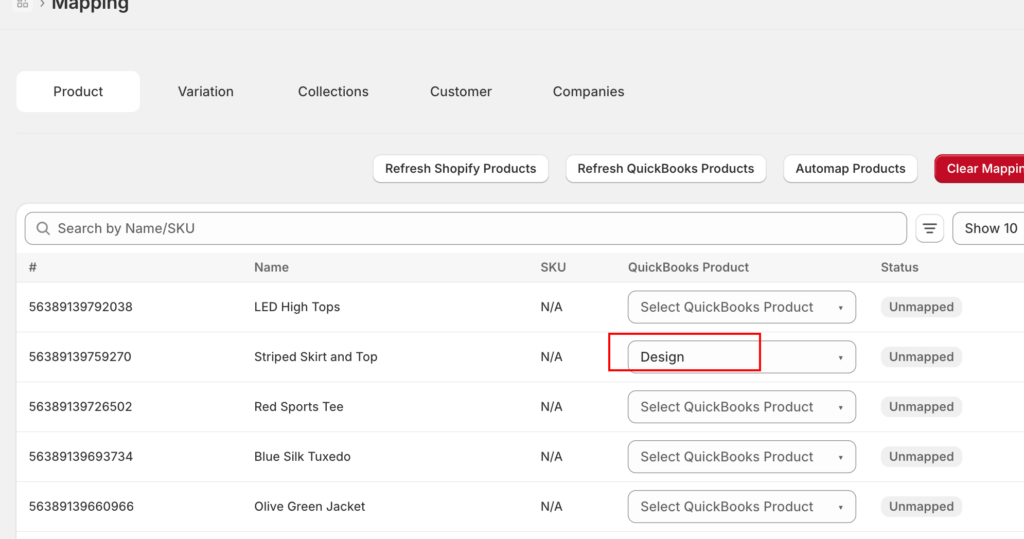
La schermata di mappatura è anche dove imposti la granularità dei ricavi. Ogni prodotto viene mappato a un articolo QBO, e ogni articolo ha un conto di ricavo. Se punti molti prodotti a un unico articolo, ottieni la variante semplice di questo modello: un unico conto Vendite Shopify. Se mappi i prodotti individualmente, ottieni ricavi per SKU, più la pubblicazione del COGS sugli articoli di tipo Inventario. È la stessa decisione di "un conto Vendite vs. conti di ricavo per riga", presentata come un menu a discesa.
Due dettagli rendono questo praticabile. Primo, la modalità di errore è sicura: un ordine contenente un prodotto non mappato genera un errore con uno stato nominato — "Prodotto non mappato" — e si blocca invece di essere pubblicato su un conto errato, quindi il modello non può essere violato silenziosamente. Secondo, la configurazione non richiede una settimana di clic sui menu a discesa: Auto-Map abbina i prodotti Shopify agli articoli QBO per SKU o nome in un clic, segnala i risultati per la revisione e lascia solo le discrepanze per la mappatura manuale.
Decisioni 3 e 4: Separazione delle Commissioni e Gestione dei Rimborsi
Decisione 3: Le commissioni Shopify non sono una singola voce.
Tre distinti tipi di commissione compaiono nei pagamenti Shopify. Raggrupparli in un unico conto "Commissioni Shopify" fa perdere una visibilità significativa su dove vanno i margini:
COMMISSIONE DI ABBONAMENTO
Fissa
Commissione piattaforma di $29–$399/mese; non correlata al volume delle transazioni
COMMISSIONE DI TRANSAZIONE
0,5–2%
Addebitata solo se NON si utilizzano Shopify Payments; scompare quando si passa a un altro metodo
COMMISSIONE DI ELABORAZIONE
2.9% + $0.30
Per transazione; la categoria di commissione più grande; riduce direttamente il margine lordo
Una struttura di commissioni pulita in QBO:
- 6100 — Abbonamento Shopify
- 6110 — Commissioni di transazione Shopify
- 6120 — Commissioni di elaborazione pagamenti
Raggruppare tutte e tre in un unico conto è il motivo per cui i commercialisti ereditano libri contabili in cui un'erosione del margine del 3% dovuta all'elaborazione dei pagamenti è invisibile, fino a quando qualcuno non chiede perché il margine lordo è inferiore a quanto previsto dal modello di prezzo. Separarli non costa nulla in fase di configurazione e fa risparmiare tempo in ogni revisione successiva.
Decisione 4: I rimborsi vengono registrati a fronte del pagamento, non dell'ordine originale.
Quando un cliente restituisce un ordine, Shopify deduce il rimborso dal prossimo pagamento disponibile. Non crea una transazione bancaria separata, ma riduce l'importo netto del versamento. Il conto contropartita per Resi e Abbuoni dovrebbe ricevere la voce del rimborso al momento del pagamento che lo contiene, non al momento in cui è stata elaborata la restituzione.
Se un reso è stato elaborato a marzo ma il rimborso è apparso nel pagamento di aprile, la voce contropartita appartiene ad aprile. Registrarla a marzo crea una discrepanza di periodo: le entrate di marzo diminuiscono, ma la riconciliazione bancaria di marzo continua a non quadrare perché l'effetto di cassa non si è verificato a marzo. Le discrepanze di periodo si accumulano mese dopo mese finché i libri contabili non richiedono una pulizia completa per essere districati.
Decisione 5: Imposta sulle Vendite come Passività Finanziaria Fin dal Primo Giorno
Nella maggior parte degli stati degli Stati Uniti, Shopify è un facilitatore di marketplace, il che significa che Shopify riscuote l'imposta sulle vendite dai clienti e la versa direttamente alle autorità fiscali statali. Il commerciante non tocca mai quei soldi. Il commerciante non deve l'imposta; Shopify l'ha già pagata.
L'imposta sulle vendite che Shopify riscuote appare nei totali lordi degli ordini sulla dashboard di Shopify, ma non fluisce mai sul conto bancario del commerciante e non costituisce ricavo per il commerciante. Se il tuo conto entrate registra i totali lordi degli ordini, inclusa l'imposta, stai sovrastimando le entrate e creando una passività fantasma nel bilancio.
La configurazione corretta richiede due conti di passività:
- Imposta sulle vendite dovuta — per le imposte che il commerciante riscuote e versa direttamente (canali non di marketplace come il commercio all'ingrosso o stati in cui non si applicano le regole dei facilitatori di marketplace)
- Imposta sul marketplace trattenuta (o “Imposta Shopify riscossa”) — per le imposte che Shopify riscuote e versa per conto del commerciante; si azzera dopo il ciclo di pagamento perché la passività è estinta dal versamento di Shopify, non da quello del commerciante
Se il tuo cliente vende su più canali — Shopify, sito web diretto, commercio all'ingrosso — il trattamento fiscale differisce per canale. Un singolo conto “Imposta sulle vendite dovuta” non può distinguere tra l'imposta gestita da Shopify e l'imposta gestita dal commerciante, e questa distinzione è importante al momento della dichiarazione dei redditi.
In LedgerPort, la Decisione 5 viene fornita come impostazione anziché come disciplina mensile. La scheda Tasse della configurazione di sincronizzazione ha un'opzione "Tassa come voce di linea": la tassa raccolta dalla piattaforma viene pubblicata come una propria voce sulla transazione QuickBooks, indirizzata a un conto di passività che scegli da un menu a discesa. "La tassa è una passività, non un ricavo" smette di essere una regola che qualcuno deve ricordare e diventa l'unico modo in cui la sincronizzazione può pubblicare.
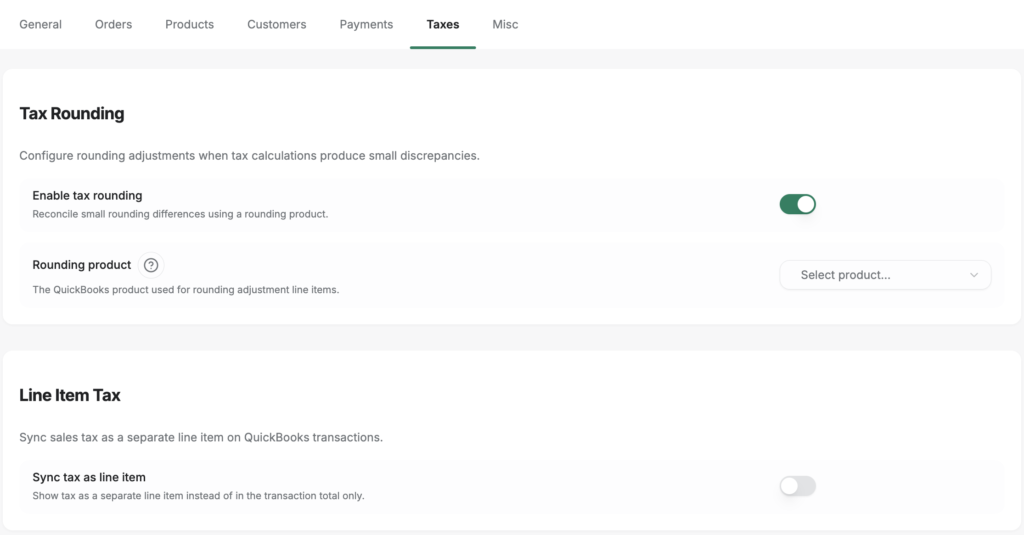
La stessa scheda contiene il dettaglio che nessuno spiega: l'arrotondamento delle imposte. La matematica fiscale della piattaforma e la matematica fiscale di QuickBooks differiscono di uno o due centesimi su alcuni ordini e, senza una sede per questi centesimi, i libri contabili si discostano di qualche centesimo per ordine in una macchia irriconciliabile. L'impostazione Arrotondamento imposte aggiunge una voce di aggiustamento dell'arrotondamento che assorbe la differenza, motivo per cui i libri contabili corrispondono al centesimo invece che a "abbastanza vicini". Abbastanza vicino non chiude.
Il Piano dei Conti che si Chiude in un Giorno
Quando tutte e cinque le decisioni sono in atto, le chiusure di fine mese avvengono così: ogni pagamento Shopify transita attraverso il conto di transito. Credito vendite lorde in entrata. Commissioni di elaborazione dei pagamenti, rimborsi e imposte sul marketplace in uscita. Il deposito bancario netto viene registrato. Il conto di transito si chiude a zero. La riconciliazione bancaria è bilanciata — per costruzione, non per indagine.
Questo è un processo di 20 minuti. La differenza non è il volume di lavoro, ma se il piano dei conti è stato progettato per ricevere correttamente i dati.
L'investimento iniziale è reale. Costruire questa architettura correttamente per un nuovo cliente richiede da due a tre ore la prima volta — più tempo che copiare un modello generico. Ma l'alternativa è impiegare quelle ore, o più, ogni singolo mese, indefinitamente.
Per i commercialisti che gestiscono cinque o dieci clienti Shopify, questa architettura è la base di un modello ripetibile. Le stesse cinque decisioni si applicano a ogni negozio Shopify in QBO. Costruiscila correttamente una volta, e la applicherai in tutta la tua attività — non dovrai reimparare il problema con ogni nuovo incarico.
Un'altra decisione: il metodo di sincronizzazione che verrà pubblicato su questi account
Un piano dei conti non è completo quando esistono i conti. È completo quando hai deciso quale tipo di transazione verrà registrata in essi. In uno strumento di sincronizzazione, quella decisione ha un nome: il metodo di sincronizzazione. In LedgerPort è un unico menu a discesa - Configurazione sincronizzazione » Ordini » Metodo di sincronizzazione, raggiungibile dalla barra laterale sinistra dell'app - con cinque opzioni, e ogni opzione chiede qualcosa di diverso dal piano dei conti che hai appena creato.
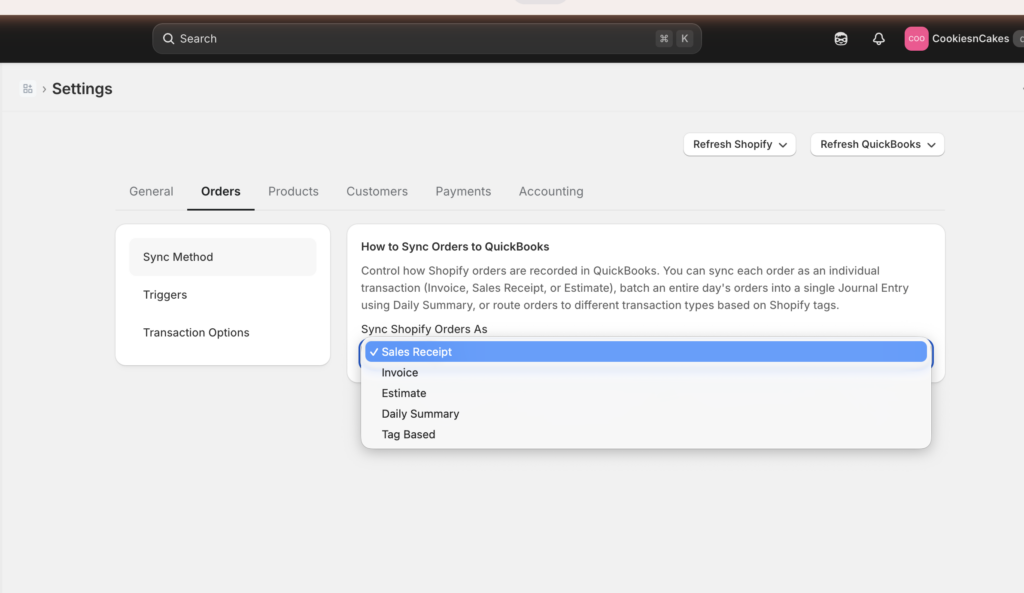
- Ricevuta di Vendita: una ricevuta per ordine, con voci, imposte, spedizione e sconti, registrata nei ricavi e nel conto di compensazione. Nessun credito richiesto.
- Fattura: due registrazioni per ordine: la Fattura quando viene emessa, un Pagamento quando Shopify la contrassegna come pagata. Scegli questa opzione e il tuo piano dei conti necessita di crediti aperti.
- Preventivo: una registrazione non registrata; non tocca nulla finché non viene convertita. La documentazione è chiara sulla rarità di questa opzione: "Se non sei sicuro di averne bisogno, probabilmente non ne hai bisogno."
- Riepilogo Giornaliero: una scrittura di diario al giorno che aggrega tutti gli ordini di quel giorno. Selezionandola, vengono visualizzati i campi di mappatura dei conti subito sotto il menu a discesa.
- Basato su Tag: i tag degli ordini Shopify indirizzano gli ordini a diversi tipi di transazione (
wholesale→ Fattura,retail→ Ricevuta di Vendita,do-not-sync→ saltato), quindi un negozio misto all'ingrosso/al dettaglio potrebbe necessitare sia di conti per crediti che per ricevute.
Osserva attentamente cosa fa il Riepilogo Giornaliero: nel momento in cui lo selezioni, il software ti chiede di nominare i conti a cui verrà registrata la sua scrittura di diario giornaliera. Quei campi di mappatura sono le cinque decisioni di questo articolo, rese come campi del modulo: ricavi lordi, compensazione, commissioni, rimborsi, imposte. Se hai creato il piano dei conti sopra, li compili in un'unica passata. Se non l'hai fatto, questo è lo schermo in cui diventa evidente.
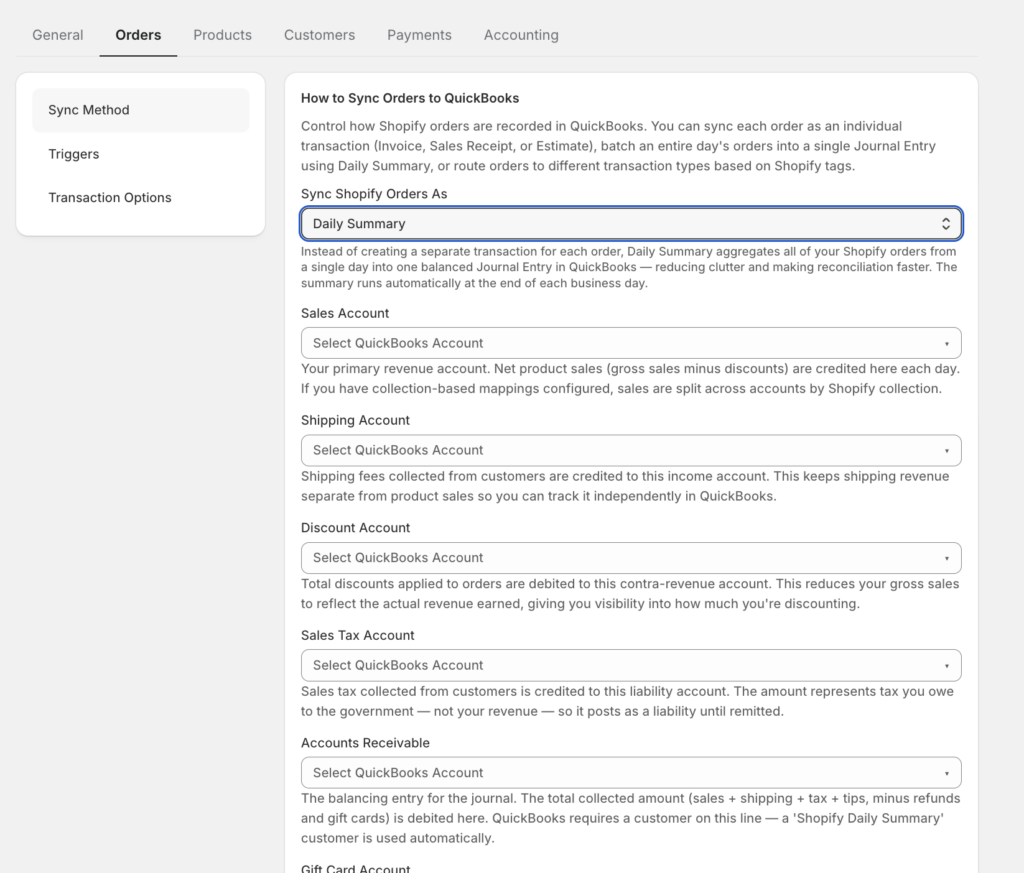
La logica decisionale è breve. Negozio DTC standard, pagato al checkout: Ricevuta di Vendita, l'impostazione predefinita della documentazione, "il giusto punto di partenza per la maggior parte dei negozi". B2B o termini di pagamento: Fattura. Alto volume - circa 100 o più ordini al giorno - con un commercialista che lavora sui totali: Riepilogo Giornaliero, che è come un mese di 3.000 ordini diventa circa 30 scritture di diario invece di 3.000 registrazioni.
E la regola che rende sicura questa decisione: cambiare il metodo di sincronizzazione non riscrive mai gli ordini già sincronizzati. Si applica solo in avanti. Scegli un metodo, osserva un ciclo di pagamento passare attraverso il conto di compensazione e rivedi se la forma non è corretta: i libri che hai già chiuso rimangono chiusi.
LedgerPort gestisce la mappatura automaticamente — la sincronizzazione registra le vendite lorde, le voci di commissione, i rimborsi e le imposte riscosse dal marketplace nei conti corretti per ogni ciclo di pagamento, in modo che il conto di transito si chiuda senza intervento manuale. Il piano dei conti deve comunque essere strutturato correttamente per ricevere tali dati, ma le cinque decisioni sopra riportate ti forniscono esattamente tale struttura.
Se stai configurando un nuovo cliente Shopify in QBO — o stai ereditando libri contabili che non si riconciliano — questi sono i cinque punti da controllare per primi. Se una qualsiasi delle decisioni sopra riportate non è stata presa, è da lì che deriva la riconciliazione di quattro ore. Ottenere il piano dei conti corretto è anche la base per avere libri contabili pronti per le tasse quando il tuo commercialista li richiede — le stesse cinque decisioni che rendono pulita la chiusura di fine mese rendono semplice la chiusura di fine anno. Scopri come LedgerPort gestisce la mappatura in una pratica multi-cliente su ledgerport.com/cpas, o inizia gratuitamente.