

- 1O Momento em Que o Processo dos Seus Livros Para de Escalar
- 2O Que a Automação da Contabilidade de E-commerce Realmente Abrange
- 3Quais São as Melhores Integrações de Contabilidade de E-commerce?
- 4A Ordem Correta para Automatizar (e o Que Falha Se Inverter)
- 5Relatórios Financeiros Automatizados para Plataformas de E-commerce
- 6Funcionalidades de Automação de Contabilidade para Empresas de E-commerce em Crescimento
- 7O Fundador Que Lê o P&L Em Vez de o Construir
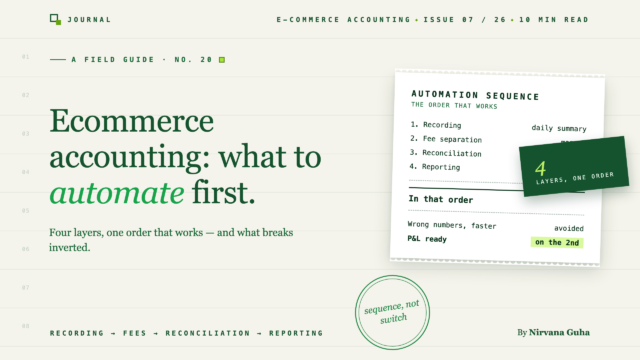
A automação da contabilidade de e-commerce é uma sequência, não um interruptor — e a ordem em que liga os interruptores decide se os seus números ficam mais rápidos ou apenas errados mais rapidamente.
É o dia 14 do mês, 9:40 da noite, e está a construir o P&L do mês passado numa aba de folha de cálculo chamada Maio — FINAL v3. A receita aumentou 60% este ano. O processo que fecha os seus livros é exatamente o mesmo que usou há dois anos e meio milhão de dólares atrás: exportar as encomendas, exportar os pagamentos, colar, ordenar, perscrutar, reconciliar as três linhas que não batem certo, prometer a si mesmo que vai corrigir isto devidamente no próximo mês.
Leu o conselho. "Automatize a sua contabilidade" — já viu essa frase cem vezes, associada a cem listas de ferramentas e cem promessas vagas sobre poupar tempo. Nenhuma delas respondeu à única pergunta que importa quando é você quem está a olhar para FINAL v3: automatizar o quê, exatamente, e em que ordem?
Porque por baixo de todo esse conselho reside uma mentira, e vale a pena dizê-la claramente: "automação de contabilidade significa conectar uma aplicação e tudo se resolve." Uma integração, um visto verde, pronto.
Não é assim que funciona. A automação da contabilidade de e-commerce não é uma coisa — são quatro camadas distintas, empilhadas umas sobre as outras, e cada camada depende de que a de baixo esteja correta. Automatize-as na ordem correta e os seus livros fecham-se sozinhos. Automatize-as na ordem errada e construiu uma máquina que produz números errados mais rapidamente do que alguma vez conseguiria fazer à mão.
Este post é a sequência.
O Momento em Que o Processo dos Seus Livros Para de Escalar
Aqui está o problema estrutural, despojado do supérfluo: a sua receita escala com a procura, mas um processo manual de contabilidade escala com o volume de encomendas. Cada encomenda é uma linha. Cada pagamento é um pequeno puzzle de reconciliação. Cada reembolso é uma exceção a tratar.
Com 200 encomendas por mês, o ritual da folha de cálculo custa-lhe uma noite. Com 1.000 encomendas, custa um fim de semana. Com 3.000, deixa de ser uma tarefa e torna-se um backlog — e os números que eventualmente produz descrevem um mês que terminou há três semanas. Está a dirigir o negócio a olhar pela janela traseira.
Existem três tipos de donos de lojas neste ponto. Alguns continuam a trabalhar com a folha de cálculo e aceitam o pânico mensal como um custo de fazer negócios. Outros entregam a confusão a um contabilista, que agora realiza o mesmo processo manual a uma taxa horária. E alguns automatizam — alguns deles na ordem certa, a maioria deles ligando qualquer aplicação que uma lista recomendou e esperando.
A diferença entre estes dois últimos grupos é o resto deste post.
O Que a Automação da Contabilidade de E-commerce Realmente Abrange
Primeiro, vamos esclarecer o vocabulário, porque o nome da categoria causa metade da confusão. Quando as pessoas procuram por software de contabilidade para comércio eletrónico, geralmente já possuem um software de contabilidade — QuickBooks Online, o livro-razão, o sistema de registo. O que elas realmente precisam é da maquinaria à volta do livro-razão. Já chamámos a isto a camada de sincronização anteriormente, na nossa análise honesta do melhor software de contabilidade para Shopify: o tradutor que se senta entre a sua loja e os seus livros.
A automação da contabilidade de ecommerce, devidamente compreendida, é composta por quatro camadas dessa maquinaria:
Camada 1 — Registo de transações. Introduzir automaticamente cada venda, reembolso e ajuste no livro de registos, no formato correto. Para a maioria das lojas em crescimento, isto significa resumos diários — uma única entrada de diário limpa por dia — em vez de 3.000 recibos individuais a entupir o QuickBooks.
Camada 2 — Separação de taxas. Dividir o que a plataforma deposita do que realmente ganhou. A Shopify paga-lhe as vendas brutas menos os reembolsos menos as taxas de processamento, como um montante total. O seu livro de registos precisa que estes sejam divididos, ou a sua receita será subestimada e as suas taxas ficarão invisíveis.
Camada 3 — Correspondência de reconciliação. Ligar cada pagamento ao depósito bancário que ele se tornou, de modo que quando o seu extrato bancário mostrar 8.412,67 €, os seus livros contenham uma entrada correspondente que explique cada cêntimo.
Camada 4 — Relatórios financeiros. A demonstração de resultados, a análise de margens, a vista da obrigação de imposto sobre as vendas. Esta é a camada que todos querem — e a única que não pode automatizar diretamente, porque os relatórios são apenas aritmética realizada nas camadas 1 a 3.
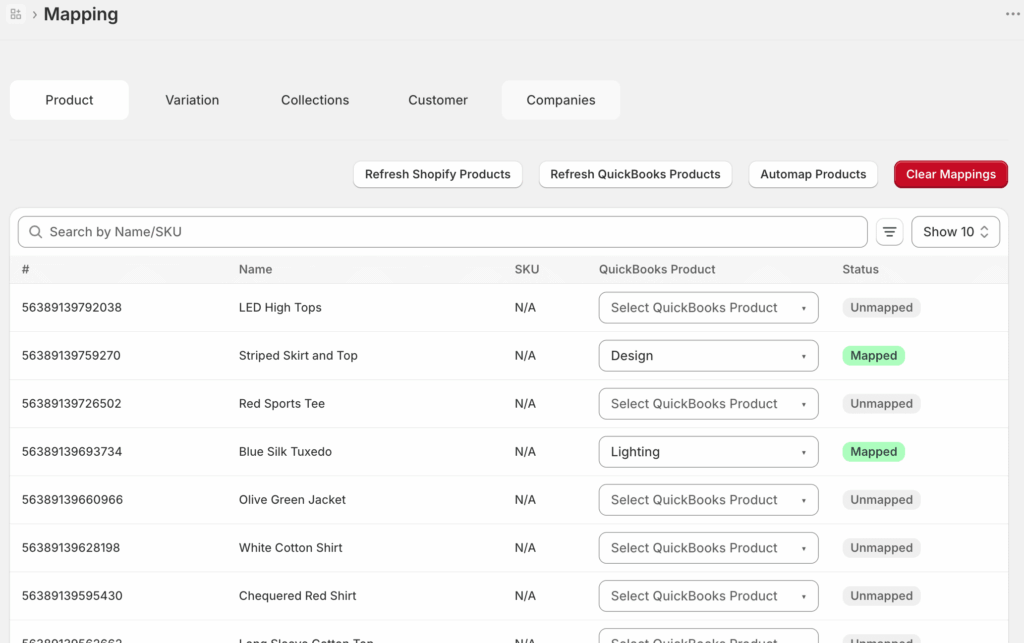
A separação de taxas merece mais uma palavra, porque é onde "sincronizou" e "está correto" se separam. Uma sincronização só é tão precisa quanto os seus mapeamentos — a tabela que diz à ferramenta a que conta do QuickBooks cada produto, taxa e método de pagamento pertence. Eis como isto se parece no LedgerPort, que é a nossa ferramenta (nós fazemo-la, julgue em conformidade):
Mantenha as quatro camadas em mente. Cada pergunta de automação que tiver — incluindo a do próximo título — é secretamente uma pergunta sobre a qual camada está a apontar.
Quais São as Melhores Integrações de Contabilidade de E-commerce?
Esta é uma das perguntas mais frequentes na categoria e a resposta honesta é que se trata de uma pergunta mal formulada. Não existe uma lista classificada de "melhores integrações", pois as integrações realizam trabalhos diferentes em camadas diferentes. Formulada corretamente, torna-se: o que deve ser conectado a quê, em cada camada da pilha?
O próprio livro-razão. O QuickBooks Online é o padrão para lojas nos EUA e é um bom padrão. O Xero é a alternativa comum. Esta escolha importa menos do que as pessoas pensam — ambos são livros-razão competentes. Todo o resto conecta-se a isto.
A camada de sincronização. Esta é a categoria que abrange as camadas 1–3: A2X, Synder, Webgility, MyWorks, LedgerPort. É também aqui que "melhor" varia genuinamente consoante a situação — a melhor opção para um vendedor Shopify-plus-Amazon não é a melhor opção para um operador Shopify com duas lojas no QBO. Comparámos honestamente todas as cinco, incluindo onde a nossa perde, na compilação.
Processadores de pagamento. Shopify Payments, PayPal, Stripe. Não escolhe estes por razões contabilísticas, mas cada um é um fluxo separado de taxas e pagamentos, e a sua camada de sincronização precisa de lidar com todos os processadores que aceita — não apenas o principal.
Inventário e CMVMC. Com um volume mais elevado, um sistema de inventário dedicado fornece dados de custo ao livro-razão para que as suas margens reflitam o custo real dos produtos. A maioria das lojas com menos de alguns milhares de encomendas por mês ainda não necessita disto como uma integração separada.
Portanto, quando avalia qualquer integração, a primeira pergunta não é "é boa?". É "que camada é esta e as camadas abaixo dela são sólidas?". Uma integração de relatórios brilhante assente em livros não reconciliados é um painel de ficção.
A Ordem Correta para Automatizar (e o Que Falha Se Inverter)
As camadas não são um menu. São uma cadeia de dependência, e a ordem é o ponto principal:
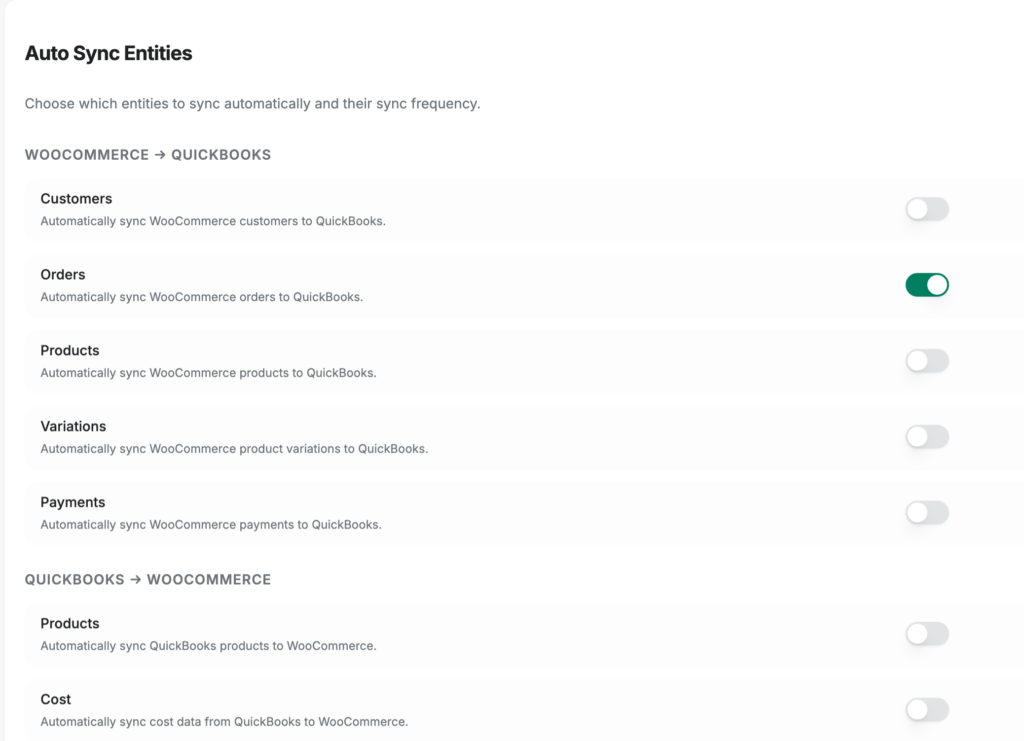
1. Automatizar primeiro o registo de transações. Até que as vendas, reembolsos e ajustes cheguem ao livro-razão de forma completa e consistente, nada a jusante pode ser confiável. Na prática, este é o passo menos dramático — no LedgerPort é uma página de configurações, não um projeto:
2. Automatizar segundo a separação de taxas. Assim que as transações fluem, certifique-se de que fluem para os lugares certos — taxas fora da receita, reembolsos no período certo, cada processador contabilizado. Este é o trabalho de mapeamento de antes, e é carregado no início: doloroso uma vez, depois feito.
3. Automatizar terceiro a correspondência de reconciliação. Com entradas limpas e separadas por taxas, a correspondência de pagamentos com depósitos bancários torna-se mecânica — o depósito é igual ao bruto menos reembolsos menos taxas, e os livros agora dizem isso linha a linha. Se quiser a canalização completa desse cálculo, escrevemos o guia completo para reconciliar pagamentos Shopify no QuickBooks.
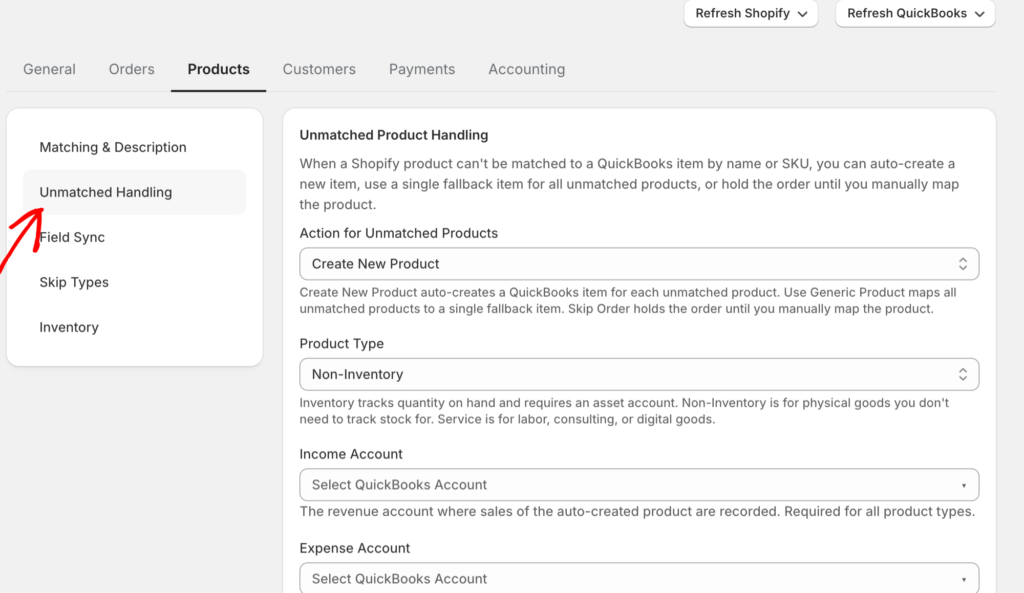
A Camada 3 é também onde a confiança em toda a pilha é conquistada, porque a reconciliação só é mecânica se nada se perder silenciosamente — e todas as ferramentas de sincronização perdem um registo por vezes. O que separa um sistema em que se pode confiar de um que se tem de vigiar é se essas falhas são visíveis. No LedgerPort, cada tentativa de sincronização escreve uma linha no registo de auditoria com um de quatro estados: Sincronizado (está no QuickBooks), Erro (falhou, com uma razão anexada), Pendente (na fila, ainda não processado) ou Em Espera (à espera de uma condição de gatilho — uma encomenda que ainda não foi paga, por exemplo). A verificação diária demora cerca de um minuto: abra o registo, filtre o Estado para Erro, e está a ver tudo o que precisa de atenção — uma lista vazia na maioria dos dias. Quando algo aparece lá, clicar na linha expande a razão real — "Produto não mapeado", "Cliente não encontrado no QuickBooks" — e quase todas as razões correspondem a uma correção específica. Faça a correção e, em seguida, envie os registos afetados novamente a partir de Sincronização Manual com uma caixa de verificação e um clique em Sincronizar Selecionados, sem esperar pela próxima execução agendada. Algumas classes de falha podem até ser eliminadas com uma única configuração:
4. Só então, confie nos relatórios. A Camada 4 automatiza-se no momento em que as camadas 1-3 são honestas. Isso não é um slogan; é aritmética.
Agora inverta-o, porque é isso que a maioria das pessoas realmente faz. A falha clássica é automatizar a camada 4 primeiro — ligar um painel de relatórios a livros desorganizados. O painel de relatórios traça diligentemente as suas taxas mal categorizadas como margem. Parece fantástico. Está errado, e está errado com confiança, atualizado em tempo real.
A falha mais subtil é saltar a camada 2: as transações sincronizam, as taxas permanecem agrupadas nos depósitos e, seis meses depois, o seu contabilista pergunta porque é que a receita está subavaliada em exatamente a percentagem da sua taxa de processamento. Automatizou a produção de números errados, e a automação nunca se cansou, nunca entrecerrrou os olhos para uma linha estranha, nunca se apanhou. Esse é o custo real de tratar a automação como um interruptor em vez de uma sequência — um erro de folha de cálculo acontece uma vez, mas um erro automatizado acontece todas as noites.
Relatórios Financeiros Automatizados para Plataformas de E-commerce
É isto que realmente comprou com as camadas 1-3: relatórios sobre os quais pode agir sem um asterisco silencioso.
Um P&L real, por loja. Quando a gravação é automatizada e as taxas são separadas, o P&L deixa de ser um projeto de construção mensal e torna-se uma consulta. Execute mais de uma loja e a diferença acumula-se — os livros de cada loja permanecem isolados, pelo que "qual loja deu lucro no mês passado" tem uma resposta em vez de uma discussão de alocação.
Margens reais. A separação de taxas é a diferença entre "receita menos custos, aproximadamente" e saber que as taxas de processamento são silenciosamente 2,9% de tudo. As lojas descobrem inteiros pontos percentuais de margem que tinham vindo a perder.
Uma responsabilidade de imposto sobre vendas que pode ler no livro-razão. Quando cada encomenda é registada com o seu imposto discriminado, a sua responsabilidade por período é um relatório, não uma escavação arqueológica em abril.
Há um pré-requisito que as pessoas perdem: os relatórios só são confiáveis durante o período que a automação realmente cobre. Automatize em junho e o seu P&L do ano até à data ainda é metade de uma folha de cálculo. É por isso que uma camada de sincronização adequada permite preencher dados retroativamente — no LedgerPort, a página de Sincronização Manual envia encomendas, pagamentos e clientes históricos para o QuickBooks sob demanda, e ignora tudo o que já foi sincronizado para que não crie duplicados:
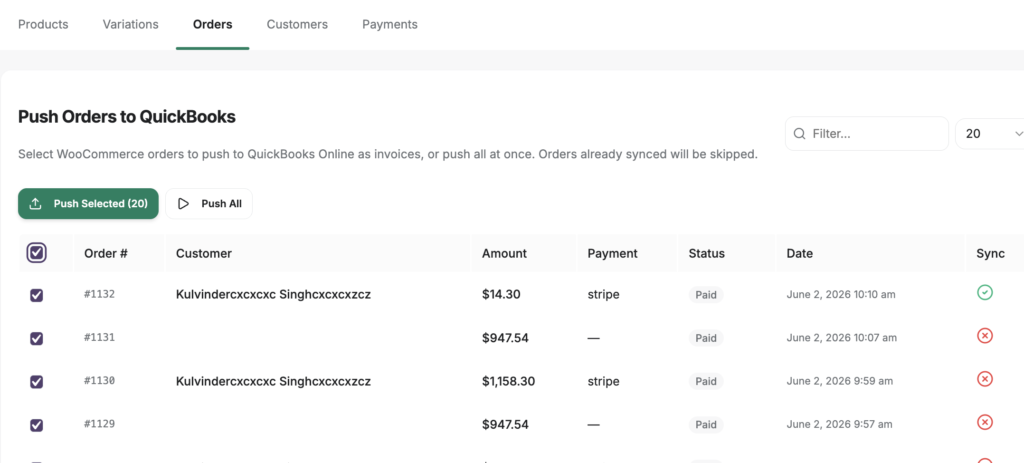
Relatórios financeiros automatizados para plataformas de comércio eletrónico, noutras palavras, não é uma funcionalidade que se compra. É uma propriedade que emerge quando as três camadas por baixo dela são automatizadas em ordem.
Funcionalidades de Automação de Contabilidade para Empresas de E-commerce em Crescimento
Se estiver a avaliar ferramentas, a maioria das páginas de funcionalidades são ruído. As funcionalidades de automação contabilística que importam para empresas de comércio eletrónico em crescimento são aquelas que se mapeiam às camadas — e ao que o crescimento faz a cada uma delas:
- Gestão de volume. A sincronização por encomenda que é encantadora a 300 encomendas por mês torna-se 3.000 linhas de desordem no QuickBooks à escala. Procure por registo diário — uma entrada de diário por dia — tipicamente uma funcionalidade de nível superior (preços tem os níveis atuais).
- Suporte multi-loja. Se a segunda loja estiver no seu roteiro, verifique se a ferramenta a trata como uma configuração normal ou uma segunda subscrição. Esta é a diferença entre uma alteração de configuração e uma segunda fatura.
- Gestão de erros que expõe falhas. Todas as ferramentas de sincronização falham às vezes — um produto não mapeado, um soluço na API. A questão é se as falhas aterram num registo de auditoria visível com uma razão e um caminho de retentativa, ou se desaparecem silenciosamente. Uma ferramenta que falha silenciosamente é pior do que nenhuma ferramenta, porque deixa de verificar.
- Acesso do contabilista. O seu contabilista deve ser capaz de ver mapeamentos e histórico de sincronização sem pedir emprestado o seu login.
E o contrapeso honesto: pode ainda não precisar de automação. Abaixo de aproximadamente 30-50 encomendas por mês, um processo manual disciplinado construído sobre práticas contabilísticas sólidas funciona bem, e a matemática do retorno é fina — os benefícios da contabilidade automatizada acumulam-se com o volume, e com baixo volume não há muito para acumular. É precisamente por isso que o plano gratuito do LedgerPort existe nesse tamanho. A automação justifica-se no ponto em que a sua contagem de encomendas, não a sua disciplina, é o gargalo.
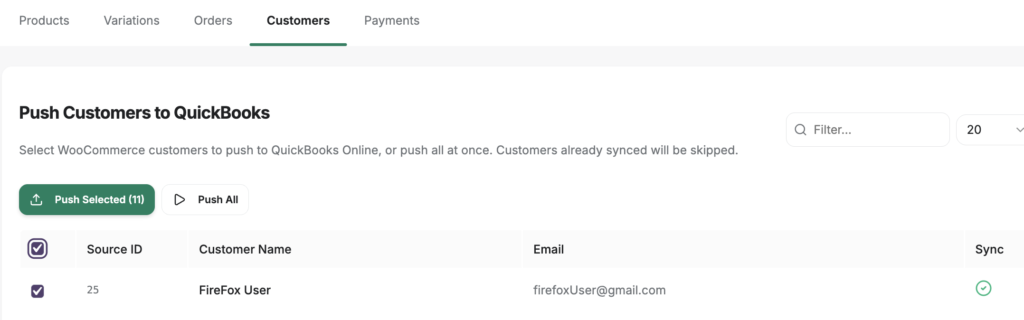
Existe também um degrau entre o ritual da folha de cálculo e a automação completa, e altera a matemática em pequena escala: manual não tem de significar copiar e colar. No plano gratuito do LedgerPort, a sincronização é manual por design — mas a maquinaria por baixo é a mesma. Os mapeamentos ainda se aplicam, as taxas ainda se separam, as entradas ainda são publicadas no formato correto. O fluxo de trabalho é uma página, não um processo: abra Sincronização Manual, e obterá uma lista de encomendas que ainda não foram sincronizadas, cada uma com uma caixa de seleção. Selecione as encomendas da semana — ou Selecionar Tudo — clique em Sincronizar Selecionados, e observe o estado de cada linha mudar para Sincronizado, ou para Erro com uma razão anexada. Esse é todo o fecho. Sem exportações, sem colar, sem FINAL v3. Com 25 encomendas por mês, é um hábito de cinco minutos de sexta-feira, e antecipa o trabalho que realmente importa — os mapeamentos de camada 2 — para que, quando o volume eventualmente forçar a mudança para a sincronização automática, esteja a mudar uma configuração, não a iniciar um projeto.
O Fundador Que Lê o P&L Em Vez de o Construir
Imagine o mesmo fundador do início deste post, quatro meses depois de fazer isto na ordem certa. É o dia 2 do mês, não o dia 14. Café, portátil, QuickBooks aberto.
O mês passado já está lá. Todos os dias publicados como um resumo organizado, taxas na conta de taxas, reembolsos no período certo, cada pagamento correspondido ao seu depósito bancário durante a noite. Não existe um separador chamado FINAL v3, porque não existe uma folha de cálculo. A Demonstração de Resultados não é algo que eles constroem — é algo que eles *leem*, da forma como leria um saldo bancário.
Notam que a margem caiu 1,2 pontos e rastreiam-na até uma promoção de envio em cerca de noventa segundos. Esse é todo o pânico. É para isso que a crise mensal foi rebaixada: um item de linha, notado no dia 2, com vinte e nove dias para fazer algo a respeito.
A distância entre esse fundador e aquele que entrecerra os olhos para FINAL v3 não é talento ou disciplina. São quatro camadas, automatizadas na ordem certa — registo, taxas, reconciliação e, em seguida, os relatórios que vêm de graça.
O LedgerPort automatiza as três primeiras camadas para lojas Shopify e WooCommerce no QuickBooks Online — a configuração demora cerca de quinze minutos, o plano gratuito cobre até 30 encomendas por mês, e os planos pagos oferecem uma garantia de devolução do dinheiro de 14 dias, sem perguntas. Comece com a camada 1 hoje à noite e leia a sua próxima Demonstração de Resultados no dia 2.
