


- 1Cos'è LedgerPort — e cosa non è
- 2LedgerPort Recensito secondo i Cinque Criteri del Roundup
- 31. Separazione delle commissioni
- 42. Recupero errori
- 53. Multi-negozio
- 64. Prezzi a volume
- 75. Accesso commercialista
- 8Vale la pena usare LedgerPort per il tuo negozio?
- 9Per Studi Commercialisti: La Matematica Multi-Cliente
- 10I Punti Deboli — Al Loro Massimo Peso
- 11Prezzi, Chiaramente
- 12Verdetto: Non Fidarti di Questa Recensione — Testala
La recensione di cui dovresti fidarti meno è quella del fornitore. Eccola comunque — strutturata in modo che tu non debba fidarti.
Hai cercato "recensione ledgerport" e questo è ciò che hai trovato: questa pagina. Scritta da noi. Questo è il problema nella valutazione di uno strumento più recente — gli incumbent hanno un decennio di recensioni di terze parti, discussioni su G2 e argomenti su Reddit da vagliare, e lo strumento più recente ha un sito di marketing. Ti sei già bruciato con siti di marketing in passato. Hai scelto uno strumento di sincronizzazione da uno di essi una volta, hai visto apparire il segno di spunta verde e hai passato il mese successivo a scoprire cosa non significava "sincronizzato".
Quindi la conclusione allettante è quella ovvia: una recensione del prodotto da parte del fornitore è inutile — saltala e aspetta qualcuno di neutrale. Questa è la bugia, o almeno metà di essa. Una recensione del fornitore scritta come una pubblicità è inutile. Una recensione del fornitore strutturata, legata a criteri e collegata a prove è verificabile — che è diverso da affidabile, e più utile.
Ecco la struttura. Nessuno recensisce il proprio prodotto più duramente di quanto recensisca i concorrenti — quindi abbiamo costruito questa esattamente come la nostra recensione A2X, stessi cinque criteri, e abbiamo stabilito una regola: ogni affermazione di punti di forza ottiene uno screenshot o un link a un documento, e la sezione sui punti deboli è più lunga di quanto qualsiasi concorrente scriverebbe su di noi. Nessuna testimonianza inventata, nessun voto che ci siamo assegnati da soli, nessun "gli utenti dicono". Le affermazioni rimandano ai nostri documenti pubblici o al sito live, e l'ultima sezione ti dice come falsificare tutto in quindici minuti gratuitamente.
A chi è destinata questa recensione di LedgerPort: Negozi Shopify o WooCommerce su QuickBooks Online i cui pagamenti non corrispondono ai loro libri contabili e studi di commercialisti che gestiscono diversi negozi di questo tipo. Se non sei tu, la risposta onesta arriva presto: salta ai punti deboli. Un'altra precisazione: LedgerPort fa parte di Awesome Motive — ecco l'annuncio.
Cos'è LedgerPort — e cosa non è
Cos'è LedgerPort? Uno strato di sincronizzazione, non un software di contabilità. QuickBooks Online è il tuo libro mastro; LedgerPort si posiziona sopra e fa la traduzione. Shopify ti paga tramite pagamenti netti — un lotto di ordini, meno rimborsi, meno commissioni, meno aggiustamenti, che arrivano come un unico deposito forfettario. QuickBooks vuole le vendite lorde con commissioni e rimborsi separati. LedgerPort è prima il pagamento: parte dal deposito che ha raggiunto la tua banca e lavora a ritroso, suddividendo vendite lorde, rimborsi, commissioni di Shopify Payments e aggiustamenti nei conti corretti. Fa lo stesso per WooCommerce tramite un plugin WordPress nativo con sincronizzazione webhook in tempo reale.
Altrettanto importante, cosa non è:
- Non un libro mastro. Non sostituisce QuickBooks; lo richiede. Specificamente QuickBooks Online — Desktop non è supportato.
- Non un POS o una piattaforma operativa. Nessuna suite di gestione dell'inventario, nessuna gestione degli ordini, nessuna etichetta di spedizione. E se le tue vendite avvengono al banco anziché tramite carrello, inizia invece dalla nostra guida al software di contabilità POS: il percorso nativo POS è uno stack diverso.
- Nessun canale di marketplace. Amazon, eBay, Etsy, Walmart — nessuno di questi. Solo Shopify (incluso Plus) e WooCommerce. Se i marketplace sono importanti per te, fermati qui e leggi invece la nostra recensione di A2X; quello è lo strumento creato per quel lavoro.
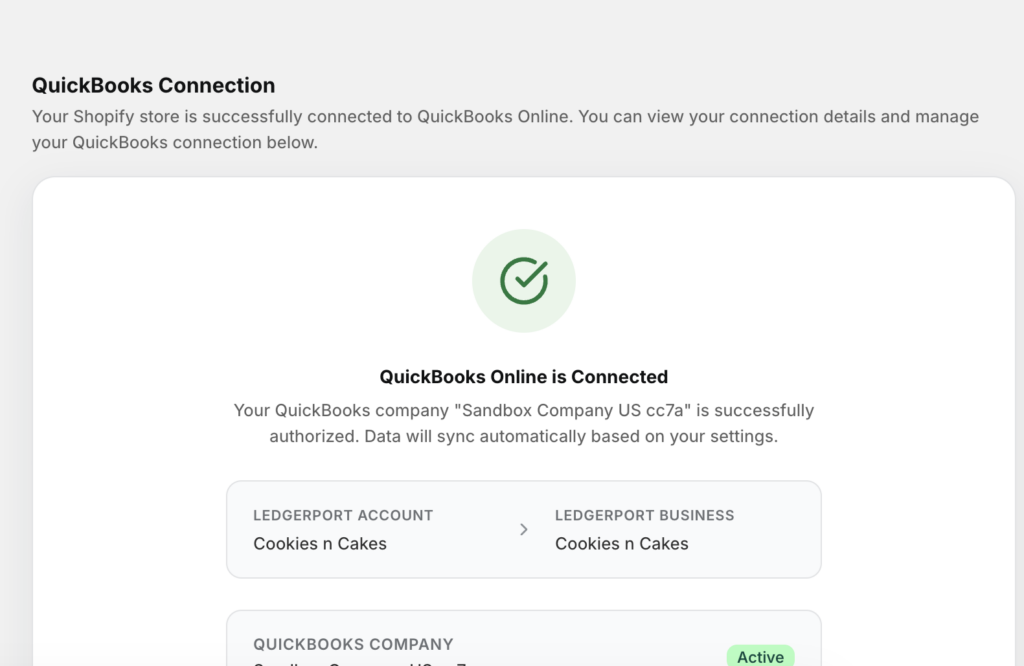
La configurazione è una checklist di tre elementi: collega il tuo negozio, collega QuickBooks, abilita la sincronizzazione automatica. L'affermazione sul sito è di circa quindici minuti, e la guida introduttiva mostra ogni schermata, inclusa quella sottostante — la pagina Connessioni dove lo stato del tuo negozio passa a Connesso.
LedgerPort Recensito secondo i Cinque Criteri del Roundup
Nel nostro confronto dei migliori software di contabilità per Shopify, abbiamo sostenuto che gli strumenti di sincronizzazione differiscono in cinque punti: separazione delle commissioni, recupero degli errori, supporto multi-negozio, prezzi in volume e accesso per commercialisti. Giusto è giusto — ecco LedgerPort contro il suo stesso punteggio.
1. Separazione delle commissioni
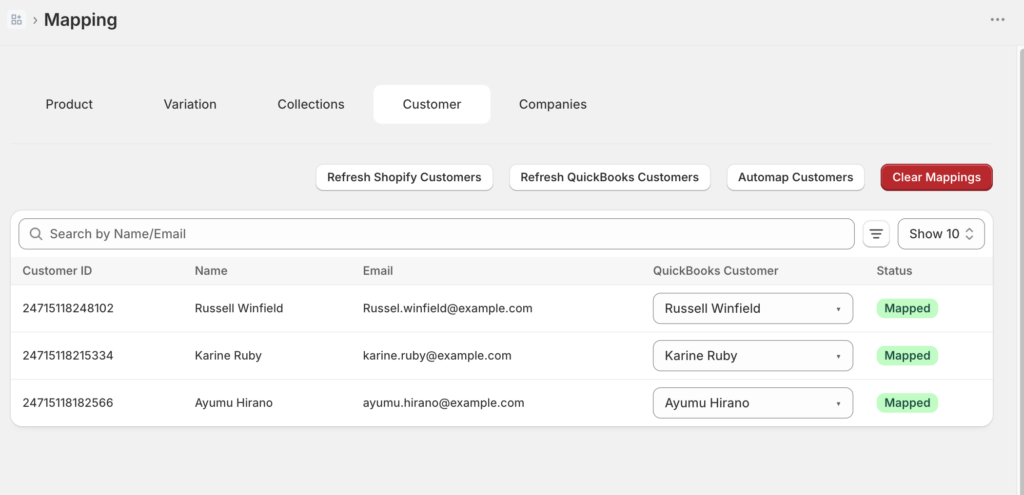
Questo è il design principale, non una funzionalità. La riconciliazione prima del pagamento significa che il deposito viene scomposto in vendite lorde, rimborsi, commissioni e aggiustamenti — la suddivisione esatta che un commercialista deve vedere sul conto economico. L'accuratezza di tale suddivisione risiede nella pagina Mappature: ogni prodotto, cliente, codice fiscale e gateway di pagamento viene mappato a uno specifico conto o articolo di QuickBooks. Auto-Map propone corrispondenze per nome e SKU, tu confermi o sovrascrivi ciascuna, e tutto ciò che non è mappabile rimane visibilmente non mappato anziché essere indovinato silenziosamente. La meccanica completa è in Impostazione delle Mappature dei Conti e Mappatura dei Prodotti da Shopify a QuickBooks.
L'asterisco onesto: i diari di pagamento dedicati e i meccanismi di gestione delle commissioni sono una funzionalità del piano Scale. Maggiori informazioni nelle debolezze.
2. Recupero errori
Ogni strumento di sincronizzazione fallisce a volte. La nostra analisi ha affermato che la domanda è chi te lo dice, quanto velocemente e quanto è difficile la correzione - quindi ecco la nostra risposta, meccanicamente. Ogni record che si sposta ottiene uno stato registrato: Sincronizzato, Errore, In attesa o In sospeso, con una motivazione dichiarata in caso di fallimento (Lettura e filtro del registro di controllo). E gli errori stessi sono denominati e documentati - Errori di sincronizzazione comuni e come risolverli esamina Cliente non trovato, Prodotto non mappato, autorizzazione QuickBooks scaduta, voci duplicate e discrepanze nella configurazione delle imposte, ognuno con il suo percorso di correzione esatto.
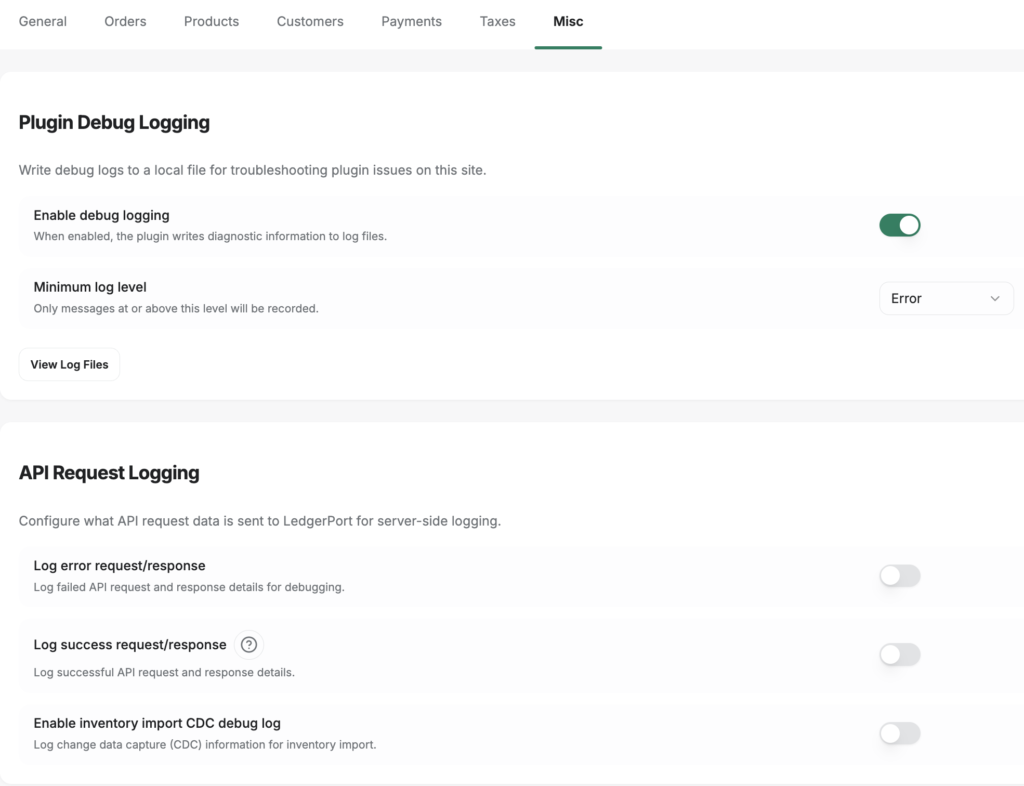
C'è anche un livello al di sotto. La configurazione di sincronizzazione del plugin WooCommerce include una scheda di debug che può acquisire il payload completo della richiesta e della risposta API ogni volta che si verifica un errore di sincronizzazione - il che significa che "perché questo è fallito" ha una risposta effettiva, non un buco nero di ticket di supporto.
3. Multi-negozio
L'unità di LedgerPort è l'Azienda: una vetrina abbinata a una società QuickBooks, isolata da ogni altra Azienda - la propria valuta, fuso orario, connessioni, mappature e impostazioni di sincronizzazione, tutto sotto un unico accesso (Come gestire più Aziende). Le quote aziendali scalano per piano: un negozio su Free e Growth, fino a tre su Scale, illimitati su Enterprise - rispetto alla norma di un abbonamento per negozio altrove nella categoria, dove il terzo negozio significa la terza fattura. Se questa è la tua domanda principale, il trattamento più approfondito è nella nostra guida al software di contabilità per e-commerce.
4. Prezzi a volume
Livelli fissi, non prezzi per ordine. Un negozio che cresce da 800 a 4.000 ordini al mese passa da Growth a Scale - un passo, prevedibile in anticipo - invece di guardare un contatore per ordine che scorre. I numeri effettivi sono nella sezione prezzi sottostante, e la pagina dei prezzi è la fonte canonica. Il giusto contrappunto: a volumi molto bassi, i prezzi per ordine possono essere più economici. I prezzi fissi sono una scommessa sulla crescita.
5. Accesso commercialista
Due ruoli: Amministratore (accesso completo - connessioni, configurazione di sincronizzazione, mappature, fatturazione, team) e Membro (visualizza log, esegui sincronizzazioni manuali, rivedi mappature - nessun accesso alla configurazione o alla fatturazione). Il tuo commercialista ottiene il proprio accesso invece di prendere in prestito il tuo (Come aggiungere membri del team e gestire i ruoli). I posti scalano per piano: uno su Free, due su Growth, cinque su Scale, dieci su Enterprise, illimitati sul livello Agency per studi professionali. E per gli studi professionali c'è un formale programma partner CPA - trattato due sezioni più avanti.
Vale la pena usare LedgerPort per il tuo negozio?
Soglie di volume oneste, poiché "vale la pena usare LedgerPort" dipende quasi interamente dal numero di ordini:
- Circa 30 ordini al mese o meno: potresti non averne ancora bisogno, e questa non è falsa modestia. Con 15 ordini al mese, inserire manualmente le transazioni in QuickBooks ti costa un'ora o due. Il piano gratuito esiste esattamente per questa dimensione (30 ordini, un negozio, sincronizzazione manuale su richiesta), quindi la mossa razionale è: usalo se i calcoli di pagamento ti infastidiscono già, saltalo se non lo fanno.
- Da poche centinaia a 1.000 ordini al mese: è qui che la riconciliazione manuale inizia a richiedere ore preziose e il tasso di errore inizia a moltiplicarsi. La crescita a $ 25/mese è l'ideale: sincronizzazione automatica giornaliera, un negozio.
- 1.000–5.000 ordini o più negozi: Scale a $ 67/mese è il livello per cui il prodotto è stato veramente creato: sincronizzazione in tempo reale, fino a tre negozi e la gestione dei diari di pagamento e delle commissioni che fanno corrispondere i depositi ai libri contabili.
- Oltre questo, o negozi con molti buoni regalo: Enterprise aggiunge ordini e negozi illimitati più la contabilità dei buoni regalo e del credito del negozio.
I negozi con un volume significativo segnalano di risparmiare ore ogni settimana: non lo abbelliremo con un numero di precisione fittizio. Esegui invece il test di pagamento alla fine.
Per Studi Commercialisti: La Matematica Multi-Cliente
Per le aziende, l'economia cambia forma: la domanda non è le ore di un singolo negozio, ma se i clienti e-commerce possono essere redditizi come categoria. Il modello Business sopra è la base: ogni cliente isolato, un accesso, e il programma partner aggiunge il livello aziendale: gestione gerarchica dei clienti da un'unica dashboard, fatturazione all'ingrosso gestita a livello aziendale con tariffe che scalano in base al numero di clienti, e una scelta tra una ripartizione dei ricavi del 20% sui clienti segnalati o uno sconto del 20% sui clienti trasferito. C'è un Modello Master per applicare una configurazione standardizzata del piano dei conti a ogni cliente, onboarding in guanti bianchi in cui il nostro team collega ogni cliente e riconcilia le prime sincronizzazioni prima della consegna, supporto di Livello 2 con un account manager dedicato e una directory di partner certificati (guida al programma).
Se stai ereditando libri contabili Shopify disordinati piuttosto che crearne di nuovi, abbiamo scritto una guida sul campo esattamente per quella pulizia: La Guida del CPA per la Pulizia del File QuickBooks di un Cliente Shopify.
I Punti Deboli — Al Loro Massimo Peso
La sezione che la recensione di un concorrente su di noi seppellirebbe in un paragrafo. Eccola in dettaglio.
1. Siamo lo strumento più recente nella categoria e non c'è scorciatoia per questo. A2X ha un decennio di fiducia da parte dei commercialisti e un solido record di recensioni di terze parti. LedgerPort non ha ancora nessuno dei due. Se la tua tolleranza al rischio dice "mai essere il primo", questa è una ragione legittima per pagare di più per un incumbent, e preferiremmo perderti onestamente piuttosto che vincerti in una situazione inadatta. È anche il motivo per cui le ricerche di "recensioni ledgerport" mostrano principalmente il nostro materiale, inclusa questa pagina. Sconta di conseguenza; verifica in modo indipendente.
2. Nessun canale marketplace. Niente Amazon, niente eBay, niente Etsy, niente Walmart. Se i marketplace rappresentano una quota seria del tuo fatturato, LedgerPort è lo strumento sbagliato oggi — A2X o Synder sono quelli giusti, e la nostra guida alle alternative di A2X lo dice chiaramente.
3. Niente Xero, niente QuickBooks Desktop. QuickBooks Online è l'unico registro a cui ci sincronizziamo. I negozi Xero e gli utenti Desktop necessitano di uno strumento completamente diverso (per Desktop, Webgility — vedi LedgerPort vs Webgility).
4. Le migliori funzionalità sono bloccate nei piani superiori. Riepilogo giornaliero e instradamento ordini basato su tag — due delle capacità più apprezzate nel nostro stesso resoconto — sono funzionalità di livello superiore. La sincronizzazione in tempo reale inizia da Scale. E i giornali di pagamento e la gestione delle commissioni si trovano anch'essi su Scale, il che significa che il piano Growth da $25 ti offre la sincronizzazione giornaliera automatizzata degli ordini ma non la completa elaborazione dei pagamenti con cui questa recensione è iniziata. Se questo sembra la funzionalità principale che si trova un livello sopra il prezzo di ingresso: sì, lo è. La pagina dei prezzi indica cosa si trova dove.
5. La manutenzione delle mappature spetta a te. I nuovi prodotti non vengono mappati automaticamente. Aggiungi un prodotto nel tuo negozio e rimane non mappato — e i suoi ordini registreranno errori invece di sincronizzarsi — finché non rivisiti la pagina Mappature. Auto-Map rende questo un compito di due minuti, non un progetto, ma "imposta e dimentica completamente" sarebbe un'esagerazione.
6. Il supporto è standard nei piani inferiori. Un account manager dedicato è incluso con Enterprise e con il programma partner. Su Free, Growth e Scale, lavori con il supporto standard e la documentazione pubblica. La documentazione è veramente completa — ogni link in questa recensione è valido — ma se desideri un contatto umano dedicato, questo è incluso nei piani superiori.
Prezzi, Chiaramente
I numeri attuali, aggiornati alla data di pubblicazione — la pagina dei prezzi è canonica se questi dovessero cambiare:
| Piano | Prezzo | Ordini/mese | Negozi | Sincronizzazione |
|---|---|---|---|---|
| Gratuito | $0 | 30 | 1 | Manuale, su richiesta |
| Crescita | da $25/mese | 1,000 | 1 | Automatica giornaliera |
| Scala | da $67/mese | 5,000 | fino a 3 | In tempo reale + giornali di pagamento e gestione commissioni |
| Enterprise | da $169/mese | Illimitato | Illimitato | Tutto, incl. contabilità buoni regalo e credito negozio |
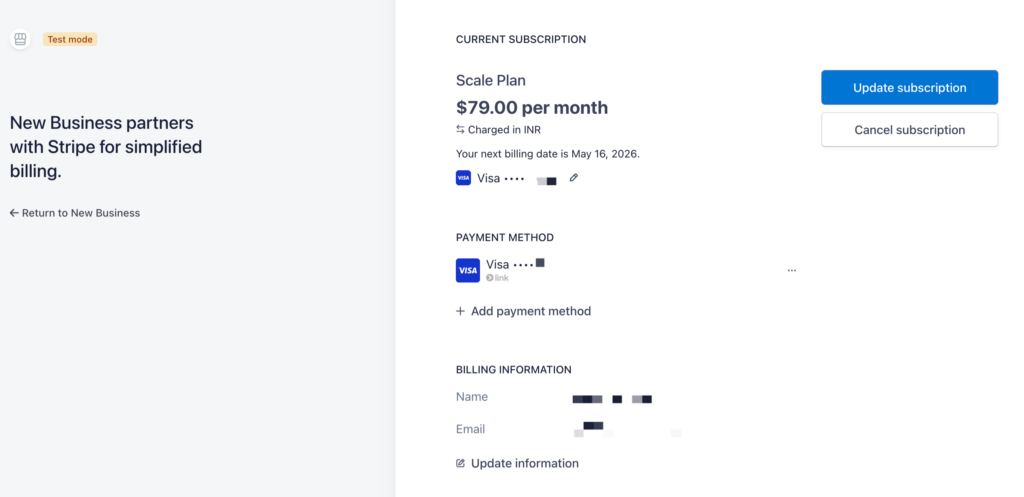
La fatturazione annuale consente un risparmio del 15%. I piani a pagamento includono una garanzia di rimborso incondizionata di 14 giorni — non una prova che si converte silenziosamente, un rimborso: 14 giorni, 100% indietro, nessuna domanda posta. Nel resoconto abbiamo pubblicato uno screenshot del nostro pulsante di annullamento come artefatto di onestà; non lo ristamperemo qui, ma la documentazione di cancellazione mostra la stessa cosa — nessun ostacolo alla retention, nessuna chiamata di vendita per andarsene, fallback al piano gratuito con i tuoi dati e le tue mappature conservate. La schermata di fatturazione dietro di essa è ugualmente noiosa, che è il punto:
Verdetto: Non Fidarti di Questa Recensione — Testala
Punteggio sui nostri cinque criteri: separazione delle commissioni e recupero degli errori sono la spina dorsale del prodotto e la documentazione ne dimostra la meccanica; il multi-store è strutturalmente migliore della norma per abbonamento; il prezzo fisso vince ai volumi elevati e perde ai volumi molto bassi; l'accesso del commercialista è reale, con il programma a livello di studio come elemento distintivo. A sfavore: la più breve storia nella categoria, nessun marketplace, nessun Xero e il macchinario di pagamento di punta bloccato al livello da $67.
Se stai confrontando prodotti, i confronti diretti sono più utili di questa pagina: vs A2X · vs Synder · vs Webgility · vs MyWorks.
Ma il vero verdetto era promesso nel terzo paragrafo: la recensione di cui dovresti fidarti meno è quella del fornitore stesso — quindi non farlo. Il piano gratuito gestisce trenta ordini al mese e circa quindici minuti di configurazione. Collega un negozio, sincronizza un pagamento reale e controllalo rispetto al tuo deposito bancario effettivo. Questo è il criterio uno, eseguito sui tuoi dati, dall'unico recensore che non ha nulla da venderti.
