

- 1One Search Term, Three Different Products
- 2The Two-Layer Stack
- 3The Ledger Layer, Honestly
- 4The Sync Layer: The Ecommerce Accounting Software Most Buyers Actually Need
- 5What an Ecommerce Accounting Integration Actually Has to Move
- 6Best Accounting Software for Your Ecommerce Business, by Stack
- 7The Honest Ending
The search results mix three different products under one name. Sort them into layers and the decision gets easy.
You searched "ecommerce accounting software" and now you're comparing three tabs: QuickBooks Online, A2X, and a done-for-you bookkeeping service. The roundup that sent you here ranked all three in one list — #3, #7, and #2 — with star ratings, as if they were competing products.
They're not. One is a ledger. One is a sync tool. One is a team of humans. Ranking them against each other is like ranking a truck, a trailer hitch, and a moving company.
Maybe you've already paid for this confusion once. You bought the tool a review called the best accounting software for ecommerce sellers, opened it during setup, and hit a screen asking you to connect your QuickBooks account — because the thing you bought wasn't accounting software at all. It was a connector that assumed accounting software. Or you went the other direction: bought a second ledger, ran it next to QuickBooks for two months, and ended up with two sets of incomplete books instead of one complete set.
The lie underneath all of those listicles is simple: ecommerce accounting software is one shelf — compare the reviews and pick the top one.
It isn't one shelf. It's a two-layer stack, and "best" only means something once you know which layer you're shopping for. Before we sort it out, one disclosure so you can calibrate: we make LedgerPort, one of the sync-layer tools in this post. You'd work that out eventually, so we'd rather say it in paragraph five and then be specific about where our competitors are the better pick — because for some stores reading this, they are.
One scope note: this post is about choosing tools. If you're earlier than that — you're not sure what ecommerce books should even look like — start with our guide to ecommerce accounting and come back when you're ready to buy.
One Search Term, Three Different Products
Everything sold as ecommerce accounting software or ecommerce bookkeeping software falls into one of three buckets:
Full ledgers. QuickBooks Online, Xero, Wave. This is where your books actually live — the chart of accounts, the P&L, the balance sheet, the thing your CPA opens at tax time. Every business has exactly one.
Sync tools. A2X, Synder, Webgility, MyWorks, LedgerPort. These don't store your books. They translate your platform's data — orders, fees, refunds, payouts — into entries inside your ledger. On their own they do nothing; connected to a ledger they replace the export-clean-import ritual entirely.
Bookkeeping services. Humans who do the work for you. When a list of the best bookkeeping software for ecommerce includes something with a human team behind it, this is the bucket it came from. Worth knowing: every competent service runs on tools from the first two buckets. You're paying for the stack plus the person driving it.
Here's the part the roundups miss: most people typing this search already own a ledger. You have QuickBooks. Your books are wrong anyway — payouts don't match deposits, fees are buried inside revenue. What you're missing isn't accounting software. It's the layer that feeds it.
The Two-Layer Stack
Think of any accounting system for ecommerce as two layers with one connection between them:
[IMAGE: Simple two-layer diagram. Top layer labeled "SYNC LAYER — translates platform data" with logos/placeholders for A2X, Synder, Webgility, MyWorks, LedgerPort, arrows coming in from Shopify/WooCommerce/Amazon icons. Bottom layer labeled "LEDGER — where the books live" with QuickBooks Online, Xero, Wave. An arrow from the sync layer down into the ledger labeled "orders · fees · refunds · taxes · payouts". A small side note: "Optional: bookkeeping service (a human operating both layers)".]
The ledger is the system of record. The sync layer is the translator sitting between your store and that record, converting what the platform reports (net payouts, lumped fees, refunds against last month's orders) into what accounting needs (gross sales, fees as expenses, refunds in the right period).
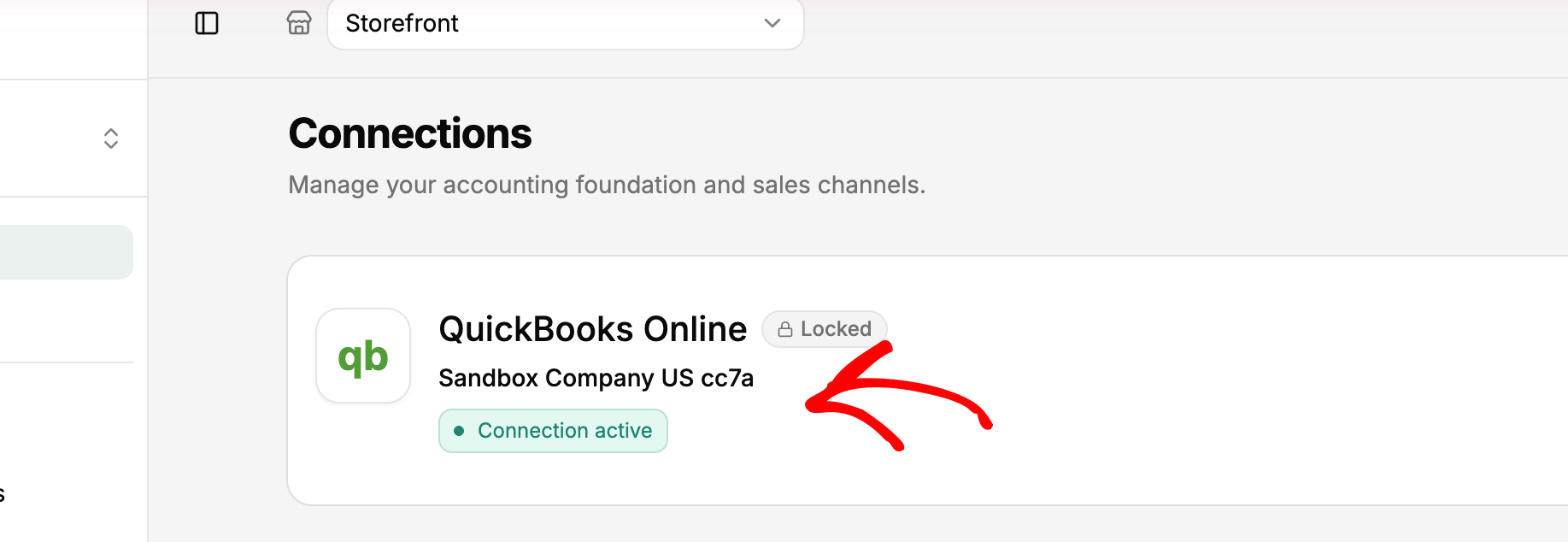
The two layers meet at a literal connection screen. In LedgerPort, the entire "install" is authorizing both sides: your store on one connection, QuickBooks Online on the other, joined by OAuth — you sign in at QuickBooks and authorize; your password never touches the sync tool. When the status flips to Connected, the stack exists. One honest wrinkle worth knowing before you click: once a business is tied to a QuickBooks company, it can't be switched later, so connect the right company the first time.
Once you see the stack, the buying question splits into two smaller, easier questions: which ledger, and which translator. Take them in order.
The Ledger Layer, Honestly
You need exactly one of these. If you already have one that works, keep it — switching ledgers is a genuine project, and almost nobody searching this term needs to do it.
QuickBooks Online is the default for US-based sellers, and the default is defensible. Nearly every CPA works in it, every sync tool in the next section connects to it, and its reporting covers what an online store needs. It's the ledger LedgerPort syncs to. If you're a US store and you're unsure, this is the boring, correct answer.
Xero is the strongest alternative, especially outside the US — it has deep accountant adoption in the UK, Australia, and New Zealand, and many bookkeepers genuinely prefer its interface. Full honesty, since we promised it: LedgerPort doesn't sync to Xero today. If Xero is your ledger, A2X and Synder both support it — pick from that shortlist, not ours.
Wave is free, and for a very small store — low volume, simple products, one channel — free plus manual entry is a legitimate stack. Its limitation shows up at the connection point: sync-layer coverage for Wave is thin across the whole category, so as volume grows you'll likely be hand-keying. Treat Wave as a starter ledger with a planned graduation, not a destination.
That's the whole layer. Notice what's not a reason to switch ledgers: payouts not matching your bank. That's a translation problem, and it lives upstairs.
The Sync Layer: The Ecommerce Accounting Software Most Buyers Actually Need
This is the layer most buyers searching for accounting software for online sellers are actually missing, and it's where the real differences hide — fee separation accuracy, error recovery, multi-store handling, pricing at volume. We wrote a full tool-by-tool teardown of those criteria in our best Shopify accounting software roundup; here's the platform-agnostic version, with the one situation where each tool is the right call.
A2X — right when you're marketplace-heavy or your accountant is choosing. The longest track record in the category, deep trust among bookkeepers, and genuinely strong Amazon coverage alongside Shopify. Pricing scales with order volume, so model next year's bill, and check their current pricing. Head-to-head: LedgerPort vs A2X.
Synder — right when your revenue spans many channels and processors. Its breadth of connectors and per-transaction detail are real differentiators for sprawling setups. The trade-off is supervision: more configuration surface means more ways to misconfigure quietly, and it rewards hands-on owners. Head-to-head: LedgerPort vs Synder.
Webgility — right when you're on QuickBooks Desktop, or want inventory and order management in the same system. It's one of the few serious Desktop options, and it's more operations platform than pure translator — which also makes it a bigger implementation and, typically, a bigger bill. Check their current pricing. Head-to-head: LedgerPort vs Webgility.
MyWorks — right when you're WooCommerce-first and want field-level control. It knows the Woo data model as well as anyone and offers granular, real-time sync for Woo stores. The specialization cuts the other way if Shopify is in your future. Head-to-head: LedgerPort vs MyWorks.
LedgerPort — right when you're on Shopify or WooCommerce, your ledger is QuickBooks Online, and payout reconciliation is the pain. Ours, so discount accordingly. It's payout-first: it starts from the deposit that hit your bank and works backward, separating gross sales, fees, refunds, and adjustments automatically. Pricing is flat rather than per-order — a free plan covers up to 30 orders a month, and paid plans start at $25/month for up to 1,000 orders — with a 14-day, no-questions money-back guarantee. The honest limits: no Amazon or marketplace coverage, no Xero, and a shorter track record than A2X. If either of the first two describes you, buy one of the tools above instead.
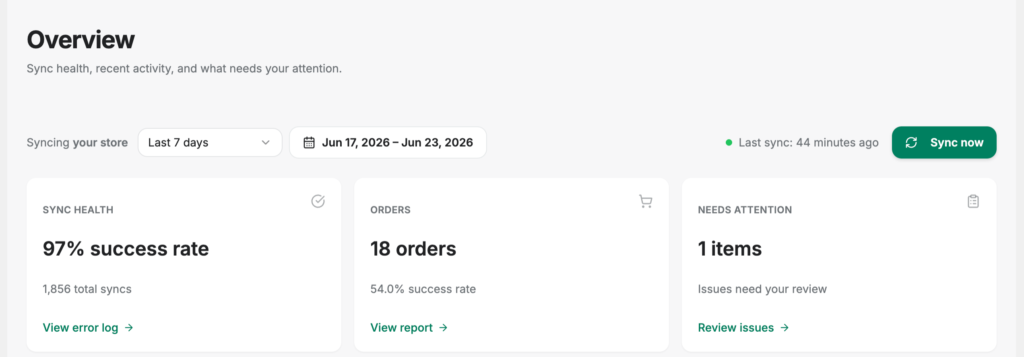
One more thing that separates the layers before you shortlist: implementation weight. Switching ledgers is a project measured in weeks. Adding a sync tool shouldn't be — and "integration" sounds enough like an IT engagement that it's worth seeing what setup at this layer actually involves. On the WooCommerce side, LedgerPort's entire install is a four-step wizard: install the plugin from WordPress.org, click Connect when the Setup Wizard opens, log in at app.ledgerport.com and authorize, and land back on your WordPress dashboard while the plugin provisions itself — it creates its own read-access WooCommerce REST API key and registers its own webhooks for orders, products, customers, and refunds, so you never touch WooCommerce's REST API settings. Two guardrails run before anything syncs: the wizard blocks the connection if your store currency doesn't match your QuickBooks company's home currency (LedgerPort doesn't convert currencies, so the mismatch is caught before it can post a single wrong number), and if provisioning fails midway, every completed step rolls back automatically so your store is never left half-configured. The docs budget about five minutes end to end. That's the calibration to carry into any demo at this layer: if a sync tool's onboarding needs a kickoff call, ask what all that time is for.
What an Ecommerce Accounting Integration Actually Has to Move
"Integration" is the most abused word on this shelf, so here's a concrete test. A proper ecommerce accounting integration has to move five things from platform to ledger, each with its own translation problem:
- Orders — posted as the transaction type your accounting workflow expects (sales receipt, invoice, or a daily summary), in the right period, without duplicates.
- Fees — platform and payment-processing fees broken out as expenses, not silently netted against revenue. This is the single most common thing cheap integrations get wrong.
- Refunds — matched to the right period and the right original transaction, even when the refund lands a month after the sale.
- Taxes — collected tax posted to a liability account, not counted as income, with rounding differences reconciled to the cent.
- Payouts — the lump-sum bank deposit tied back to the orders, fees, and refunds inside it, so the deposit matches the books without a spreadsheet.
If a tool moves orders but not fees, or fees but not payouts, it's a partial integration — you'll still be doing month-end forensics on whatever's missing.
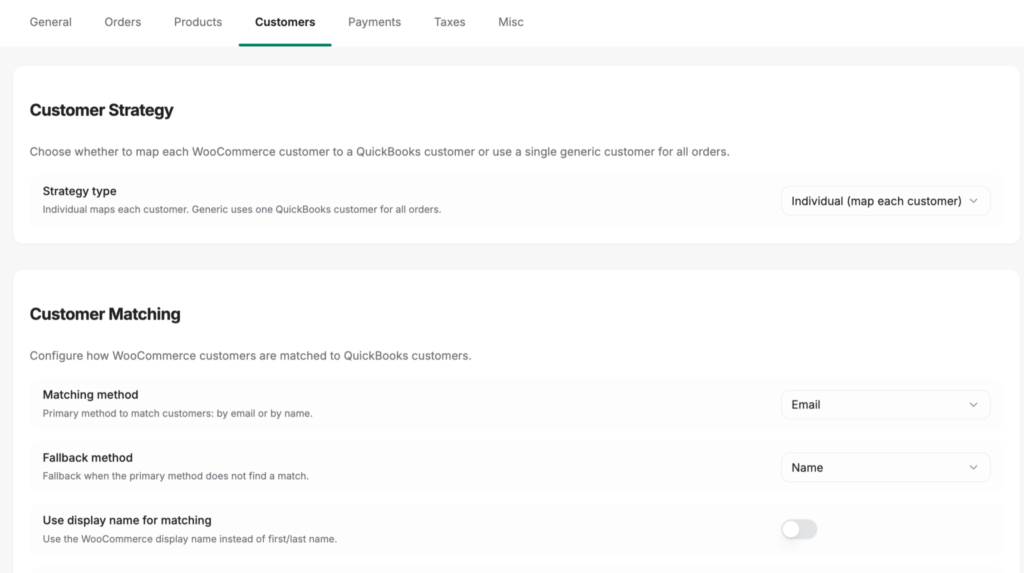
The second thing a real integration owes you is explicit control over the translation choices, because no two stores keep books identically. In LedgerPort this lives in one Sync Config page, organized into seven tabs — General, Orders, Products, Customers, Payments, Taxes, and Misc — one per data type it moves. The Customers tab is a good example of what a translation decision looks like: you choose whether every buyer becomes an individual QuickBooks customer or all orders post to one generic catch-all (most high-volume stores pick generic; wholesale operations want individual), and how matching works — by email, by name, with a fallback if the first method misses. Defaults are sensible enough that most stores never touch this page, but when your CPA asks "why is it posting this way?", the answer is a setting you can point at, not a black box.
The third thing — and the sharpest test you can run during a trial — is what the tool does with a record it can't match. Every store eventually sells a product that has no counterpart in QuickBooks yet: a new SKU, a renamed variant, a one-off bundle. A tool that guesses posts a wrong line to your ledger, and you find it weeks later during reconciliation. In LedgerPort this is a page you can watch work: Mapping » Products lists your catalog next to its QuickBooks match status. Auto-Map does the bulk pass, linking products to QuickBooks items wherever the SKU or product name matches; anything it can't confidently match stays visibly marked Unmapped instead of being guessed at. And if an order containing an unmapped product tries to sync, it fails loudly — a Product Not Mapped error — rather than posting anything. From there you have two fixes: map the item manually from a dropdown, or set a fallback item under Sync Config » Products so unmapped products post to a default catch-all (more resilient, but you give up per-product reporting, which is why it's a choice and not the default). Either way, the held orders re-sync from Manual Sync with one filter — Status: Error — and one click. The WooCommerce plugin behaves the same way: an order with an unmapped entity logs a sync error and holds until the mapping is resolved. Error-and-hold is the behavior to demand from any tool on this shelf; wrong-but-posted is the failure mode that costs real money.
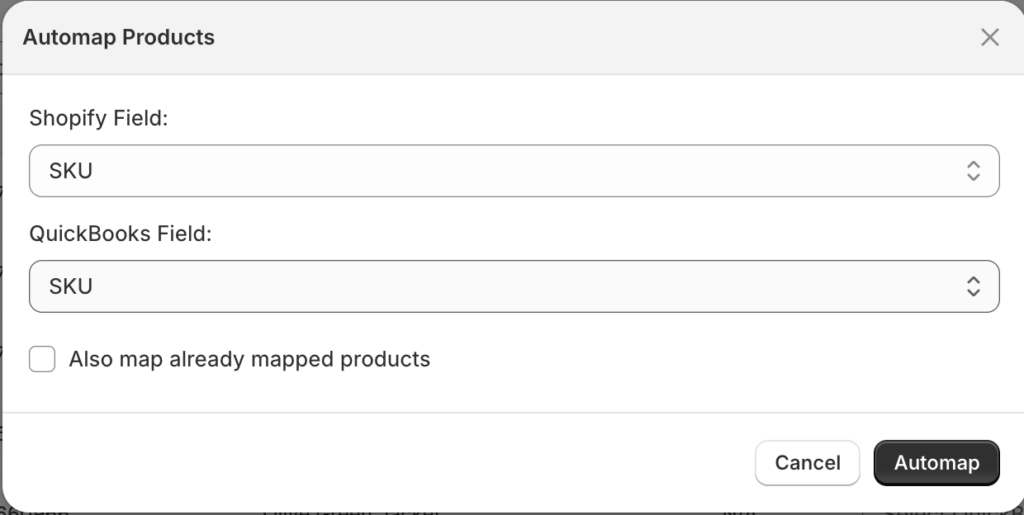
Whatever tool you evaluate, ask to see its version of these screens — the five data types it moves, the settings that control how, and what happens to a record it can't match. If the answer is "it just works," that's the sound of a black box you'll be reverse-engineering next tax season. And if you want to see what the stack looks like once the whole thing runs without you, we've mapped that end-state in our guide to ecommerce accounting automation.
Best Accounting Software for Your Ecommerce Business, by Stack
| Your situation | Ledger | Sync layer |
|---|---|---|
| Shopify store, US, on QBO | QuickBooks Online | LedgerPort — payout-first, flat pricing (full comparison in the Shopify roundup) |
| WooCommerce store on QBO | QuickBooks Online | LedgerPort or MyWorks — Woo-native both; field-level control vs payout-first |
| Amazon-heavy or marketplace mix | QBO or Xero | A2X — marketplace coverage is the deciding row |
| Many channels + processors | QBO or Xero | Synder — breadth, if you'll supervise it |
| QuickBooks Desktop | QuickBooks Desktop | Webgility — one of the few real Desktop options |
| Ledger is Xero | Xero | A2X or Synder — LedgerPort doesn't sync to Xero today |
| Under ~30 orders/month | QBO or Wave | LedgerPort free plan (QBO) or manual entry (Wave) — automation is optional at this size |
| High volume, multiple stores | QuickBooks Online | LedgerPort Scale — up to 3 stores, real-time sync, payout journals; from $67/mo |
| "Just take it off my plate" | Whatever the firm runs | A bookkeeping service — but ask which sync tool they use and who owns the QuickBooks file |
Every vendor's pricing moves; check current pricing on each site — including ours — before you decide.
The Honest Ending
Nobody in this post sells a bad product. QuickBooks is a good ledger. Xero is a good ledger. A2X, Synder, Webgility, and MyWorks all have thousands of stores whose books close cleanly because of them. So does LedgerPort.
The expensive mistake in this category isn't picking the wrong brand. It's picking the wrong layer — buying a second ledger when your books needed a translator, or subscribing to a translator and wondering where your P&L is. That's the mistake the one-shelf listicles manufacture, one affiliate link at a time. You've paid that bill once already. The fix costs nothing but the sorting you've now done.
So: confirm your ledger (you probably already own it). Pick the translator that matches your platform, your volume, and that ledger. And if your row in the table points at us — Shopify or WooCommerce, QuickBooks Online, payouts that should match the bank — the test is cheap: connect a store on the free plan, sync a payout, and check the five data types against your own bank deposit.
Start free and run the five-item test on your own books →
Still comparing? The deep dives are here: best Shopify accounting software · LedgerPort vs A2X · LedgerPort vs Synder · LedgerPort vs Webgility · LedgerPort vs MyWorks — and pricing, with every tier public.
